
Navigation
Install the app
How to install the app on iOS
Follow along with the video below to see how to install our site as a web app on your home screen.
Note: This feature may not be available in some browsers.
More options
You are using an out of date browser. It may not display this or other websites correctly.
You should upgrade or use an alternative browser.
You should upgrade or use an alternative browser.
Canon T3i with Magic Lantern
- Thread starter laniwolf
- Start date
ScaryHands
Member
Hi guys - I have a problem with installing ML:
I was trying to install Magic Lantern on my T3i, but unfortunately I can't.
I even don't know where is the problem. I did this exactly like it is in INSTALL.pdf. I downloaded everything which is needed for T3i/600D. Unzipped folder is called "magiclantern-2011Jul08.600D.fw101.alex". I have Canon Firmware 1.0.1 on my T3i. I formatted SD card like it's said in INSTALL.pdf and I do the rest like I should, but I have only screen which says:
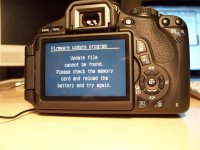
"Firmware update program - Update file cannot be found. Please check the memory card and reload the battery and try again."
Camera doesn't react after that, so only way to turn it off is to take the battery out.
I did this with Lexar SDXC 64GB 133 Class10 Card. I tied also exactly same steps with Transcend 4GB SD Card and it made something, but Magic Lantern wasn't installed. Trying again won't help - it's like that every time.
Here is picture of what is after try with Lexar SD card:
Here is picture of what is after try with Transcend SD card:
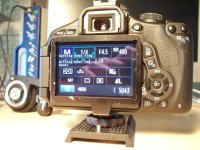
After try with Transcend SD card, after around 10-15 seconds, camera is like turned off, but it doesn't react. There is black screen after that what you see on the picture and nothing else. So after both I have to take out the battery.
This trying of installing ML on my T3i doesn't change anything. Firmware on my camera is still 1.0.1 and it's like no changes, no Magic Lantern.
I bought T3i 1 week ago on B&H. It works normal.
Did anybody have same problem or can give me advise, how can I get ML on my T3i?
Thanks for any advice.
SH
I was trying to install Magic Lantern on my T3i, but unfortunately I can't.
I even don't know where is the problem. I did this exactly like it is in INSTALL.pdf. I downloaded everything which is needed for T3i/600D. Unzipped folder is called "magiclantern-2011Jul08.600D.fw101.alex". I have Canon Firmware 1.0.1 on my T3i. I formatted SD card like it's said in INSTALL.pdf and I do the rest like I should, but I have only screen which says:
"Firmware update program - Update file cannot be found. Please check the memory card and reload the battery and try again."
Camera doesn't react after that, so only way to turn it off is to take the battery out.
I did this with Lexar SDXC 64GB 133 Class10 Card. I tied also exactly same steps with Transcend 4GB SD Card and it made something, but Magic Lantern wasn't installed. Trying again won't help - it's like that every time.
Here is picture of what is after try with Lexar SD card:
Here is picture of what is after try with Transcend SD card:
After try with Transcend SD card, after around 10-15 seconds, camera is like turned off, but it doesn't react. There is black screen after that what you see on the picture and nothing else. So after both I have to take out the battery.
This trying of installing ML on my T3i doesn't change anything. Firmware on my camera is still 1.0.1 and it's like no changes, no Magic Lantern.
I bought T3i 1 week ago on B&H. It works normal.
Did anybody have same problem or can give me advise, how can I get ML on my T3i?
Thanks for any advice.
SH
ScaryHands
Member
Why it doesn't want to set bootflag on my Lexar SD card?
What I should do after my Transcend 4GB SD card will be bootable? I want to use my Lexar 64GB....
What I should do after my Transcend 4GB SD card will be bootable? I want to use my Lexar 64GB....
Last edited:
ScaryHands
Member
It looks like the trandcend worked. I had the same problem.
You should be able use either card to extract the ML to to use now at this stage.
Dont forget to use eoscard or nothing will work.
I have mac. EOSCard doesn't work for me.
I read somewhere that Magic Lantern doesn't work with SDXC Cards. Only SDHC. so 100 bucks waisted or I can make ML somehow work on my Lexar 64GB SDXC 10Class card?
ScaryHands
Member
You can use ML with SDXC, but you can't do the first install step.
For Mac, use MacBoot.
So I can do 1st install on my 4GB Transcend card and then copy files on my Lexar SDXC card, yes?
No get the latest firmware from the canon site.[/QUOTE
I went to the Canon Canada website and the latest version they got for my T3i is 1.0.1. Where do I get that 1.0.9 or even the 1.0.8 version? I tried Canon USA and they got the same version (1.0.1).
rikitik22

Bruce Foreman
Veteran
1.0.8 and 1.0.9 are for the T2i, NOT for your T2i.
Some of you people would be best off learning your camera first before trying to "monkey" around with modified firmware.
Some of you people would be best off learning your camera first before trying to "monkey" around with modified firmware.
ectobuilder
Veteran
Hi guys - I have a problem with installing ML:
I was trying to install Magic Lantern on my T3i, but unfortunately I can't.
I even don't know where is the problem. I did this exactly like it is in INSTALL.pdf. I downloaded everything which is needed for T3i/600D. Unzipped folder is called "magiclantern-2011Jul08.600D.fw101.alex". I have Canon Firmware 1.0.1 on my T3i. I formatted SD card like it's said in INSTALL.pdf and I do the rest like I should, but I have only screen which says:
"Firmware update program - Update file cannot be found. Please check the memory card and reload the battery and try again."
Camera doesn't react after that, so only way to turn it off is to take the battery out.
I did this with Lexar SDXC 64GB 133 Class10 Card. I tied also exactly same steps with Transcend 4GB SD Card and it made something, but Magic Lantern wasn't installed. Trying again won't help - it's like that every time.
Here is picture of what is after try with Lexar SD card:
View attachment 37317
Here is picture of what is after try with Transcend SD card:
View attachment 37318
After try with Transcend SD card, after around 10-15 seconds, camera is like turned off, but it doesn't react. There is black screen after that what you see on the picture and nothing else. So after both I have to take out the battery.
This trying of installing ML on my T3i doesn't change anything. Firmware on my camera is still 1.0.1 and it's like no changes, no Magic Lantern.
I bought T3i 1 week ago on B&H. It works normal.
Did anybody have same problem or can give me advise, how can I get ML on my T3i?
Thanks for any advice.
SH
Same issue here, the solution is to use an SDHC card (not SDXC which is the Lexar Professional) when installing the magiclantern.fir. After that you can then revert back to your SDXC card for the autoexec.bin stage. And it should work! Keep in mind I did this for my T2i not T3i.
ScaryHands
Member
1.0.8 and 1.0.9 are for the T2i, NOT for your T2i.
Some of you people would be best off learning your camera first before trying to "monkey" around with modified firmware.
I agree with you. Many people who starts with HDSLR and video want everything at once (including me). We young beginners should listen you "stagers" ;-)
I will do few projects first using Canon firmware and after I will have some experience I can make next step. Thanks Bruce for help here and on hv20 forum. You and few others helped me save money and make good decisions.

Check this page: http://magiclantern.wikia.com/wiki/Unified/Features
On T3i, ML does not change audio settings (but T3i has manual audio anyway), there's no audio monitoring and no LCD remote. These are the most important differences.
On T3i, ML does not change audio settings (but T3i has manual audio anyway), there's no audio monitoring and no LCD remote. These are the most important differences.
Last edited:

capitanfracassa
Active member
Just installed ML on 600d. Impressed by the speed of getting it up to speed so fast.
On my camera I have problems with Display Profiles. Changing the Display Profile locks the camera. (The off switch leaves LV but the camera stays on).
Other than full audio, my only wish is that it would be possible to switch the main dial to do aperture control in movie mode. (since we don't mess with the shutter speed anyway, and there is no second dial like our big brothers have).
On my camera I have problems with Display Profiles. Changing the Display Profile locks the camera. (The off switch leaves LV but the camera stays on).
Other than full audio, my only wish is that it would be possible to switch the main dial to do aperture control in movie mode. (since we don't mess with the shutter speed anyway, and there is no second dial like our big brothers have).
Just for testing: can you change display profiles with this binary? http://groups.google.com/group/ml-devel/msg/15b53ebac2967a84
(it also has shutter lock in movie mode, which is a small step in this direction).
The audio chip on 600D is different (Oki ML26121A), and we don't have a datasheet for it yet. All other cameras have Asahi-Kaisei AK4646.
(it also has shutter lock in movie mode, which is a small step in this direction).
The audio chip on 600D is different (Oki ML26121A), and we don't have a datasheet for it yet. All other cameras have Asahi-Kaisei AK4646.
capitanfracassa
Active member
Yes. The problem was solved, although I am not sure how. This binary didn't cause an immediate lock. But it did lock after a few back and forth. I then deleted the cropmarks. Rebooted, played a while. then added the cropmarks back. Problem not seen any more. for now ;-)
I am aware of the chip issue. I trust that it will be solved n good time. The ML team is omnipotent ;-)
THANKS!
I am aware of the chip issue. I trust that it will be solved n good time. The ML team is omnipotent ;-)
THANKS!