Canon R5 Announced with 8k

I remember going from blown out lamps with a 10-stop camera (GH4/5) to subtle gradation with C300m2/A7rii filming the same scene. It made a difference.

was that sth you were paid for?
If not it doesn't matter.
If so: bring a light/gaffer

What I want to say: these scenarios are completely irrelevant for me.
Unfortunately in this low job period a lot of people found the time to do those "tests".
Even more found the time to watch and to comment them.
 
Shot a little fight scene with the R5 using 90% RAW. It was fun. Decided to also uploaded it to youtube in 8k which makes no sense.

Had no problem with overheating in 8k raw because there are not enough cards. We had two 128 gigs and that gave us a wholesome 10 minutes.

 
was that sth you were paid for?
If not it doesn't matter.
If so: bring a light/gaffer

What I want to say: these scenarios are completely irrelevant for me.
Unfortunately in this low job period a lot of people found the time to do those "tests".
Even more found the time to watch and to comment them.

Well it was scenes of a doc that were filmed during 4 years, same room, different cameras. The lamps were of course in the background so not important, I just felt the hard-clipped ones being very ugly, and distracting. Its a personal preference of course, the film travelled the world and probably no one else noticed. Or they did, but only subconsciously.

Sure you can bring a gaffer but I prefer to have a camera that can handle it better. And in this case - at the office of the Ministry of Foreign Affairs - more people would mean less access, less story.
 
yeah, I end up watching in 4K, even on a 1080 screen, because there is less compression.

But only when I am looking for the image quality. If I am watching a show or something I generally don't care.
 
Shot a little fight scene with the R5 using 90% RAW. It was fun. Decided to also uploaded it to youtube in 8k which makes no sense.

Had no problem with overheating in 8k raw because there are not enough cards. We had two 128 gigs and that gave us a wholesome 10 minutes.


Thanks for sharing!
 
Shot a little fight scene with the R5 using 90% RAW. It was fun. Decided to also uploaded it to youtube in 8k which makes no sense.

Had no problem with overheating in 8k raw because there are not enough cards. We had two 128 gigs and that gave us a wholesome 10 minutes.


Nice job! Great little BTS too.
 
CROPPED EXCELLENCE?

This has been asked before but this thread is soo long.
Have you guys used the 4K25/30/24 APS-C crop 5,1 oversampled mode? The best quality unlimited recording mode I guess.
- Do you like it?
- Can you ALWAYS go back to that mode when the other modes make the R5 overheat? (Important to know, in that case , the overheating is less of an issue )

Best
 
CROPPED EXCELLENCE?

This has been asked before but this thread is soo long.
Have you guys used the 4K25/30/24 APS-C crop 5,1 oversampled mode? The best quality unlimited recording mode I guess.
- Do you like it?
- Can you ALWAYS go back to that mode when the other modes make the R5 overheat? (Important to know, in that case , the overheating is less of an issue )

Best
This post from earlier in the thread has some comparison shots of the different recording modes:
http://www.dvxuser.com/V6/showthrea...ith-8k&p=1986837200&viewfull=1#post1986837200

In general, it seems that the oversampled 5.1K to 4K APS-C crop mode is actually fairly similar in sharpness to the oversampled 8K to 4K full-frame mode, but noisier. A 5.1K capture from a Bayer-pattern sensor is evidently enough to resolve most of the detail needed for 4K resolution output, but the noise reduction benefits of an 8K to 4K downsample from a larger sensor area is lost. So it is a bit of a tradeoff between detail and noise between the oversampled APS-C crop and pixel-binned (regular) full-frame 4K30 modes. Keep in mind that in most of the tests done so far, people have had difficulty differentiating between the oversampled full-frame 4K HQ mode and the pixel-binned full-frame 4K regular mode, so the increased noise in APS-C mode may actually be more noticeable than any difference in resolution (unless you are further cropping the 4K output in post).

Metabones does make an EF to RF-mount Speed Booster that could help things when in crop mode, although I believe the early reports are that it may need a firmware update to work properly with the R5.

The four recording modes on the R5 that overheat are: 8K, 4K120, 4K60, and 4K HQ (full-frame oversampled) up to 30 fps. Other video recording modes on the R5 don't have overheating constraints, which means that these modes are always available for video recording even if the higher-spec recording modes are locked out. The non-overheating recording modes include pixel-binned full-frame 4K30 and oversampled 4K30 APS-C as well as all of the HD recording modes.

The way this works is that there is an indicator at the top of the screen that gives an estimate of the available record time in the currently selected video mode. For the video modes that don't overheat, this will always show 29:59 of record time available (the camera still has a 30-minute per clip limit, regardless of the recording mode). For the higher-spec video modes that can overheat, this indicator will often show some amount of time less than 29:59 and will show no time remaining (with a overheat indicator) when the camera has overheated. So if recording 8K and the camera overheats and shows no time available in that mode, you can switch to one of the lower-spec video modes and it will still show 29:59 remaining. And you can record indefinitely (in 30 minute clips) in those lower-spec modes.

In the APS-C crop mode, the video is always oversampled from a 5.1K sensor readout, regardless of frame rate (there is no menu option to choose between regular and oversampled when the APS-C crop is enabled). Note that while the 4K30 APS-C crop mode does not overheat, the 4K60 APS-C crop mode can overheat, although it does so less quickly than the full-frame 4K60 mode. And due to the 5.1K oversampling, the 4K60 APS-C crop mode is actually sharper than the full-frame 4K60 mode which uses pixel binning.
 
Last edited:
This post from earlier in the thread has some comparison shots of the different recording modes:
http://www.dvxuser.com/V6/showthrea...ith-8k&p=1986837200&viewfull=1#post1986837200

In general, it seems that the oversampled 5.1K to 4K APS-C crop mode is actually fairly similar in sharpness to the oversampled 8K to 4K full-frame mode, but noisier. A 5.1K capture from a Bayer-pattern sensor is evidently enough to resolve most of the detail needed for 4K resolution output, but the noise reduction benefits of an 8K to 4K downsample from a larger sensor area is lost. So it is a bit of a tradeoff between detail and noise between the oversampled APS-C crop and pixel-binned (regular) full-frame 4K30 modes. Keep in mind that in most of the tests done so far, people have had difficulty differentiating between the oversampled full-frame 4K HQ mode and the pixel-binned full-frame 4K regular mode, so the increased noise in APS-C mode may actually be more noticeable than any difference in resolution (unless you are further cropping the 4K output in post).

Metabones does make an EF to RF-mount Speed Booster that could help things when in crop mode, although I believe the early reports are that it may need a firmware update to work properly with the R5.

The four recording modes on the R5 that overheat are: 8K, 4K120, 4K60, and 4K HQ (full-frame oversampled) up to 30 fps. Other video recording modes on the R5 don't have overheating constraints, which means that these modes are always available for video recording even if the higher-spec recording modes are locked out. The non-overheating recording modes include pixel-binned full-frame 4K30 and oversampled 4K30 APS-C as well as all of the HD recording modes.

The way this works is that there is an indicator at the top of the screen that gives an estimate of the available record time in the currently selected video mode. For the video modes that don't overheat, this will always show 29:59 of record time available (the camera still has a 30-minute per clip limit, regardless of the recording mode). For the higher-spec video modes that can overheat, this indicator will often show some amount of time less than 29:59 and will show no time remaining (with a overheat indicator) when the camera has overheated. So if recording 8K and the camera overheats and shows no time available in that mode, you can switch to one of the lower-spec video modes and it will still show 29:59 remaining. And you can record indefinitely (in 30 minute clips) in those lower-spec modes.

In the APS-C crop mode, the video is always oversampled from a 5.1K sensor readout, regardless of frame rate (there is no menu option to choose between regular and oversampled when the APS-C crop is enabled). Note that while the 4K30 APS-C crop mode does not overheat, the 4K60 APS-C crop mode can overheat, although it does so less quickly than the full-frame 4K60 mode. And due to the 5.1K oversampling, the 4K60 APS-C crop mode is actually sharper than the full-frame 4K60 mode which uses pixel binning.

Thank you for the splendid write-through! And for the link to that old post.
Great to know that you WILL be able to record whatever happens (not possible on the R6 I think) and that the crop version is sharp and probably the best unlimited mode in good light, the normal mode maybe better in poor lightning.

PS I use the Metabones regularly on the R, works fine.
 
Yes, Metabones is working to update the EF->RF speedbooster for the R5 and R6. Right now aperture looks locked at wide open, and no electronics work. If your lens focuses without power, you can use it and shoot wide open and focus manually.
 
DGO doubles the readout time, no? I'm not sure canon is fast enough to do dgo 8K FF yet
According to the CineD lab tests, the rolling shutter performance for the R5 sensor in 8K RAW is 15.5ms, which suggests that the sensor is actually capable of a full 8K (17:9 aspect ratio) readout at up to 60 fps. I assume that the reason the R5 doesn't support 8K 60 recording, is at least in part due to processing and thermal limitations. Just because the sensor readout is fast enough for this, doesn't necessarily mean that the rest of the image processing and recording pipeline is.

But you could imagine a DGO version of the sensor which does 8K up to 30 fps with DGO enabled and 8K up to 60 fps with DGO turned off. Now, if the DGO readout really does double the readout times, then the rolling shutter performance in DGO 8K wouldn't be great (31 ms), although perhaps they could make some improvements with another year of sensor development time.

Interestingly Canon's earlier prototypes of an 8K cinema camera had a Super 35 sensor, so it's unclear whether their first 8K cinema camera will be Super 35 or full frame:
https://www.cined.com/canon-8k-cinema-camera-first-official-footage
 
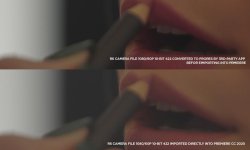
Seeing a strange issue with random R6 clips in Premiere. Can you guys download one of my files and let me know if you see it in your NLE? https://drive.google.com/file/d/1ybS4aH_o7dvj10ONVWN2HKRiDBaZqTdr/view?usp=sharing

I'm seeing distortion/pixilation that looks akin to low bitrate 8-bit compression (detail blurred and harsh steps in gradations). Strange facts though: only appears on some shots, only appears in the upper part of the screen, only seems to be happening in Premiere (when I load the clips in VLC or other 3rd party apps, the problem is not visible.)

Here's a screengrab (the JPG compression and scaling here is making the top example look more like the bottom one. It looks much worse in Premiere. Orig screengrab here: https://postimg.cc/gxT4GKq3 )
2020-10-09 r6 pixelation in premiere2020.jpg
 
looks okay in FCPX - and it seems a well-known Premiere issue. Are you in 10 bit mode?

I don't know of a way to force it into any kind of 10-bit mode. I think if you import a 10-bit file it should just be edited in a 32-bit space like everything else in premiere. Where you seeing this issue document? I can't find any comments on it.
 
I don't know of a way to force it into any kind of 10-bit mode. I think if you import a 10-bit file it should just be edited in a 32-bit space like everything else in premiere. Where you seeing this issue document? I can't find any comments on it.

I'm not a Premiere user, but this is what I have found, which I guess applies to Premiere's decoding of 10bit 4:2:2 H265 files, so the R6 included:

https://community.adobe.com/t5/prem...-r5-422-footage-properly/td-p/11319405?page=1

For what it's worth decoding 10bit 4:2:2 H265 file seems to be a problem with a lot of apps and CPU's. For me in Davinci Resolve, the files just randomly go on and offline, but mainly stay offline. I end up having to transcode them with Media Encoder into ProRes files before I can edit or color them in Davinci Resolve.
 
Back
Top