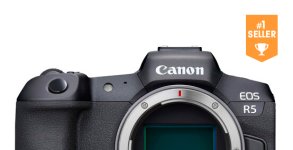
Canon R5 Announced with 8k

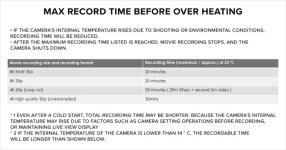
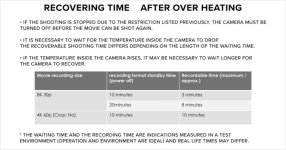
I think the 8k choice might be good for marketing but it will end up limiting adoption of the camera by more pro/prosumer video folks. Because it is such a large task for a small camera, I think it has distorted other areas of the product. Overheating in 2020 is a no go. We have been dealing with that is earlier generations of cameras. Most people I would assume have the attitude that if they can't get it done without overheating, then don't include it.

What is bothering me about the R5 is that you might not be able to just ignore the 8k and use 4k or HD and have those modes be spot on. Rolling shutter is unknown but will it be compromised in 4k & HD because the camera has 8k? 4k RAW is a lot more useful for operators of this ilk, but that is not an option. I have read or heard about 4k overheating warnings as well. Just seems like if this had been a 4k RAW camera for video it would have less negatives to deal with. But that might not be the best fit for still shooters and that is always a compromise with hybrids.

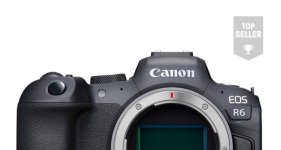
The R6 is looking a little better to me but it still has the dumb 30 min. time limit and micro HDMI if you want to use an Atomos. I thought that connector had been banned! :) I am doing a cost scenario and seeing what is best for me going forward.
 
I think the 8k choice might be good for marketing but it will end up limiting adoption of the camera by more pro/prosumer video folks. Because it is such a large task for a small camera, I think it has distorted other areas of the product. Overheating in 2020 is a no go. We have been dealing with that is earlier generations of cameras. Most people I would assume have the attitude that if they can't get it done without overheating, then don't include it...
They should have offered several crops/aspect ratios a la GH-4. Plus, a line skipping 6K or center-crop 6K. Or both. They had to have known about the overheating issues but went ahead with the specs anyway.
 
As someone who has used the a6300 more than most cameras - which has a micro-HDMI port, badly overheats, and holds the record for the worst rolling shutter in history (it's 39.0 ms, lol) - here are a few thoughts...

- People on forums love to hate the micro-HDMI port but I can guarantee you that half of them never even worked with it.
- It is not such a big problem as it is made out to be. I mean...what exactly are you shooting that you think you'll have the cable ripped out from your camera/recorder? If you're working in extremely rough conditions and terrain then you do not need any cables sticking out from your camera. (Even though many Hollywood productions do that are not all locking connections.)
- Wait until the manual is available to see the specs of the HDMI output.
- If 4K/24p is available, a recorder will solve overheating issues if you'd like to use one.
- Regarding some of the comments I am seeing (and not sure if this needs to be said), a micro-HDMI will work with a recorder. It doesn't need to be Type-A to Type-A.
- Rolling shutter...it's a problem if you're Michael Bay. If you're whipping around a camera then it's just not the system to use. But in reality, when you stop daydreaming about what you could film with it and how RS may affect it, it's not an issue in most day-to-day work, including having a 0% effect on interviews.

___

P.S. Here's a random sample of the a6300/25p on a gimbal with some decent movement: https://vimeo.com/163103896
 
Last edited:
As someone who has used the a6300 more than most cameras - which has a micro-HDMI port, badly overheats, and holds the record for the worst rolling shutter in history (it's 39.0 ms, lol) - here are a few thoughts...

- People on forums love to hate the micro-HDMI port but I can guarantee you that half of them never even worked with it.
- It is not such a big problem as it is made out to be. I mean...what exactly are you shooting that you think you'll have the cable ripped out from your camera/recorder? If you're working in extremely rough conditions and terrain then you do not need any cables sticking out from your camera. (Even though many Hollywood productions do that are not all locking connections.)
- Wait until the manual is available to see the specs of the HDMI output.
- If 4K/24p is available, a recorder will solve overheating issues if you'd like to use one.
- Regarding some of the comments I am seeing (and not sure if this needs to be said), a micro-HDMI will work with a recorder. It doesn't need to be Type-A to Type-A.
- Rolling shutter...it's a problem if you're Michael Bay. If you're whipping around a camera then it's just not the system to use. But in reality, when you stop daydreaming about what you could film with it and how RS may affect it, it's not an issue in most day-to-day work, including having a 0% effect on interviews.

___

P.S. Here's a random sample of the a6300/25p on a gimbal with some decent movement: https://vimeo.com/163103896

I'm not everyone, but I own three cameras with the micro HDMI connection. One has broken and had to go back for a replacement, not covered under warranty, $565.00. The other two with micro HDMI are brand new and straight out of the box,
plug in a high quality cable plugged into a monitor and even slightly jiggle the connection and it goes out and is loose after just one insertion.

As far as what am I shooting where the connection could be ripped out of the camera? Two main scenarios, gimbal use where even with the clamp, my producing partner actually rip out the connection on the rented camera when the small loop between the output jack and the
monitor snagged on a seatbelt getting out of car. Also using three micro HDMI connections in live streaming scenarios, one a motion control slider, two on tripods, all three with 25' HDMI cables going from cameras to Vmix Live. We velcro the connection to the tripod leg with
a loop strain relief and even then, after just a few uses, the connection is loose, sloppy and periodically cuts out. Micro HDMI is utter garbage, even for light, prosumer use. Most of the products that have it, it's loose from the first time you use it. At least Type A has some robustness
to it because of the size and I suppose even Mini HDMI like my 80D has is slightly better.

In regards to rolling shutter, did you own or ever shoot with the Canon 5D MKII? You caould barely move the camera on a tripod without seeing the edges of the frame skewing and shooting from vehicles, any vertical items in the frame were bent in motion at ridiculous angles.
Fast forward to 2020 and the rolling shutter on our C200 is negligible, I never even notice it. But when I tested the EOS R, the rolling shutter was almost as terrible as the 5D MKII was, such a slow scan rate. So it's all relative. But if it affects handheld shooting or gimbal shooting, the camera is uselsss to me.
If the new Canons don't improve on the EOS R rolling shutter, that will hinder them. I never do whip pans, yet really bad skewing Jello is a thing that shows up in many other scenarios besides whip pans. True doesn't affect interviews. Does affect walk & talks, shooting from vehicles, riding inside vehicles and shooting,
shooting red carpets if there is no flash band compensation function, shooting helicopter and prop planes, shooting from trains and cars, etc.

It's 2020, there should be no more micro HDMI connections on video or mirrorless cameras or extremely slow scan rate sensor readouts, we have moved past those.
 
Wow, they are releasing the R6 one month after the R5 (expected July 31st).

Oh, they are marketing monarchs.

R6 Availability.jpg
 
I'm not everyone, but I own three cameras with the micro HDMI connection. One has broken and had to go back for a replacement, not covered under warranty, $565.00. The other two with micro HDMI are brand new and straight out of the box,
plug in a high quality cable plugged into a monitor and even slightly jiggle the connection and it goes out and is loose after just one insertion.

As far as what am I shooting where the connection could be ripped out of the camera? Two main scenarios, gimbal use where even with the clamp, my producing partner actually rip out the connection on the rented camera when the small loop between the output jack and the
monitor snagged on a seatbelt getting out of car. Also using three micro HDMI connections in live streaming scenarios, one a motion control slider, two on tripods, all three with 25' HDMI cables going from cameras to Vmix Live. We velcro the connection to the tripod leg with
a loop strain relief and even then, after just a few uses, the connection is loose, sloppy and periodically cuts out. Micro HDMI is utter garbage, even for light, prosumer use. Most of the products that have it, it's loose from the first time you use it. At least Type A has some robustness
to it because of the size and I suppose even Mini HDMI like my 80D has is slightly better.

In regards to rolling shutter, did you own or ever shoot with the Canon 5D MKII? You caould barely move the camera on a tripod without seeing the edges of the frame skewing and shooting from vehicles, any vertical items in the frame were bent in motion at ridiculous angles.
Fast forward to 2020 and the rolling shutter on our C200 is negligible, I never even notice it. But when I tested the EOS R, the rolling shutter was almost as terrible as the 5D MKII was, such a slow scan rate. So it's all relative. But if it affects handheld shooting or gimbal shooting, the camera is uselsss to me.
If the new Canons don't improve on the EOS R rolling shutter, that will hinder them. I never do whip pans, yet really bad skewing Jello is a thing that shows up in many other scenarios besides whip pans. True doesn't affect interviews. Does affect walk & talks, shooting from vehicles, riding inside vehicles and shooting,
shooting red carpets if there is no flash band compensation function, shooting helicopter and prop planes, shooting from trains and cars, etc.

It's 2020, there should be no more micro HDMI connections on video or mirrorless cameras or extremely slow scan rate sensor readouts, we have moved past those.

Yea, it's always story time on the forums for all of us...we can say anything, really...who'd know the truth?

Everyone will have their own experiences.
 
NorBro - that a6300 video shows pretty languid movement and, again, we're looking at an edited video. I've seen RS ripples from dony cameras on people turning their head or just walking.

And the entire motion cadence is affected by the readout speed. It's not just an issue of "will average joe notice this awful glitch."

Andree - if you can record short clips then the 8K becomes more interesting. And yes, if you can't record only short clips, you can use another codec. If I weren't concerned about rolling shutter and overheating, I'd still be interested in the R5.
 
It's just so exhausting to read complaints about RS and the micro port on a stills camera that shoots video year after year.

Gave us so much after so long, and it always goes back to RS and the HDMI port.

They are running a business here...can't give away everything. We're lucky this camera isn't $6,499.
 
I loved my S1 because I never had to worry about it. No, it didn't have good AF. But I never had to worry about how long I was shooting for, the battery life was great, the camera was reliable, the full-size HDMI port was secure. It did the job and got out of my way. I don't want to be thinking about my camera.
 
I imagine the overheating will only be an issue for continuous recording. It's a shame if it will truly affect 4K/24p and shut down after a certain time, but we all need to test it ourselves for our own work.

Some people who shoot two-hour 4K interviews without any breaks will no doubt be out-of-luck, but others grabbing 10 minute interviews/soundbites at events here and there may just be able to get away with it.

That is the general consensus on the a6300; shoot on and off and the camera works all day, or shoot 4K for more than 30 minutes and it powers down.
 
It looks like 4K may overheat in the 8K-oversampled mode but there's a lower quality 4K mode that is probably fine.

Documentary shooting generally requires continuous recording.

And if you're shooting multiple 10-minute clips repeatedly, I'm sure the heat adds up. Look at how much you can record after resting for 20 minutes.

But yes, like everything, it all depends on what you shoot. I shoot a lot of different types of things and want a one-size-fits-all camera.
 
But based on what you've been saying for the past few months and how many cameras you've owned, you may never find everything you're looking for in a one-size-fits-all system.

They all will always have one major feature missing whether it's AF, DR, IBIS, FF, color, continuous recording, etc.

Even the cinema cameras...I'm sure most C500 Mark II owners love their $16K camera, but I think a few may also be a bit annoyed they don't have 4K/120p or the new sensor-shift IS.
 
Wonder if you'll see people doing like in the old RED days, putting ice/cold packs on the camera in an effort to keep it cool enough to keep running.
 
I hate rolling shutter and HDMI, in any form, period. But I think this all needs to be taken in context. It's first and foremost a (BAD @SS) stills cam. If there was horrible RS and unreliable HDMI connections were the only video outputs and overheating issues that severely limited roll time on a $100K Alexa LF or $40K Venice or even the $11K 300/3, that's one thing. But we're talking about a stills camera with video functionality. Now, I'm not defending Canon, I'm just trying to put this in context and look at it from a practical, realistic standpoint. It's a stills camera and if it has video functions that can serve you, that's awesome, but I think there needs to be some slightly more realistic expectations based on what it actually is and not what you want it to be.

Personally, I think there is a LOT of camera there. The AF alone seems to justify the price.
 
Well I bought new cameras mostly for new specs. 4K (gh4), 4k 60p (gh5), iso 50k (s1). Fs7 and OG c300 were because of client demand (which was related to broadcast HD codec, 4k 60p pro codec, xlr/nd etc). I will always want a "proper video cam" next to a mirrorless gimbal-friendly shooter.

The R5 could be my everything mirrorless camera if the RS is fast enough (let's say 25ms or lower) and there are 10-bit 4k 24p and 60p modes available that can shoot all-day. Then it's back in contention.

And I agree with you that at some point if the answers are unclear, you need to test the nitty gritty for yourself.

The R6 is cool too but lacks some of those really beefy codecs that are great when you're shooting a low amount of footage that you want to look its best.

If the R5 checks out, I don't think I would need to upgrade it for a long time. Improvements would be marginal (better DR, faster AF) rather than adding new, required specs.
 
Last edited:
I was actually thinking that it's kind of an end of an era for me with the R5 (and the a7SIII's future)...the end of my excitement for cameras. :crybaby:

Maybe eventually they will have more DR and even more resolution and framerates and even ND filters built-in, but the added value wouldn't be there for me.

15 years of chasing cameras, and I think I've caught one. I may finally now have enough resolution/framerates and slow-motion (4K/120p), AF, IBIS, and data/color information I could possibly ever want in one small fun camera.
 
15 years of chasing cameras, and I think I've caught one. I may finally now have enough resolution/framerates and slow-motion (4K/120p), AF, IBIS, and data/color information I could possibly ever want in one small fun camera.

Yeah I agree with you. And you can do ND with the drop-in filter adapter. Most of the specs are there for me, it just needs to pass some basic usability requirements that are a little unclear right now.

I would love to still be shooting with it in 10 years!
 
Back
Top