
Navigation
Install the app
How to install the app on iOS
Follow along with the video below to see how to install our site as a web app on your home screen.
Note: This feature may not be available in some browsers.
More options
You are using an out of date browser. It may not display this or other websites correctly.
You should upgrade or use an alternative browser.
You should upgrade or use an alternative browser.
C100: Canon Log. Wow!
- Thread starter Erik Naso
- Start date


Jason Ramsey
Admin
Looks good.
And what is the onboard depth of the C100 ? 420?
That's color space. And it's 4:2:0. Color depth is bits. It's 8-bit.
morgan_moore
Major Contributor
With no extra depth to properly De-Log therefore?
Hence the need to test before saying 'Wow' ?
Hence the need to test before saying 'Wow' ?


Liam Hall
Veteran
In theory you'll get best results shooting C-Log with mid grey set to 33% IRE, but I've found better looking results with mid-tone set to 40-45% IRE. It still gives lots of headroom for the highlights and doesn't introduce unnecessary noise in the low lights.
Edit: That's on the C300
Edit: That's on the C300
Greyfus Wolf
Active member
Yep, internal recording is 8-bit 4:2:0 AVCHD 24Mbps

Postmaster
Dark Side of the Camera
Shooting in C-Log, expose as good as possible and slap a LUT on it, should do 90% of the trick without stressing the codec too much.
Speedlooks does some fine worke there: http://looklabs.net/
Speedlooks does some fine worke there: http://looklabs.net/

brettsherman
Well-known member
LOG shooting has nothing to do with that. Fine gradients are helped by higher color depth.
The two are not inseparable. The "color depth" is the same as "luminance depth". 8-bit is 8-bit no matter how you slice it. I think the point being made is that when you shoot with C-Log you are not using the entire range of the 8-bits you are given, because blacks are elevated and whites are reduced. Theoretically you would loose bit depth in this scenario, because a lot gets crowded in the midrange. When you then color correct you are expanding the lower contrast image which could bring out some banding. The question becomes how far do you have to push the levels and how much difference it makes. I shoot with C-Log on the C300 and have not noticed banding, but AVCHD is a different animal.

KINOKS
Well-known member
@kinoks:
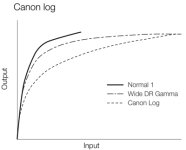
If you just need the highlights rolloff, use the WideDR gamma. That's exactly what it is doing: long rolloff above the knee, but keeping the mids detailed. Log only makes sense if you actually want to exctract more detail from the extremes and are ready to sacrifice the mids, it is not about the rolloff.
Thanks! I didn't realize this...yet!

morgan_moore
Major Contributor
Despite what some others are saying, I think the frame grabs look great.
I dont have the C100, but if I did I would always shoot in log. A little extra post time is well worth the safety of the extra DR.
Yep the OPs (compressed and reduced) grabs look nice, the skin seems about to 'break' IMO but beyond that good, but it is not the sort of scene that shows banding under a grade like a smooth sky or wall..
So it is not a good test shot for exploring the dangerous mix of a narrow codec and a flat profile
S
Liam Hall
Veteran
There's a lot of confusion about C-log. Here's a good article by those nice chaps at Abelcine:
http://blog.abelcine.com/2012/10/05/working-with-canon-log/
Here's the dull as dishwater technical paper from Canon:
http://downloads.canon.com/CDLC/Canon-Log_Transfer_Characteristic_6-20-2012.pdf
And here's Jem Schofield explaining it all:
http://learn.usa.canon.com/galleries/galleries/tutorials/eos_c300_tutorials_gallery.shtml
So, in short, test. Buy a grey card (I use a pop-up target by lastolite) and test some more. Buy a lightmeter and test some more. Trust your own eyes and make sure whomever you hand the footage to understands what they need to do to make the pictures sing. It's a shame the C100/C300/C500 don't put the WFM in the viewfinder, bit of an oversight that...
http://blog.abelcine.com/2012/10/05/working-with-canon-log/
Here's the dull as dishwater technical paper from Canon:
http://downloads.canon.com/CDLC/Canon-Log_Transfer_Characteristic_6-20-2012.pdf
And here's Jem Schofield explaining it all:
http://learn.usa.canon.com/galleries/galleries/tutorials/eos_c300_tutorials_gallery.shtml
So, in short, test. Buy a grey card (I use a pop-up target by lastolite) and test some more. Buy a lightmeter and test some more. Trust your own eyes and make sure whomever you hand the footage to understands what they need to do to make the pictures sing. It's a shame the C100/C300/C500 don't put the WFM in the viewfinder, bit of an oversight that...
morgan_moore
Major Contributor
From the Abel site.. "Talking to Canon, they insist they are using the “right 8-bits,” and as funny as that sounds, it seems to be true." for the C300
That doesnt really clarify the situation with the thinner codec on the C100
Really its down to each users personal set of imaging criteria, personally I take a cut in DR for a less broken image, and control my DR with modifying the light, but each to their own
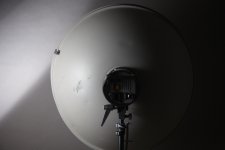
In terms of really understanding the effect of log/thin codec IMO one should evaluate/grade an image like this.. (something that Abel always avoid!)
Personally I find all the tests with step charts flawed.
That doesnt really clarify the situation with the thinner codec on the C100
Really its down to each users personal set of imaging criteria, personally I take a cut in DR for a less broken image, and control my DR with modifying the light, but each to their own
In terms of really understanding the effect of log/thin codec IMO one should evaluate/grade an image like this.. (something that Abel always avoid!)
Personally I find all the tests with step charts flawed.
Last edited:
Personally I find all the tests with step charts flawed.
How so?
morgan_moore
Major Contributor
How so?
Because they dont test subtle changes of tone which is what causes banding under a grade
also (a slightly different issue) - I dont think they get close to real world DR
Of course they are probably not designed to do either, being older than digital
S
Of course they are probably not designed to do either, being older than digital
Xrite has the Color Checker Digital SG - it has 140patches (instead of the regular 24), especially selected for calibratingdigital color.
The Xrite i1 Pro software can use the SG to generate .ICC's that have a lot more lookup points. I have found that editing the ICC's is a good way to create"Looks", like LUT’s, to apply in post.
Unfortunately, the Adobe DNG Profile editor still relies on the regular, 24 patch Color Checker to create it's profiles. But that is a faster and easier way to edit the response for each patch (holding skin tones, for example, while amping the saturation on blues, greens, etc.) to create a standard Look when working in CS6, plus stills (Lightroom & Bridge.)
morgan_moore
Major Contributor
Not completely filling the histo is nuts - just for clots that cant expose
Im even against knee profiles that ram more DR into the narrow space, but as I said that is a personal choice on the trade offs that any non raw shooter offers, others will take a different trade off.
S
Im even against knee profiles that ram more DR into the narrow space, but as I said that is a personal choice on the trade offs that any non raw shooter offers, others will take a different trade off.
S