C300: Canon EOS C300 Mk II - Multitrack Issues

DYORD

Member
Our company just purchased this camera and I am the primary user. We already have the C500 so I'm pretty much familiar with the camera. However, the C300 Mk II has a new codec. XF-AVC/H.264. We still use Final Cut Pro 7 and we still use DVCPROHD as our company house format.

Anyhow, I've tried several MXF converters. Brorsoft, Pavtube, Akrok, etc.. All these cannot retain all those 4 tracks. Everything is merged into either mono-single track or stereo - dual mono.

Although the video conversions were ok, I find the audio useless.

Here are my Input/Channel assignments:

Channel 1: Boom
Channel 2: Lavalier
Channel 3: Built-in microphone - which I cannot turn off
Channel 4: Built-in microphone - which also cannot be turned off


After conversion, all these tracks are merged.

I haven't figured out how to solve it.


Please help!!!
 
You could use FCPX to transcode, or perhaps use FCPX to edit natively. Editing in FCPX would save time and time is money.
 
I used this program to transcode footage from a card with broken file structure from original c300 for an early version of FCPX. Not sure if it'll work for you to bring it into Final Cut 7, but thought I'd put it out there. http://www.divergentmedia.com/editready

Update: Re-read the EditReady manual and it's possible audio 'passthrough' might work. Basically transcode the video and leave audio as sourced.

Oddly enough, I don't have any footage w/ linked multi-source audio hanging around or I'd test for you. If I keep blowing off my writing deadline, I'll test and update.

Wishing you well with troubleshooting.

And +1 for FCPX.
 
Last edited:
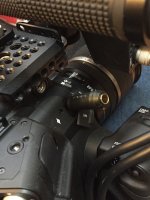
I believe Eric on this forum found a working solution for muting built in audio channels. If you plug a powered mic into the 1/8" stereo input, that input will replace the internal microphone for Channel 3 and 4. And by turning off that mic, you get a clean Channel 3 and 4. I just tried it with a simple cable, not plugged into anything, and it also worked but anytime the cable moved it picked up a little rustling. So then I plugged in a simple 1/8" adapter (with a 1/4" female on the other end) - but basically anything that fits into the jack and doesn't stick out far will work. The only time it picked up noise was if i purposefully tapped the little adapter.

IMG_1149.JPG
 
That was one point the instructor made at the all day C300 MKII class I took. If the C300 MKII is recording, it is recording you and anyone standing close to the camera all the time it is recording onto Ch 3-4. Needless to say, people often say things that they would like to be kept private from behind or around the camera. The Slavik/Eric fix above is highly recommended, especially if you shoot for other producers and give them your footage.
 
I believe Eric on this forum found a working solution for muting built in audio channels. If you plug a powered mic into the 1/8" stereo input, that input will replace the internal microphone for Channel 3 and 4. And by turning off that mic, you get a clean Channel 3 and 4. I just tried it with a simple cable, not plugged into anything, and it also worked but anytime the cable moved it picked up a little rustling. So then I plugged in a simple 1/8" adapter (with a 1/4" female on the other end) - but basically anything that fits into the jack and doesn't stick out far will work. The only time it picked up noise was if i purposefully tapped the little adapter.

View attachment 118354

Thanks! We've also tried that option.. but it's just too risky. Every time that adapter was touched, it gets grounded sound. Also, even if i get a clean chan 3 & 4, i still can't get a separate channels 1 & 2 after conversion. The converter merge all the channels.

Buying the latest fcpx is a big question, our old MAM system can't work with the latest Mac OS. And you have to update the OS to install FCPx.

I hope canon make a firmware update where you can choose stereo only without the built-in mic.

I'm not an audio guy, but from what i understand, the C300 mk ii put all 4 tracks in 1 channel. Converters "think" it's mono audio. So it will convert it as it is. Making all those tracks to merge down to 1 channel or track.

It confused me the first time.
 
I work with a guy who uses Final Cut 7 to edit my C300 Mark II footage. He converts it to ProRes (using Adobe Media Encoder) and is able to get all of the four tracks separate. I don't know how converting DVCPROHD works in terms of separating tracks. Why not just use ProRes?
 
I work with a guy who uses Final Cut 7 to edit my C300 Mark II footage. He converts it to ProRes (using Adobe Media Encoder) and is able to get all of the four tracks separate. I don't know how converting DVCPROHD works in terms of separating tracks. Why not just use ProRes?

Hi! What version of adobe media encoder did he use? I've tried the CC version, it doesn't recognize the clip.
 
Hi! What version of adobe media encoder did he use? I've tried the CC version, it doesn't recognize the clip.
He used CC.

Adobe Premiere CC recognizes all forms of C300 Mark II footage without transcoding. I'd assume the Media Encoder would as well, and it worked for him. Maybe your computer drivers or CC aren't up to date?
 
Canon just added a firmware update which will turn off the internal mic on the C300 Mark II.

There are also other updates and including ones for the C300 Mark I which tie into the new 18-80 and the 17-120 servo zooms.

Full list here - Canon NAB NY FW Announcements New FW is to be released on Dec. 13th.
 
Back
Top