José Alkon
Member
I just wanted to post some pics and finding from shooting with my Canon 1DC set to 4k but recording externally to my Atomos Samurai Blade.
Now first up you'll be asking yourself why would I do such a thing as obviously it is only recording externally as 1920x1080 and not 4k. The benefits of shooting 4k are great and I shoot it when it is the right job for it but as we know they are huge files to deal with in post, depending on the shoot you'll need several 1000x CF cards and motion jpeg can be a bit of a let down in some situations. The majority of times HD is the format most clients want and require and I have been shooting most of my work on the 1DC on s35 mode (which is a beautiful image seamless next to a c300 and personally I think it looks better) dual recording into the camera and externally to a Ninja2 with great results.
I started doing some test recording externally all the formats the 1DC can do and was amazed to find the quality difference between them. Philip Bloom has already done this and his review is fantastic but it only talks about recording in-camera, externally the difference between Full Frame and s35 is obvious but set to 4k the quality and resolution gets even better. Canon understates it saying it is just intended as a proxy record for post but after doing a shoot with it recently I was quiet blown away by it. Sharper than s35, wider FOV, no aliasing, and most important no compression banding! The only thing you have to do in post is zoom in by 7% to get rid of the black bars on the top and bottom due to the different aspect ratio which does not hinder the overall quality but you will have to take into account when shooting.
I'm not sure if technically I'm correct in saying this but in theory would the image recorded externally to a recorder be the same as the 4k image down coverted to 1920x1080 in post? Please let me know your thoughts.
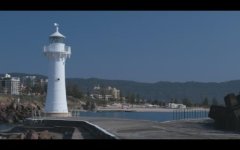
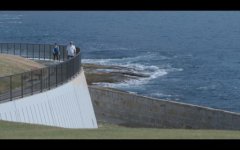
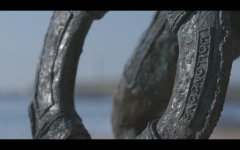
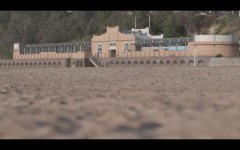
This is not a scientific test but my personal views on shooting with it, sorry I have not had time to do identical comparisons shots in the different modes for a more technical review. Attached are some screen shots from my macbook retina from the original ungraded Prores 422 files recorded on my Samurai Blade (awesome recorder/monitor highly recommend it, waveform is unreal!), notice the detail in the bricks in the pavilion, hand railing in the walkway and on top of the lighthouse, on the statue, no sky banding, etc etc.
Camera: Canon 1DC
Format: 4k 25p
Picture Style: C-Log
ISO: 400
Filters: ND1.2 / True Polariser
Lens: Canon 70-200 f2.8 IS, 24-70 f2.8
External Recorder: Atomos Samurai Blade (Prores 422)
Now first up you'll be asking yourself why would I do such a thing as obviously it is only recording externally as 1920x1080 and not 4k. The benefits of shooting 4k are great and I shoot it when it is the right job for it but as we know they are huge files to deal with in post, depending on the shoot you'll need several 1000x CF cards and motion jpeg can be a bit of a let down in some situations. The majority of times HD is the format most clients want and require and I have been shooting most of my work on the 1DC on s35 mode (which is a beautiful image seamless next to a c300 and personally I think it looks better) dual recording into the camera and externally to a Ninja2 with great results.
I started doing some test recording externally all the formats the 1DC can do and was amazed to find the quality difference between them. Philip Bloom has already done this and his review is fantastic but it only talks about recording in-camera, externally the difference between Full Frame and s35 is obvious but set to 4k the quality and resolution gets even better. Canon understates it saying it is just intended as a proxy record for post but after doing a shoot with it recently I was quiet blown away by it. Sharper than s35, wider FOV, no aliasing, and most important no compression banding! The only thing you have to do in post is zoom in by 7% to get rid of the black bars on the top and bottom due to the different aspect ratio which does not hinder the overall quality but you will have to take into account when shooting.
I'm not sure if technically I'm correct in saying this but in theory would the image recorded externally to a recorder be the same as the 4k image down coverted to 1920x1080 in post? Please let me know your thoughts.
This is not a scientific test but my personal views on shooting with it, sorry I have not had time to do identical comparisons shots in the different modes for a more technical review. Attached are some screen shots from my macbook retina from the original ungraded Prores 422 files recorded on my Samurai Blade (awesome recorder/monitor highly recommend it, waveform is unreal!), notice the detail in the bricks in the pavilion, hand railing in the walkway and on top of the lighthouse, on the statue, no sky banding, etc etc.
Camera: Canon 1DC
Format: 4k 25p
Picture Style: C-Log
ISO: 400
Filters: ND1.2 / True Polariser
Lens: Canon 70-200 f2.8 IS, 24-70 f2.8
External Recorder: Atomos Samurai Blade (Prores 422)