Canon 1D C 4K 25p firmware surfaced

Isn't going under 400 like going to - db in gain? So when I go to - 6db with the XF100 it's basically limiting the dynamic range. That's just how cameras work.

No, there is something else going on with the 1Dc. Unfortunately there's no white paper that I know of that might shine a light on this.

Have a look at a histogram here
 
No, there is something else going on with the 1Dc. Unfortunately there's no white paper that I know of that might shine a light on this.

Have a look at a histogram here

I was told firmware 1.1.9 service upgrade is coming out soon for Europe, sometime next week. It's already available in the rest of the world like the US and Asia.

Oh, and I can confirm there is no hardware fix, a friend of mine in China told me he took the camera to a Canon service centre and it's just a simple firmware update via CF card. Everything was done in 10min.

The reason for not making it downloadable is indeed to prevent public circulation of the firmware file, which could possibly lead to hacks.
 
No, there is something else going on with the 1Dc. Unfortunately there's no white paper that I know of that might shine a light on this.

Have a look at a histogram here

That's how the FS700 works. When you go below ISO 640, it will decrease dynamic range. But no, it shouldn't just clip it like that.
 
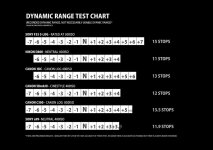
That's certainly an interesting issue - hard clip on ISO 400 and below in Canon Log and whilst it's something that requires a fix IMO, what's the sensor native ISO? Couldn't find that anywhere. However, I note with my C300 I never shoot below the 850 (optimum ISO on this camera) shooting exteriors. The reason is simple I loose a full stop in the highlights @ iso 400 and this is not what I want on a bright day.

In real world shooting to optimum, I just wonder where this may be an actual issue. The key piece of information here is: @400 ISO on the 1DC is how many stops am I getting under middle grey? The reason I state it this way is from the C300 I get maximum clean (read with less noise) shadow retention @320. Thats great when you have a dark interior scene thats set up with little in the top end. At ISO 320 / 400 I dont want much above middle grey as I have less space to work there, but I have a lot in the deep shadows. In fact @ ISO 400 if I can control the top end (which I really want to as Ive got under 4 stops), I have more shadow detail to work with than Alexa @ ISO 400 (yes, its true, but Alexa has 8 under middle grey - and still holds six above). As I said however if I light right I can utilise 8.3 under.

With that said - is the 1DC simply saying, yeah I can't take much at the top end below ISO 400 so watch it! Especially the image on that thread is at ISO 125 - I imagine at this point the highlights are offering very little at all and the shot on that thread is not the way to shoot that image at all. Nothing on the top end so you shoot a bright light...

Anyway, I hope this info is useful to some.
 
That's certainly an interesting issue - hard clip on ISO 400 and below in Canon Log and whilst it's something that requires a fix IMO, what's the sensor native ISO? Couldn't find that anywhere. However, I note with my C300 I never shoot below the 850 (optimum ISO on this camera) shooting exteriors. The reason is simple I loose a full stop in the highlights @ iso 400 and this is not what I want on a bright day.

In real world shooting to optimum, I just wonder where this may be an actual issue. The key piece of information here is: @400 ISO on the 1DC is how many stops am I getting under middle grey? The reason I state it this way is from the C300 I get maximum clean (read with less noise) shadow retention @320. Thats great when you have a dark interior scene thats set up with little in the top end. At ISO 320 / 400 I dont want much above middle grey as I have less space to work there, but I have a lot in the deep shadows. In fact @ ISO 400 if I can control the top end (which I really want to as Ive got under 4 stops), I have more shadow detail to work with than Alexa @ ISO 400 (yes, its true, but Alexa has 8 under middle grey - and still holds six above). As I said however if I light right I can utilise 8.3 under.

With that said - is the 1DC simply saying, yeah I can't take much at the top end below ISO 400 so watch it! Especially the image on that thread is at ISO 125 - I imagine at this point the highlights are offering very little at all and the shot on that thread is not the way to shoot that image at all. Nothing on the top end so you shoot a bright light...

Anyway, I hope this info is useful to some.

The native ISO for 1D C is 400
 
400, it's stated in the metadata of 5D3's movie file.

Ok thanks for that! So is it best to shoot at 400 on the 5Dmk3 as well (I hadn't noticed any 'clipping' in the image when using it at 100, but I haven't been looking for it I suppose)?
 
Ok thanks for that! So is it best to shoot at 400 on the 5Dmk3 as well (I hadn't noticed any 'clipping' in the image when using it at 100, but I haven't been looking for it I suppose)?

No. It doesn't clip when not using LOG-mode and the 5d has no LOG.
 
Ok thanks for that! So is it best to shoot at 400 on the 5Dmk3 as well (I hadn't noticed any 'clipping' in the image when using it at 100, but I haven't been looking for it I suppose)?

If you use ISO lower than 400 on 5D3 you will likely notice vertical banding in underexposed areas.
 
400 ISO has more fixed pattern noise than 320 or 640 ISO on the MK3. 1250 ISO has the least FPN. Just do a body cap ISO test, push the shots 3-4 stops in post to see the noise.

DR2.jpg
 
Back
Top