***Update*** Canon did some tests for me. The only camera that fits the bill is the HF G20. Success!
I wasn't sure where to put this thread since it is related to more than one brand of camera, so please feel free to move this is necessary.
I work for a company that creates thousands of product videos each year and we are expanding our production. We are looking to purchase another 12 cameras over the course of the year but are finding it difficult to find the proper solution for our needs.
Currently we have about a dozen Canon HF G10 camcorders which have been doing a fine job. Our workflow from camera to network storage is where we are running into problems. Our current process is the following:
Shoot throughout the day (single camera setups and multi-cam studio setups). Once finished, the cameras are plugged in via USB and AC power to their respective computer. We have a piece of software which will CUT/PASTE the files from the camera to the local computer and name the file appropriately. It repeats this process until the camcorder is empty. Overnight the files are moved from the local computer to our server where our editors can access the files and get to editing.
The problem is that the HF G10 is no longer in production. My initial camera purchase was the newer version in that line...the HF G30. The camera itself is great but we ran into an issue with access permissions. When plugged in via USB, the camera is locked to read-only mode at a hardware level. I checked this by loading DISKPART on win7 and getting info by using the 'DET DIS' command. When pulled up, the camera shows 'current read-only state:yes' which to my understanding means the camera is locked to read-only at a hardware level.
The question: If you own any of the following cameras, could you check if the camera is locked to read-only? It would help us avoid purchasing camera after camera to find one that is not. I have contacted manufacturers but they don't seem to help or even have access to the cameras to check...so I figured I'd come to those who have cameras.
Canon:
XA20 - Current read-only state: Yes
XA25 - Current read-only state: Yes
XF100 - Current read-only state: Yes
XF105 - Current read-only state: Yes
HF G30 - Current read-only state: Yes
HF G20 - Current read-only state: No
HF G10 - Current read-only state: No
Panasonic:
HMC40 -
AC90 - Current read-only state: Yes
HMC-150 -
AC130A -
X920 -
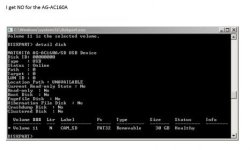
AG-AC160A - Current read-only state: No
Sony: Sony tech stated none of their cameras would do what I'm looking for. (Kinda skeptical but he didn't seem interested in testing any of them)
To check...follow these steps:
1 - Start > Run > type in 'DISKPART' and open as admin
2 - Type 'LIS DIS' and return.
3 - Then 'SEL DIS #' (whichever number the camera is) and return.
4 - Finally, 'DET DIS' and it will give you the info about your camera.
The line in question is 'Current read-only state:' -- if it says NO, then it is a camera we can use. If it is 'Yes' -- then it is locked to read-only.
Any help would be much appreciated!
I wasn't sure where to put this thread since it is related to more than one brand of camera, so please feel free to move this is necessary.
I work for a company that creates thousands of product videos each year and we are expanding our production. We are looking to purchase another 12 cameras over the course of the year but are finding it difficult to find the proper solution for our needs.
Currently we have about a dozen Canon HF G10 camcorders which have been doing a fine job. Our workflow from camera to network storage is where we are running into problems. Our current process is the following:
Shoot throughout the day (single camera setups and multi-cam studio setups). Once finished, the cameras are plugged in via USB and AC power to their respective computer. We have a piece of software which will CUT/PASTE the files from the camera to the local computer and name the file appropriately. It repeats this process until the camcorder is empty. Overnight the files are moved from the local computer to our server where our editors can access the files and get to editing.
The problem is that the HF G10 is no longer in production. My initial camera purchase was the newer version in that line...the HF G30. The camera itself is great but we ran into an issue with access permissions. When plugged in via USB, the camera is locked to read-only mode at a hardware level. I checked this by loading DISKPART on win7 and getting info by using the 'DET DIS' command. When pulled up, the camera shows 'current read-only state:yes' which to my understanding means the camera is locked to read-only at a hardware level.
The question: If you own any of the following cameras, could you check if the camera is locked to read-only? It would help us avoid purchasing camera after camera to find one that is not. I have contacted manufacturers but they don't seem to help or even have access to the cameras to check...so I figured I'd come to those who have cameras.
Canon:
XA20 - Current read-only state: Yes
XA25 - Current read-only state: Yes
XF100 - Current read-only state: Yes
XF105 - Current read-only state: Yes
HF G30 - Current read-only state: Yes
HF G20 - Current read-only state: No
HF G10 - Current read-only state: No
Panasonic:
HMC40 -
AC90 - Current read-only state: Yes
HMC-150 -
AC130A -
X920 -
AG-AC160A - Current read-only state: No
Sony: Sony tech stated none of their cameras would do what I'm looking for. (Kinda skeptical but he didn't seem interested in testing any of them)
To check...follow these steps:
1 - Start > Run > type in 'DISKPART' and open as admin
2 - Type 'LIS DIS' and return.
3 - Then 'SEL DIS #' (whichever number the camera is) and return.
4 - Finally, 'DET DIS' and it will give you the info about your camera.
The line in question is 'Current read-only state:' -- if it says NO, then it is a camera we can use. If it is 'Yes' -- then it is locked to read-only.
Any help would be much appreciated!
Last edited:
 Also just to clarify, "current read-only state:" is what you are referring to? There are two different read only lines when you check.