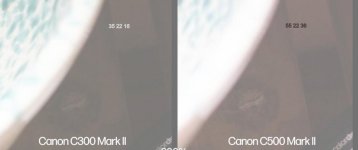
C500: C500MKII low light noise reduction

twickers83

New member
Hi Everyone. I hope you are all doing well despite these "interesting" times we currently live in.

I am considering getting a C500MKII but I have been a little surprised by some of the noise in the shadows when I have rented one.

I have come across this video https://www.youtube.com/watch?v=_P3WhWcEST8 and wondered of any of you had tried these settings out for yourselves and if so, did they work for you in both XF-AVC and Raw and also how you had found it affected the fixed pattern noise of the C500MKII. I also wonder if you had found it did affect the overall sharpness of the image.

Your input is very much appreciated.
 
Definitely use those settings if you are not liking the noise.

In particular in Fullframe mode shooting 6K, you have sharpness and detail to spare.


One thing the video doesn’t talk about, is that the pixel count on the C300Mk2 is likely close to 8megapixels (not enough for true 4K colour resolution), so, even though it is “4K”, the pixel size between the C500mk2 and the C300mk2 are likely similar*. Another thing not me tioned, is that the C500mkii sensor came out on the C700FF a few years back, so it isn’t exactly that much more modern than the C300mk2. So expecting the C500mkii in s35 crop to have better noise performance than the C300mk2 is quite literally ill-informed.

In FF35 mode, the extra resolution does help the C500ii perform better in low light. The noise reduction settings are a great option. Use them until they get in your way. If you need to shoot iso12,800 then yeah, crank up the noise reduction.

Another thing the reviewer is not mentioning, The C500ii has more dynamic range than the C300mk2. It may be that they tuned the sensors differently, or maybe the C500ii is digging into the shadows a little more, but regardless, i’d take the C500ii over the C300mk2 any day of the week!


*FF35 is about 1.6x’s bigger than s35 or APS-C crops. The C300mk2 has 4,000 photosites across, and the C500mk2 has 6,000 across.

6 to 4 is 1.5x

So, chances are the photosites between the two cameras are similar enough, that noise reduction plays the bigger part.
 
Last edited:
I've played around with it, and basically it DOES work, but if there's a lot of movement going on it's starts to smear.

I saw the video you linked and bumped up that NR value to 1, went off for a shoot, and the footage came back pretty sub-par. I was filming skateboarders riding in an empty pool in broad daylight, so I didn't need the setting toggled anyway but I had it on and basically everything looked smeary, but you could really see it in one of the skater's freckles on close ups. I was handheld and they were skateboarding so kind of worst case scenario for that temporal NR, but I shouldn't have compulsively set it because it was "better". Better for what?

So, moral of the story: on the C500 leave it off unless it's a really still scene and you really need it (and don't have NR as an option in post somehow). I shoot at ISO400 usually and that has eliminated any noise I potentially was seeing in almost every case, including low-light. In the middle of the day outside I'll probably kick it back up to 800 though.
 
I did two dives into this on my blog looking at noise in Super 35 mode and Full-frame.

In the tests my main concern was the noise evident in Super 35 mode. Setting Frame Correlation to "1" does clean that up and in my testing and filming to date I haven't noticed any negative affects but none of my filming involved any super quick action or camera movement that would have stressed the situation.

I do not tend to change FC to 1 for full-frame filming. I leave it at its default of "0". It seems fine as is and I haven't run into noise issues.

I do change FC to "1" when I shoot in Super 35. Again, to date, no issues but beyond the testing I have only shot one job in Super 35 mode. So, not a lot of user time to draw a firm conclusion.
 
As an independent (sony) observer I think the camera is most likely excellent and you should do your own tests - probably open up a stop and get the histo/wfm in the middle unless you have good reason not to.

THe first video start the C500 is clearly 1/2 to 1 stop brighter (in the shadows) than the C300 and giving more noise.. of course - if we used a curve to bring down the luminance level to that of the C300 the noise would vanish.. also using S35 mode is probably a poor approach that will lead to noise. You would not test any other sensor by evaluating half of it (double the magnification)

WHen he shows his waveform (self portrait shot) the image looks under exposed - a route to noise.

This guy has noise - of course he does.

Then of course we know nothing of his post methodology - which should usually be to desaturate the shadows and then consider post noise reduction.
You can save this as a setting and paste it onto future footage - it should not be a pain in post.

Jons videos also seem fairly odd. He is in a bright space and has no strategy for finding ghosting - he should be filming a table fan or other moving thing. you are not giong to get ghosting with a static subject like a gretag card.
 
Jons videos also seem fairly odd. He is in a bright space and has no strategy for finding ghosting - he should be filming a table fan or other moving thing. you are not giong to get ghosting with a static subject like a gretag card.

I was primarily looking at noise. There are non-Xrite/Gretag card tests in the videos in each article, some with camera movement, some with subject movement, but again nothing too extensive. I literally leave it as an open question if there is a "noticeable effect in certain filming situations..." re: ghosting and state that the camera/subject movement clips are are "quick initial tests" advising people to test on their own.
 
Back
Top