
Navigation
Install the app
How to install the app on iOS
Follow along with the video below to see how to install our site as a web app on your home screen.
Note: This feature may not be available in some browsers.
More options
You are using an out of date browser. It may not display this or other websites correctly.
You should upgrade or use an alternative browser.
You should upgrade or use an alternative browser.
C300: C300mkii - top monitor coming loose
- Thread starter seanarmada
- Start date

seanarmada
Well-known member
Thanks for all the tips! The only thing about the magic arm solution is I can see it slowing down workflow with the Zacuto handle. I often switch positions throughout a shoot depending on what I'm doing, if I'm also using the Gratical HD, etc. Needing to also reposition with the magic arm could be quite cumbersome or even not possible at all, but i realize it's probably the best solution given the design limitations.
If you like to move your monitor around during a shoot then the magic arm fix is a bad idea. I haven’t experimented with it that much but I can tell it will be a headache if I try to dismantle the set up in a hurry.
Unfortunately I can’t find a link to the arm but I remember it was about $35 off the shelf from a Camera House store in Central Australia
Unfortunately I can’t find a link to the arm but I remember it was about $35 off the shelf from a Camera House store in Central Australia
Hi guys, I managed to fix the mount for real by ordering a replacement part from a Canon Service Centre. I was tipped off by person an the C300 MKII user group.
EDIT: Here's a video showing the before and after - https://youtu.be/6NrN8e_CfXs
This is the part you need:
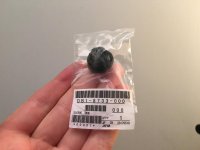
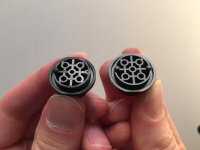
The culprit causing the wobble is these plastic pins which line the cold shoe to the monitor unit. You can see the one on the left has a pin snapped off and the new part on the right has 2 pins:
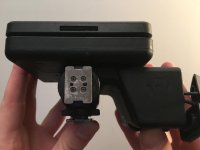
All you need to do is remove these 4 screws and replace the part:
The monitor is now solid again with no sag. It's definitely liable to break again as these plastic pins are weak, so I'm going to remove the monitor unit when I put the camera in my bag.
Hope that's useful to someone!
EDIT: Here's a video showing the before and after - https://youtu.be/6NrN8e_CfXs
This is the part you need:
The culprit causing the wobble is these plastic pins which line the cold shoe to the monitor unit. You can see the one on the left has a pin snapped off and the new part on the right has 2 pins:
All you need to do is remove these 4 screws and replace the part:
The monitor is now solid again with no sag. It's definitely liable to break again as these plastic pins are weak, so I'm going to remove the monitor unit when I put the camera in my bag.
Hope that's useful to someone!
Last edited:
seanarmada
Well-known member
Hi guys, I managed to fix the mount for real by ordering a replacement part from a Canon Service Centre. I was tipped off by person an the C300 MKII user group.
EDIT: Here's a video showing the before and after - https://youtu.be/6NrN8e_CfXs
This is the part you need:
View attachment 127640
The culprit causing the wobble is these plastic pins which line the cold shoe to the monitor unit. You can see the one on the left has a pin snapped off and the new part on the right has 2 pins:
View attachment 127641
All you need to do is remove these 4 screws and replace the part:
View attachment 127642
The monitor is now solid again with no sag. It's definitely liable to break again as these plastic pins are weak, so I'm going to remove the monitor unit when I put the camera in my bag.
Hope that's useful to someone!
!!!! Amazing!!
Where did you order this? Link?
Thanks mrtreve. Just ordered a couple of spare ones.
In the UK, you can order Canon parts direct from www.hlehmann.co.uk
!!!! Amazing!!
Where did you order this? Link?
In the UK, you can order Canon parts direct from www.hlehmann.co.uk
Thanks mrtreve. Just ordered a couple of spare ones.
In the UK, you can order Canon parts direct from www.hlehmann.co.uk
No worries. Yes I ordered from H Lehmann. Just quote the code on the pack and the part name is 'Sleeve, Shoe'.
Matt Turner
Well-known member
Awesome thanks!
Found this for those who live in 'Straya...
http://www.mediaform.com.au/products/canon-sleeve-shoe-db1-8733-000000.html
Probably worthwhile picking up a few as spares.
Found this for those who live in 'Straya...
http://www.mediaform.com.au/products/canon-sleeve-shoe-db1-8733-000000.html
Probably worthwhile picking up a few as spares.