C300: C300 MKII: Ways to avoid cmos smear/banding issues

seanarmada

Well-known member
Hi guys

I know this issue is well documented on the C300 Mark II, not sure if it's also a problem with the C200.

I'm curious if there are some ways to mitigate this issue in high contrast/backlit situations? I've run into it a few times on a new series I'm shooting this past week.

Making sure you ABB each time loading up is the obvious one, but beyond that I'm wondering if there are any tips in terms of profile settings, i.e. are you better off shooting Clog vs Clog 2 or 3?

Sean
 
Hi guys

I know this issue is well documented on the C300 Mark II, not sure if it's also a problem with the C200.

I'm curious if there are some ways to mitigate this issue in high contrast/backlit situations? I've run into it a few times on a new series I'm shooting this past week.

Making sure you ABB each time loading up is the obvious one, but beyond that I'm wondering if there are any tips in terms of profile settings, i.e. are you better off shooting Clog vs Clog 2 or 3?

Sean
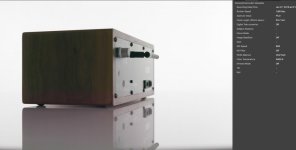

ABB will have little effect other than perhaps correcting tint of the smear. Your best bet is to shoot at ISO 400 or lower, and if you are in a high silhouette situation with little to no light in the foreground, Either fill the shadows, or crush them in post.... Unfortunately I've seen it in Clog2 and 3 and I've seen it in situations where it wasn't even deep shadows that showed the banding, but shooting at 400 seems to clean it all up.
 
ABB will have little effect other than perhaps correcting tint of the smear. Your best bet is to shoot at ISO 400 or lower, and if you are in a high silhouette situation with little to no light in the foreground, Either fill the shadows, or crush them in post.... Unfortunately I've seen it in Clog2 and 3 and I've seen it in situations where it wasn't even deep shadows that showed the banding, but shooting at 400 seems to clean it all up.

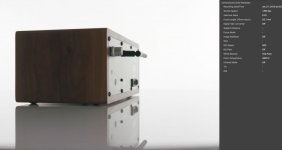
I thought I'd post an example. I was doing some product spins a while back and was having trouble maintaining an adequate stop on a couple of the items. We'd been shooting at ISO 500 which is where I normally rate the MkII, but decided to raise to 800 for a couple of items that needed more DOF. We'd lit these to have a bit of contrast to match some of the still photography, so when the item turned away from the key, toward the camera it would go dark for a few seconds. Luckily I caught it (not too apparent viewing in Clog3, but once the LUT was applied it became clear.) The difference between 500 and 800 was enough to expose the smear. What's crazy is you can see there really isn't that much of a "high contrast" background here...maybe 1 stop difference between the background and the reflection off the acrylic (you can barely see the horizon once the LUT is applied)...yet there's a huge shift in color in the speaker and even the much lighter reflection in the acrylic.

800iso f5.0t copy.jpg500iso f4.0 copy.jpg
 
Last edited:
To clarify, I don't regularly shoot in log profiles and the only time I've really noticed the smearing is when I'm shooting in a log profile. I have a regular event/presentation shoot that I usually just shoot in my own profile. I decided to give c log 3 a chance and I immediately noticed the smearing that hadn't been apparent in the past with my more baked in profile. I haven't done any controlled tests, but I wonder if some of the specialized noise reduction in the log profiles isn't adding to the banding issue.
 
That's bizarre. So it's specifically ISO 800 where you've noticed this issue most frequently?

No...Just that the lower ISO's seem to supress it as they aren't stretching out the shadows in the same way as the higher ISOs. Remember...C300markII native ISO is 100...Optimum ISO is 800. They are pulling extra stops of DR as they gain to 800, and maintaining that DR at higher ISOs through some other pixie dust that I don't quite understand. Essentially, at ISO 500 in the example...I'm giving the sensor extra light with a more open aperture. The images look the same, but the 800 has more gain. If you really want to get into the nitty gritty, take a look at the color shifts throughout the image in the 800...they don't exactly mesh with classic smear...they banding aligns with the over exposure border, but the color goes wonky on both sides of that border, shifting green above and red below.

Way back after the camera was announced, but before it shipped, I got to play with one of the demo cameras and the thing that stuck out was that the banding in Clog2 wasn't consistent between various ISO's...you'd ramp up the ISO, and with each gain step the color and position of the banding would change, and not necessarily in response to anything on the input side. By release they had softened this effect, and then a later FW fixed it more, but the remnants of it are still apparent.

I've gotten fantastic results from this camera at iso's up to 12,800 and have gotten surprising occasional results like the samples I just shared at 800. (and 1600, 2500, 3200 etc). All I can say is you have to keep an eye on it, and that I've never seen smear show up in the 400-500 iso range.
 
To clarify, I don't regularly shoot in log profiles and the only time I've really noticed the smearing is when I'm shooting in a log profile. I have a regular event/presentation shoot that I usually just shoot in my own profile. I decided to give c log 3 a chance and I immediately noticed the smearing that hadn't been apparent in the past with my more baked in profile. I haven't done any controlled tests, but I wonder if some of the specialized noise reduction in the log profiles isn't adding to the banding issue.

I don't think that's it. The baked in profiles are simply placing the shadows where they belong. It's really easy to shoot in log and get your exposure wrong, because you can see all this detail in the shadows. Put some schmo up against a blasted out window with no fill and you can probably still make out his face in the VF. In a rec709 profile, he'd be perfectly black, and so you'd do something to fix that...by pinning the highlights or adding some fill. The smear shows up typically in the bottom two stops of DR, which should be rendered almost black in Rec709. Clog,2,and 3 are just showing you something the baked in profiles are hiding.

Clog and Clog 3 work by lifting the shadows, but keeping them generally compressed. CLog2 stretches the shadows by a stop or two beyond what the other two do. So you'll see these problems the most in Clog2, but in the other two as well.

Expose correctly, and grade correctly, and generally it's not a problem.
 
I think I've only noticed this when shooting uniform surfaces like the wooden side of that object in scenes with that have a degree of backlighting.

I think sometimes in controlled lighting situations, the final result can look cleaner when shooting Wide DR instead of log. I find the C-log 2 gives you DR in the useless bottom couple of stops of the shadows which need to be crushed in the grade anyway. C-log 3 seems to clamp these down which is why it works better for low light.

It's be nice if the newer generation of cameras have cleaner sensors as it seems there has been quite the amount of trickery (updates to NR etc) at play to get the MKII to perform they way we'd all like.
 
I find it usually happens when I'm trying to have my cake and eat it too as far as exposure goes. It happens quite a bit in doc style shoot, especially filming people in cars for ride-alongs. It seems to happen when you have a number of pixels slightly over exposed, the sensor strips away the green channel across the sensor laterally. I did a test against blinds, rotating the camera to a dutch angle actually made the problem go away.

For narrative work it hasn't been too much of a challenge and the smears dissolve in post.

DISCOVER_quick_color.00_04_14_11.Still030.jpg
DISCOVER_quick_color.00_04_14_11.Still029.jpg
 
I don't think that's it. The baked in profiles are simply placing the shadows where they belong. It's really easy to shoot in log and get your exposure wrong, because you can see all this detail in the shadows. Put some schmo up against a blasted out window with no fill and you can probably still make out his face in the VF. In a rec709 profile, he'd be perfectly black, and so you'd do something to fix that...by pinning the highlights or adding some fill. The smear shows up typically in the bottom two stops of DR, which should be rendered almost black in Rec709. Clog,2,and 3 are just showing you something the baked in profiles are hiding.

Clog and Clog 3 work by lifting the shadows, but keeping them generally compressed. CLog2 stretches the shadows by a stop or two beyond what the other two do. So you'll see these problems the most in Clog2, but in the other two as well.

Expose correctly, and grade correctly, and generally it's not a problem.

I should also point out that I was shooting my event at ISO16000. It I expose correctly, use a somewhat baked in profile, and add NR in camera, and ABB, the results are surprisingly OK. In a log profile with color correction, I saw all kinds of banding and weird color casts.
 
Back
Top