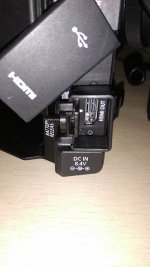
C300: C300 (MarkI) HDMI clamp

Some of my legacy hardware consist of wireless HDMI transmitter that works so well i would liek to keep on using it. As it's using HDMI out of the camera is there a way to get some kind of HDMI lock so that the connector doesn't get worn out over time?
I assume it requires getting some kind of cage around the body but which one?
 
The only HDMI clamps I've seen have always been part of some kind of cage set up....you need a firm base to hold the brace/bracket. There have been a few that attached to the small screw next to a few HDMI ports on some cameras but they didn't last.


Jim Martin
EVSonline.com
 
Last edited:
I use JerkStoppers on most of my equipment. I cage my C100 though, but you can find These cable stays in a variety of anchor styles. This is cable restraining, not connector. How would anchor the plug body to the camera? That would be a new one on me...
 
I use JerkStoppers on most of my equipment. I cage my C100 though, but you can find These cable stays in a variety of anchor styles. This is cable restraining, not connector. How would anchor the plug body to the camera? That would be a new one on me...
A few cameras in the past had a small philips head screw next to the HDMI port....and there was a HDMI cable that had a small hasp with hole that was next to or attached the the male end of a HDMI cable so you could remove the small screw, insert it through the hole, and screw it back into the hole. I remember that it really didn't work because if you jerked on the cable, the hasp bent & twisted and actually held the HDMI male cable it a awkward position and tweeked the HDMI port.
 
Agreed, every time I rig up my Ninja Blade to my C100, I have to say a little prayer that it will not come undone in the heat of battle and that it will continue to work. BNC for SDI is sooooo much better.
 
My wireless transmitter is based on HDMI technology so i do need it. I care more about the wire not getting pulled/bent thus i need to find a solution how to protect it. The fact that on C100/300 series the ports are at an angle make sit very difficult to customize some solution thus i was asking if people found something that works.
 
^OK, well there is nothing on the camera that allows an anchor point for a clamp. As mentioned, some sort of bracket off the bottom of the camera or a cage will give you that anchor. What is this xmitter attached to? If Tether Tools doesn't have something that can work for you, nobody does.
 
A few cameras in the past had a small philips head screw next to the HDMI port....and there was a HDMI cable that had a small hasp with hole that was next to or attached the the male end of a HDMI cable so you could remove the small screw, insert it through the hole, and screw it back into the hole. I remember that it really didn't work because if you jerked on the cable, the hasp bent & twisted and actually held the HDMI male cable it a awkward position and tweeked the HDMI port.

OK, well I thought Jim here says they don't work. I guess it may depend on how rough or not you want to treat your equipment...
 
Finally received the hdmi locks I talk in the previous post. Not like the hdmi cables that Jim said didn't work. This is exactly what I was loking for. Very solid. When installed I can't move the cable (your own hdmi). The only drawback is that you have to fight with very small screws and allen keys to install but in a minute is done.
You have to install two pieces. This is the first one that attach to the screw in camera.
34i39rr.jpg

The second one have an allen screw to tight the cable.
4qq5qr.jpg

Seems a good fix for cameras with this screw and wobbly hdmi port (c100 and mkII). It comes with two kits and there are some adhesives for cameras without the screw, perhaps can help a little but is not a solution
2v2zbpd.jpg
 

Attachments

  • 4qq5qr.jpg
    4qq5qr.jpg
    251.9 KB · Views: 0
Back
Top