C300: C300 Mark II Official Canon LUTs

jcs

Veteran
After googling turned up no LUTs for the C300 Mark II, I found them directly here:Click on Drivers & Downloads, then Software to find them. Also select Windows 10 (x64) for Operating System (otherwise the LUTs are hidden if in OSX, etc.).

For use with Premiere Pro CC 2015, the following line in the .cube files must be commented out to load them with Lumetri:

Change:
LUT_3D_INPUT_RANGE 0.0 1.0

To:
#LUT_3D_INPUT_RANGE 0.0 1.0

Hopefully Adobe will update Premiere Pro 2015 so this won't be necessary in the future.

Observations:
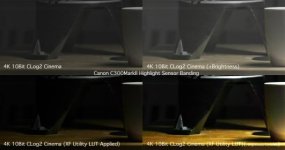
Canon Log 2 with Cinema Gamut can have banding issues in low light, even in 12-bit. Canon Log looks better indoors/low light.
Premiere's Alexa/Amira LUTs so far are looking better than Canon's LUTs for skin tones (CLog2 + Cinema Gamut (with or without "Production" (ARRI) color matrix)).
In order to preserve highlights, CLog2 + Cinema Gamut to Wide DR looks better than 709 (can fine tune with curves and saturation).
 
Last edited:
Any banding in low light in Clog 2 is an anomaly...when you have a really bright area in a predominately dark shot it shows up....once you put a LUT on it, gone, it's not there, it goes away.......

Jim Martin
EVSonline.com
 
Any banding in low light in Clog 2 is an anomaly...when you have a really bright area in a predominately dark shot it shows up....once you put a LUT on it, gone, it's not there, it goes away.......

Jim Martin
EVSonline.com

So is the 'banding issue' acceptable or something that is a problem that owners just need to deal with? For the cost of the investment, i'd hope the response to 'hey, this camera has highlight banding issues in low light scenarios' isn't 'deal with it'

i own the camera and notice the banding... Just want to make sure it's a common occurance and if there is anything that can be done with it... Also, it the issue across other camera platforms?
 
Any banding in low light in Clog 2 is an anomaly...when you have a really bright area in a predominately dark shot it shows up....once you put a LUT on it, gone, it's not there, it goes away.......

Jim Martin
EVSonline.com

Hey Jim do have you an example showing this (settings+LUT(s)+screenshots is sufficient). Thanks!
 
Any banding in low light in Clog 2 is an anomaly...when you have a really bright area in a predominately dark shot it shows up....once you put a LUT on it, gone, it's not there, it goes away.......Jim MartinEVSonline.com

Jim-so, you're saying this image (below) is accptable from a brand new $17,000 camera?the highlight banding is baked into the image recorded from the c300mkII ... so a colorist has to go frame by frame to track the individual moments of highlight exposure banding and try to correct it.... that doesnt seem right at all.... and it shows up after LUT as well.

CA593A68-1101-472F-8A21-ECC7450AA90E.jpg
 
Are you guys talking about banding here—or streaking/smearing?

I also wonder how many users in % that experience actual banding are looking at an 8-bit monitor…

Jim-so, you're saying this image (below) is accptable from a brand new $17,000 camera?

Can you re-link to an image of usable size?
 
When you are using Log 2 and have a bright area in a predominately dark frame in lower light, a color streak or bar can go horizontally from the bright area into the dark area. Once you apply a LUT, it goes away...it's not there. We noticed it when we were using higher ISOs (1600, 3200, etc) but it shows up less with the lower ISOs (400-800)....and it only shows up in LOG 2.....it is an anomaly. You would never shoot using a LOG if you weren't going to color in post so it is not a problem. This anomaly does not show up in the original LOG and does not show up in any of the preset looks or looks you create.......that's what I know and what I'm being told by the many here in town that have the MK II.

Jim Martin
EVSonline.com
 
Yeah that's sensor smearing in the example above. Pretty common in most cameras, they just show up differently between manufacturers.
 
For what it's worth, the original C300, and most Red cameras have this issue too. Apparently my blind ignorance to that fact shielded me from ever noticing it once in the 3 plus years I've been shooting with the C300. :-)

If you expose properly, and grade properly, you'll never see it on the new camera either.
 
So I downloaded the file, "EOS C300 Mark II LUT (lookup table) for Canon Log 2 Gamma (10/12/16bit)". Once extracted, I get a file such as "CanonLog2_10ToCineon_10_LUT_Ver.1.0.csv". But Magic Bullet Looks 3 wants a .cube file. How do I get the .cube file?
 
So I downloaded the file, "EOS C300 Mark II LUT (lookup table) for Canon Log 2 Gamma (10/12/16bit)". Once extracted, I get a file such as "CanonLog2_10ToCineon_10_LUT_Ver.1.0.csv". But Magic Bullet Looks 3 wants a .cube file. How do I get the .cube file?

You need to download "EOS C300 Mark II Gamut / Gamma Transfer 3D LUT (3D Look-Up Table) 65 Grid, Version 1.0", depending on your application (on-set or post), you choose 17grid, 33grid or 65grid, those are all .cube 3D LUT.
 
Back
Top