C300: C300 Mark II, Log 2 strange color reproduction and noise pattern / aliasing

Alex P

Member
Hi guys,

I have this large colorfull painting in my living room, that I use for reference when testing camera settings. When testing different settings on the C300 MK II, I noticed this strange noise pattern when recording in Canon Log, Log 2 and Log 3 (Most pronounced in Log 2) also the reproduction of certain green colors are strange and way off.

Please see the issue in this clip where I have made a comparison to BT.709 preset. Dropbox link - https://www.dropbox.com/s/f9my1pwuxhrsci8/C300 MK II LOG Noise.mov?dl=0

I have also uploaded to vimeo, but the compression pretty much masks the issue - https://vimeo.com/201644739 Password: dvxuser (original file downloadable from here as well)

The Camera is thoroughly tested by Canon and according to their own description (calibrated) As it was send in for a CMOS replacement when it was only two days old.

Ahh - sometimes I really wish that I've had just waited a couple of months, bought myself a couple of GH5´s, and treated my family a lovely vacation, instead of spending 15.000$ on this dated, piece of..... -difficult to love camera. Oh well, no good comes from complaining.

/Alex
 
Hi guys,

I have this large colorfull painting in my living room, that I use for reference when testing camera settings. When testing different settings on the C300 MK II, I noticed this strange noise pattern when recording in Canon Log, Log 2 and Log 3 (Most pronounced in Log 2) also the reproduction of certain green colors are strange and way off.

Please see the issue in this clip where I have made a comparison to BT.709 preset. Dropbox link - https://www.dropbox.com/s/f9my1pwuxhrsci8/C300 MK II LOG Noise.mov?dl=0

I have also uploaded to vimeo, but the compression pretty much masks the issue - https://vimeo.com/201644739 Password: dvxuser (original file downloadable from here as well)

The Camera is thoroughly tested by Canon and according to their own description (calibrated) As it was send in for a CMOS replacement when it was only two days old.

Ahh - sometimes I really wish that I've had just waited a couple of months, bought myself a couple of GH5´s, and treated my family a lovely vacation, instead of spending 15.000$ on this dated, piece of..... -difficult to love camera. Oh well, no good comes from complaining.

/Alex

I'll give you $1,000.00 for that defective POS ;-)
 
CLog2 is more noisy than CLog/CLog3 in order to get the most dynamic range out of the camera, and does require some noise reduction in post.

edit: I downloaded the original files and looked at the noise. Yes it's noisy in the green and purple hues on the painting.

Yeah, the Canon color science isn't very accurate. I've had trouble with deep blues. Have you tried shooting at different Color Matrix and Gamut settings? The default preset - Neutral Matrix + Cinema Gamut does require some work to tweak colours to get where they're supposed to be. There is also an option to not select any Matrix, which I have not personally tried.
 
Last edited:
I'll give you $1,000.00 for that defective POS ;-)

Thanks for the offer, maybe I should take the deal and cut my losses ;-)

I have seen some very beautiful images from the C300 Mark II, so I am pretty sure that what mostly lacks, is my own skills. I do find it very difficult to find information, and people sharing their experiences compared to the more widely spread consumer friendly camera models.

I must admit though that the GH5 specs is quite impressive considering the price point, and I know that I could just grab it, put on a nice canon lens with a speedbooster and strait away get some results my clients would love. The C300 makes me work a lot harder for just a little better image, but then again that is part of a learning process, and I do love to improve my skill set.

Back on topic, any thoughts on what causes the noise in Log modes?
 
xntrggr

I have tried C.Gamut and BT.2020 with similar results.

it is somewhat of a paradox that the color science ins't accurate, when exactly the color science was one of my main reasons for choosing the C300 Mark II over a Sony or Panasonic for that matter :huh:
 
Last edited:
This might be stating the obvious but I make a point of ALWAYS doing a black balance before a shoot. With the C100 it was a good habit to get into, but with the C300 MKII it's a necessity. There's a noticeable difference when you don't do it.
 
I did ABB right before the clips was recorded. The black balance necessity, is also kind of cumbersome, having to do so every time you turn on the camera, change the ISO etc. which essentially means that the camera's real life boot time, is even longer than on the Panasonic VariCam LT
 
There was a post on this forum not too long ago about how FCPX might be misinterpreting the Clog2/3 footage from firmware 1.06 as having data levels vs video levels, or vice versa. Try bringing the footage into Davinci Resolve, and apply the LUT, then switching between video and data levels and see if that helps?
 
The noise looks like it could be coming from a bad color gamut transform...anyway you can make the .mxf file available for download?
 
Hi, Alex. The first thing will be to make sure that the exposure is the same with the BT.709 preset as in Canon Log 2. The shutter speed and aperture should be set the same in both. Reducing the exposure will increase the noise.

Next, understand that the BT.709 preset is not actually BT.709. It's a gamut setting of BT.709 and a gamma setting of Canon Wide DR.

The next thing is to understand that ISO 800 in Canon Log 2 is not the same as ISO 800 in Wide DR. Canon Log 2 has 2x the highlight range of Wide DR at the same ISO setting. That's one stop. To achieve that, the camera operates with lower gain in Canon Log 2 mode compared to Wide DR at the same ISO setting. It's probably 2x lower, but the actual number depends on what Canon has done with the camera internally, and I'm only guessing. Lowering the gain pushes the shadows into a lower part of the camera's response curve, which makes them noisier even if the exposure has not changed.

If you want noise to be equivalent in Canon Log 2 and Wide DR, you need to raise the ISO setting in Canon Log 2. Try shooting in Canon Log 2 with ISO 1600 instead of ISO 800 and the same exposure settings (shutter and aperture). That should increase the gain by 2x, and still leave you with the same highlight range as Wide DR at ISO 800. I can't promise it will fix the noise completely, but I bet it will be reduced.

Of course the footage will no longer be exposed properly for Canon's LUT. And that reveals the problem with all camera-to-display LUTs: they operate correctly only with a single exposure setting. If you want the flexibility to expose however you want and then apply exposure compensation in post, you need to shoot raw, or use a color managed workflow such as ACES or the Logarist workflow that I developed. I have input transforms for all variants of Canon Log 1, 2, and 3, though not yet for how Canon has screwed up the levels of Canon Log in firmware version 1.0.6 for apps like FCPX that read the video_full_range_flag. If you contact me I can provide a LUT that compensates for that.

If your goal is to minimize the noise, first you want to operate with the highest exposure you can, and then set the ISO setting as high as you can while still giving you the highlight range you want. Your Canon Log 2 clip has a lot of highlight range unused. You could increase the exposure by quite a lot without any clipping.
 
Hi, Alex. The first thing will be to make sure that the exposure is the same with the BT.709 preset as in Canon Log 2. The shutter speed and aperture should be set the same in both. Reducing the exposure will increase the noise.

Next, understand that the BT.709 preset is not actually BT.709. It's a gamut setting of BT.709 and a gamma setting of Canon Wide DR.

The next thing is to understand that ISO 800 in Canon Log 2 is not the same as ISO 800 in Wide DR. Canon Log 2 has 2x the highlight range of Wide DR at the same ISO setting. That's one stop. To achieve that, the camera operates with lower gain in Canon Log 2 mode compared to Wide DR at the same ISO setting. It's probably 2x lower, but the actual number depends on what Canon has done with the camera internally, and I'm only guessing. Lowering the gain pushes the shadows into a lower part of the camera's response curve, which makes them noisier even if the exposure has not changed.

If you want noise to be equivalent in Canon Log 2 and Wide DR, you need to raise the ISO setting in Canon Log 2. Try shooting in Canon Log 2 with ISO 1600 instead of ISO 800 and the same exposure settings (shutter and aperture). That should increase the gain by 2x, and still leave you with the same highlight range as Wide DR at ISO 800. I can't promise it will fix the noise completely, but I bet it will be reduced.

Of course the footage will no longer be exposed properly for Canon's LUT. And that reveals the problem with all camera-to-display LUTs: they operate correctly only with a single exposure setting. If you want the flexibility to expose however you want and then apply exposure compensation in post, you need to shoot raw, or use a color managed workflow such as ACES or the Logarist workflow that I developed. I have input transforms for all variants of Canon Log 1, 2, and 3, though not yet for how Canon has screwed up the levels of Canon Log in firmware version 1.0.6 for apps like FCPX that read the video_full_range_flag. If you contact me I can provide a LUT that compensates for that.

If your goal is to minimize the noise, first you want to operate with the highest exposure you can, and then set the ISO setting as high as you can while still giving you the highlight range you want. Your Canon Log 2 clip has a lot of highlight range unused. You could increase the exposure by quite a lot without any clipping.

Thank you, thank you, thank you!
 
Hi, Alex. The first thing will be to make sure that the exposure is the same with the BT.709 preset as in Canon Log 2. The shutter speed and aperture should be set the same in both. Reducing the exposure will increase the noise.

Next, understand that the BT.709 preset is not actually BT.709. It's a gamut setting of BT.709 and a gamma setting of Canon Wide DR.

The next thing is to understand that ISO 800 in Canon Log 2 is not the same as ISO 800 in Wide DR. Canon Log 2 has 2x the highlight range of Wide DR at the same ISO setting. That's one stop. To achieve that, the camera operates with lower gain in Canon Log 2 mode compared to Wide DR at the same ISO setting. It's probably 2x lower, but the actual number depends on what Canon has done with the camera internally, and I'm only guessing. Lowering the gain pushes the shadows into a lower part of the camera's response curve, which makes them noisier even if the exposure has not changed.

If you want noise to be equivalent in Canon Log 2 and Wide DR, you need to raise the ISO setting in Canon Log 2. Try shooting in Canon Log 2 with ISO 1600 instead of ISO 800 and the same exposure settings (shutter and aperture). That should increase the gain by 2x, and still leave you with the same highlight range as Wide DR at ISO 800. I can't promise it will fix the noise completely, but I bet it will be reduced.

Of course the footage will no longer be exposed properly for Canon's LUT. And that reveals the problem with all camera-to-display LUTs: they operate correctly only with a single exposure setting. If you want the flexibility to expose however you want and then apply exposure compensation in post, you need to shoot raw, or use a color managed workflow such as ACES or the Logarist workflow that I developed. I have input transforms for all variants of Canon Log 1, 2, and 3, though not yet for how Canon has screwed up the levels of Canon Log in firmware version 1.0.6 for apps like FCPX that read the video_full_range_flag. If you contact me I can provide a LUT that compensates for that.

If your goal is to minimize the noise, first you want to operate with the highest exposure you can, and then set the ISO setting as high as you can while still giving you the highlight range you want. Your Canon Log 2 clip has a lot of highlight range unused. You could increase the exposure by quite a lot without any clipping.

THIS +1.

Was trying to explain this to the director on my current job who likes to 'expose dark' - creating volumes of noise.

Also, was checking out your Logarist workflow and it's very cool. Really appreciate it. Look forward to working with it more as time permits.
 
The next thing is to understand that ISO 800 in Canon Log 2 is not the same as ISO 800 in Wide DR. Canon Log 2 has 2x the highlight range of Wide DR at the same ISO setting. That's one stop. To achieve that, the camera operates with lower gain in Canon Log 2 mode compared to Wide DR at the same ISO setting. It's probably 2x lower

Where did you read that? To my understanding the sensor amplification does not change when you change gamma curves - you're just remapping luminance per the curve.

first you want to operate with the highest exposure you can, and then set the ISO setting as high as you can while still giving you the highlight range you want.

Above 800 ISO on the C300, you're highlight range does not increase past 6.3 stops - are you thinking in terms of Alexa distribution where as you increase iso (1600, 3200) you increase highlight retention?

Setting the C300 Mark II to the "highest ISO possible" has never been my modus operandi. I rate the camera at 800 ISO anytime I have uncontrollable highlights and I need to maximize my highlight protection, but if I'm on a controlled stage I'll usually rate down at 400 - giving up a stop of highlight protection - for a cleaner toe.
 
Where did you read that? To my understanding the sensor amplification does not change when you change gamma curves - you're just remapping luminance per the curve.
I don't think I read it in any one place. It's just how I understand cameras work. I'm not talking about stops above middle grey. I'm talking about the absolute highlight range; the maximum sensor illuminance before clipping. That's determined by the sensor's full well capacity, and it can be reduced by setting the gain too high. Some gamma curves may be wasting highlight range that the sensor actually captured, but Canon Log 2 on the C300mk2 is not. Canon Log 2 is giving you the full range of the sensor (less some margin for white balance correction). Canon Log 2 has twice the highlight range of Wide DR at the same ISO setting. Wide DR could just be using a different gamma curve that ignores the upper stop of highlight range, but that would be a really dumb way to do it, and I doubt Canon is that dumb. Wide DR should be using twice the gain of Canon Log at the same ISO setting.

Canon Log has 16x the highlight range of BT.709, so the difference in gain between Canon Log and BT.709 could be as high as 16x, though I bet it's probably closer to 8x, because BT.709 can have its range extended with a knee.
 
Just shoot:

Gamma: Canon Log3
Color Space: Cinema Gamut
Color Matrix: Production Camera

I expose with both the LUT on in the LCD and an eye on my O7Q/False Color.
Should be a lot more reliable.
 
The noise looks like it could be coming from a bad color gamut transform...anyway you can make the .mxf file available for download?

Do you think you could elaborate a bit more on this? From looking at the clip, the noise seems to appear heavily in some colours (greens, purple) and not so much in other colours like brown, black, yellow.
 
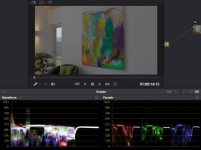
Can someone explain why the scopes for this image looks like this? Specifically, if this is a CLog2 image, why is there color information below 0?

Screen Shot 2017-02-18 at 12.06.20 AM.jpg
 
Highly saturated colors like the ones in that image may fall outside of the gamut set in the camera. Out-of-gamut colors translate to negative values in one or two of the color channels. The Canon Log 2 gamma curve is mirrored below the black point, to support encoding of negative values. Those colors can be recovered using an appropriate transform. If you just clamp the negative values, it has the effect of clamping chromaticities to the gamut.
 
Do you think you could elaborate a bit more on this? From looking at the clip, the noise seems to appear heavily in some colours (greens, purple) and not so much in other colours like brown, black, yellow.

Sometimes people can mismatch their acquisition color space and post transforms and it results in some oddly saturated and almost confetti like colors - but that is not what is happening here.

Can someone explain why the scopes for this image looks like this? Specifically, if this is a CLog2 image, why is there color information below 0?

View attachment 121114

You need to go to the clip in the media pool, right click, go to Clip Attributes, and se the range to Full Range instead of "Auto" which interprets it incorrectly at Video levels.

Canon Log 2 shouldn't have any luma values lower than 96.
 
Back
Top