After carefully matching the 1DX II and C300 II via HDMI into a Win10 PC and OBS (Magewell 4 channel HDMI card), I later shot tests using the internal CFast cards at another location, where the WB and onscreen LCDs looked like a good match. Upon reviewing the recorded footage, the colors didn't match at all.
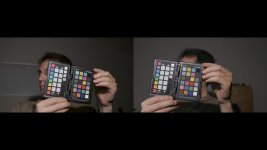
Today I repeated the test using my main 4K editing box and a Magewell and Epiphan AV.io 4K USB 3.0 devices. I used the custom WB systems of both cameras and a grey card to set WB (where WB is based on a live capture/image, not manually dialed in). Light was provided by a Fiilex P360EX (set to about 4100K). It looked pretty good however these custom WB systems don't seem to adjust for WB offset, they just appear to find the nearest Kelvin and call it a day. So I had to tweak the WB Offset on the 1DX II by adding a lot of M (magenta) and a little B (blue) to get them to match via the live HDMI output. Upon reviewing the recorded footage (both 4K, both using my custom Filmic Skin settings (currently dialing the C300 II to match Filmic Skin on the 1DX II)), once again totally different color and gamma. Left side 1DX II, Filmic Skin picture style, right C300 II, close-matching Custom Picture settings:

I was able to relatively quickly/closely match the internal shots to HDMI adjusting WB, Tint, and contrast/curves, however the color shifts required were pretty large.

The lesson is the built-in LCDs and HDMI output do not match the color and gamma of the internal recording systems.
Is this a common issue: LCD & HDMI output is not calibrated to the internal recording system? A slight shift would seem reasonable, however these results are pretty far off.
Today I repeated the test using my main 4K editing box and a Magewell and Epiphan AV.io 4K USB 3.0 devices. I used the custom WB systems of both cameras and a grey card to set WB (where WB is based on a live capture/image, not manually dialed in). Light was provided by a Fiilex P360EX (set to about 4100K). It looked pretty good however these custom WB systems don't seem to adjust for WB offset, they just appear to find the nearest Kelvin and call it a day. So I had to tweak the WB Offset on the 1DX II by adding a lot of M (magenta) and a little B (blue) to get them to match via the live HDMI output. Upon reviewing the recorded footage (both 4K, both using my custom Filmic Skin settings (currently dialing the C300 II to match Filmic Skin on the 1DX II)), once again totally different color and gamma. Left side 1DX II, Filmic Skin picture style, right C300 II, close-matching Custom Picture settings:
I was able to relatively quickly/closely match the internal shots to HDMI adjusting WB, Tint, and contrast/curves, however the color shifts required were pretty large.
The lesson is the built-in LCDs and HDMI output do not match the color and gamma of the internal recording systems.
Is this a common issue: LCD & HDMI output is not calibrated to the internal recording system? A slight shift would seem reasonable, however these results are pretty far off.