c300 - C-Log - completely inaccurate colors! Do we have a bad unit?

Matthew Bennett

Well-known member
After doing some testing with my companies c300 last week, we determined that the cinema lock (c-log) mode, and the cinema picture profiles have completely inaccurate colors!

Greens were skewed into blue, and reds were skewed into orange.

The Test:
Very simple, just a quality grey card, macbeth color checkers, human face, and some problem fabrics in the shot.
Shot both daylight and tungsten. Metered shot, grey balanced off the card, and then checked for balance with the RGB waveform.

The Results:
Some of the picture profiles we tested had correct colors. The EOS standard was the most accurate.

C-Log was radically skewed. Grey was correct, and the face was correct. But the green turned blue, and deep scarlet red turned orange.

(UPDATE) July19,2012

We tested another camera against ours today. Exact same rendering of the green color! (As cyan).

If for some reason this is standard for the camera, C-Log is now unfortunately useless for any work involving accurate color reproduction.

Hmmm. Time to talk to the Canon Head Office.
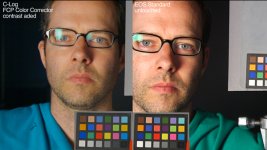
3_C300_color_compare.jpg

1_C300_C-LOG.jpg


2_C300_EOS_STD.jpg
 
Last edited:
Sounds strange - my experience in testing has been the complete opposite. C-log has been the most accurate for me, while EOS has a pleasing but exaggerated color profile.

Is this what your camera looks like?

CanonLog.jpg
 
I haven't had this issue. Shoot in C-Log, drop in a LUT, and I pretty much get what I expect to get. I'm guessing you've checked with Canon about this?
 
Posted grabs.

Actually the red looks semi-okay in the grabs, but we've had some problems on a shoot (branded soccer jerseys turning orange..)
 
my guess is that you are color correcting the Canon Log improperly. Can you post the curve you've been using to color correct the footage? I find in Apple Color and DaVinci that you mostly adjust the bottom 1/3 of the curve the most directly.

Your stills look to me like you've pull the mids too far up.
 
You can't trust color accuracy in FCP.
Also, have you bypassed what Apple is doing to your colors by using a Black Magic Intensity Pro card?
 
my guess is that you are color correcting the Canon Log improperly. Can you post the curve you've been using to color correct the footage? I find in Apple Color and DaVinci that you mostly adjust the bottom 1/3 of the curve the most directly.

Your stills look to me like you've pull the mids too far up.

It was just the fcp color corrector for a quickie contrast addition. Not normal practice, just something to quickly show the color distortion.

We worked the same footage in Apple Color and After Effects, with similar results - the green color of the shirt is being completely mis-represented in C-Log as well as many other picture profiles we tested.
I'm not a camera engineer, but this behaviour from a camera is bizarre, and well - unacceptable as our work is based around strict color accuracy. (as I'm sure pretty much everybody on the planet's is.. ;))

Anyway, we're taking it back and getting it replaced...
 
You can't trust color accuracy in FCP.
Also, have you bypassed what Apple is doing to your colors by using a Black Magic Intensity Pro card?

The curse of fcp..:(

Haven't tried a BMD card even though we have one at the office...

The clincher is that some of the picture profiles reproduce the color well (varying degrees), with EOS STD being almost perfectly accurate.

We're going to test another c300 unit against ours, same setup, and see if the results are the same.
 
Matthew, my experiences are similar to your findings. Green is skewed to cyan in Cine gammas with low saturation. When shooting green screen with Cine gammas, the green looks blue. It is possible to go into the matrix and adjust for REC709 with a Chroma Du Monde chart.
There is also the zone based color correction circuit, but I haven't figured that out yet.

For what it's worth, I've had similar experiences with Panasonic cameras being green deficient out of the box, but in the case of the 2/3" high-end cameras, very easy to get accurate color points with matrix and color correction menus. I've had the same issue with EX1's, but harder to correct.

Here are my matrix color points for a more accurate REC 709 C300 file, this is just a rough baseline, but should get you closer:

Gain +41
Phase +6
R-G -31
R-B -28
G-R +3
G-B -39
B-R -8
B-G +12

Hope this helps, YMMV.
 
Matthew, my experiences are similar to your findings. Green is skewed to cyan in Cine gammas with low saturation. When shooting green screen with Cine gammas, the green looks blue. It is possible to go into the matrix and adjust for REC709 with a Chroma Du Monde chart.
There is also the zone based color correction circuit, but I haven't figured that out yet.

For what it's worth, I've had similar experiences with Panasonic cameras being green deficient out of the box, but in the case of the 2/3" high-end cameras, very easy to get accurate color points with matrix and color correction menus. I've had the same issue with EX1's, but harder to correct.

Here are my matrix color points for a more accurate REC 709 C300 file, this is just a rough baseline, but should get you closer:

Gain +41
Phase +6
R-G -31
R-B -28
G-R +3
G-B -39
B-R -8
B-G +12

Hope this helps, YMMV.

This is extremely helpful - thanks!
 
The colors produced by my C300 are also inaccurate. I have been playing with the matrix settings since day one, and I have still not found an ideal combination. Reds have been my main concern, but I am not surprised to see that green is also a problem.

I am curious to see the results using Jeff's matrix settings, however I am unclear about the starting point for gamma and for matrix. Cine2 gamma and cine2 matrix? That is one of the unique aspects of the C300 - the ability to use different gamma/matrix combinations, like a Cine gamma with a Normal matrix. It also adds to the complexity.

I read on a another forum that Canon held a seminar called "Painting the Canon EOS C300" on June 26th in LA. It would be nice to know what was discussed. I really wish Canon would make more information available about picture profiles especially with regard to gamma, matrix and color correction.
 
Yes, good point. I'm trying to remember what matrix setting I started with, since each shows zeros but are offset from each other. I normally shoot in Cine 2 gamma and Cine 2 matrix, but I did this file back in April, so I'm not sure. Most likely Cine 1 or Cine 2 matrix. I will revisit this when my Leader 5330 scope comes back from rental.
 
Edited first post.

We tested another camera against ours... Same results!

What the? We're starting to think the c300 is unfortunately going to become a paperweight! Anyway... time to talk to Canon head office and see their view.
 
This is a pretty interesting topic, and reminded me of Art Adams' article on white balance trimming with the C300. Did you shoot under tungsten or daylight white balance? It probably makes a difference, and could account for some people noticing a color inaccuracy or not. Below are some of his findings that I think are pertinent to this discussion.

Regarding blue & green:

"Under tungsten light the green channel sees a little bit too much blue, although there’s not a lot of separation between the colors overall. Red and blue are slightly elevated in tungsten light and slightly lower in daylight... It’s pretty clear that green is a bit less saturated under tungsten light as it has a little bit more blue in it."

And regarding red:

"Under tungsten light the green advances a little, making red just a tad bit orange. The daylight red appears very slightly magenta although, technically, the waveform and histogram say it falls in the correct place. The vectorscope shows a very slight lean towards magenta."

And part of his conclusion:

"It is fairly clear that blues and greens will be more vibrant in daylight and reds will be a touch more saturated under tungsten, but that’s okay: colors fluctuate between indoor and outdoor lighting all the time."

He does talk about flesh tones always being accurate and that these "nuances are easily fixed via color science or grading." In my experience, no camera has ever given perfectly accurate color renderings; whether they be digital or film. it's always an interpretation. Page two of his article has more in depth analysis of his color findings: http://provideocoalition.com/index....plus_a_look_at_daylight_vs._tungsten_colo/P1/

Also, if you find the EOS Std matrix the most accurate, you may want to combine that with the gamma of your choice (norm, cine, c-log) and see if that gives you a more acceptable color rendering for your purposes. I've found red's to be quite exaggerated with the EOS Std profile, though, and blues not as accurate - or maybe not as pleasing...? It's hard to tell which, sometimes ;)
 
Thanks for the insights Cowpunk.

Actually we first noticed the cyan shift of the green under Daylight conditions. Then, to test the two cameras against each other, we actually only had time to do a tungsten kinoflo.

So, yes, basically we've seen the same result at 3200K and 5600K.

And yes, eventually we isolated the color in Apple Color and brought it to where it should be. But of course it caused a lot of client confusion on set, producers sweating, generally all the things you don't want to stir up on a corporate job where color branding has to be accurate from the get-go.


---- Intrigued by your comment that you've found C-Log to be the most accurate color setting. I'm assuming this the Cinema Lock mode? (That's what we tested, although found color shifts in many other profiles)
 
Matthew, I believe the C300, like most modern digital video cameras, has enough menu driven matrix and color correction control to hit primary and secondary color points properly. It just takes some knowledge, test equipment and patience. I had a client get very concerned about the color of the green screen until I changed scene files from Cine 2 to my Chroma Du Monde scene file.

Panasonic 2/3" cameras are green deficient out of the box on purpose to make Asian flesh tones look better. Easily fixed with matrix and color correction menus.
 
Matthew, I believe the C300, like most modern digital video cameras, has enough menu driven matrix and color correction control to hit primary and secondary color points properly. It just takes some knowledge, test equipment and patience. I had a client get very concerned about the color of the green screen until I changed scene files from Cine 2 to my Chroma Du Monde scene file.

Panasonic 2/3" cameras are green deficient out of the box on purpose to make Asian flesh tones look better. Easily fixed with matrix and color correction menus.

Yes, I don't doubt it.

With a day of testing, digging into the menus, having some scopes and other tools handy, I'm sure that an owner-operator of the camera could lick the problem.

It's definitely the most deficient image I've seen from a camera in this price range though.

Actually Canon Canada is one of our main corporate video clients. So we can get to talk to an engineer fairly quickly and at least ask some deeper questions about the problem.

I'll post the results of any discussions and thoughts that Canon Canada might have.
 
I haven't done any extensive chart testing, but when comparing real-world environments and locations with different profiles (when I was prepping for my last feature), C-log gave what we thought was the best blend of accurate and pleasing color renderings, although I realize that's not the same thing as 'perfectly accurate color.' Now, it could be that I just never shot the particular green-teal that seems to shift to cyan in your examples, but that issue hasn't crept up for me yet. Yellows are what I pay attention to the most because in my experience that's been the most difficult hue for digital cameras to represent accurately.

My findings are that in EOS Std, my yellows shift toward green and my blues just get sucked away. Blues are quite pronounced in C-log, but I find it rather pleasing, and yellows are more accurate than in any other gamma. In EOS, red also shifts too far toward magenta for my taste, whereas in C-log they fall in the right spot according to the vectorscope. I've noticed a slight blue shift in my greens on the vectorscope in C-Log, but it hasn't been a problem in any real world environs that I've shot. Nature still comes out looking realistic and vibrant, and that's where I want my greens to work primarily. However, by your example, it looks like green-teal may definitely edge into cyan territory due to this.

I totally understand getting colors right for corporate logo work - I've been working on a campaign for Dickies clothing lately, so you'll understand that red, yellow, & blue have been my biggest focus!
 
Last edited:
Back
Top