C200: C200 VS C100 Colors

Adewitt1

New member
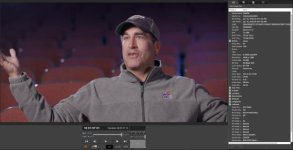
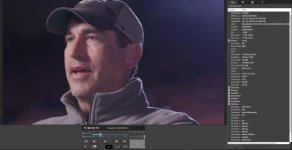
We have been using a couple C100IIs and a C300II for a few years and recently added a C200 to the mix. Our first C200 had a bad sensor (returned and replaced) and the second one's color just seems... off. Have not been able to get good results at all, everything comes out too red/purple-y.

C100 Settings:
CP Cinema Locked ON
WB: 5600K

C200 Settings:
Preset OFF
Color Matrix - Cinema EOS Orignal
CLOG [not 3]
WB: 5600K +-0

I can probably correct it, but it's very annoying they are so different.


C100 Example0.jpgC200 Example0.jpg
 
I'll add to the suggestion about black balance and found it works well for me.

Whenever I change ISO or adjust color temperature I redo the black balance and I've gotten consistently good results.

Whenever I forget to do this I've found that there is a slight magenta/red shift.
 
Agreed. I have gotten some weird colors when I neglected to BB.
Although generally, I do see slightly different colors from the C100 MKI to MKII, either compared to the C200 and the C300 MKII and C200 are in the same neighborhood but the C300 MKII has contrastier, more saturated colors when trying to match the C200.
 
Reminds me of a Blackmagic camera in bright sunlight with no IR cut off filter.

Are you doing black balance?

I usually do it at the start of a shoot, but was in a rush and didn't have a chance to redo it when we moved from the ~3500k conference room lights to the daylight office. I'll try and be more diligent about it in the future.
 
I usually do it at the start of a shoot, but was in a rush and didn't have a chance to redo it when we moved from the ~3500k conference room lights to the daylight office. I'll try and be more diligent about it in the future.

I find a custom white balance goes a long way vs. a preset K setting. Mostly because it automatically corrects for some type of hue (+/- after WB temp).

I asked something similar (page 3/post#21) in this thread. I never really got to the bottom of it because I found custom WB to be good enough. But if you're still unhappy I'd try experimenting with some custom settings in the three areas I listed. You probably won't have to do much, a few small changes should be all that's needed.
 
Wasn't able to get a custom white balance (wasn't on the shoot, so I couldn't make the DP do it), but did black balance before shooting. Magenta is going to haunt me forever.

Screen Shot 2020-01-13 at 10.08.57 AM.jpgScreen Shot 2020-01-13 at 10.11.18 AM.jpg
 
This thread is about the C100, but I suspect that it speaks to the issue you are having. From Barry Green:

Auto white balance adjusts all color channels.

Dialing in the color temperature only affects red/blue, and does not affect cyan/magenta.

For this reason, it will always, always, always be more accurate to set the white balance using the AWB function. Dialing in a manual color temperature is only valid if the light source has perfect color rendition.

I know that using a variable white balance and dialing in the color temperature is popular, but it is also (IMO) a mistake in many situations. The white balance metering will provide more accurate color in more situations than dialing in the color temperature will.

I can vouch for this being true because it had me stumped for a while too. I have a C200 now but white balance in post using a gray card, so I haven't run into this particular issue.
 
There's nothing wrong with any of those shots. Nobody will care. If you want to pursue excellence and perfection, go for it. But nobody else will care about the difference between those two shots.

If you need an absolutely perfect match, you need to use the exact same camera, same firmware, etc. Hell, even then you might spot differences that will drive you crazy.
 
Color temp seems to be a universally red-blue axis only shift in post software, probably true of most cameras too.
Tint covers the green-magenta axis shift.

Both are required for accurate white balance since the white point locus falls along a curve as color temp changes, not a straight line from red to blue.

CIE1931_ledtuning.png
 
Last edited:
There's nothing wrong with any of those shots. Nobody will care. If you want to pursue excellence and perfection, go for it. But nobody else will care about the difference between those two shots.

If you need an absolutely perfect match, you need to use the exact same camera, same firmware, etc. Hell, even then you might spot differences that will drive you crazy.

I agree most people won't notice but would still categorize it as something that needs to be fixed. Shooting a local hungover real estate agent then who cares? But an actor as big as Rob Riggle, it's probably a pretty good idea to take care of any hue issues. Wait, that is actually RR?
 
@razz interesting chart, hadn't seen that before. Thanks for the info!

Haha that is Rob Riggle, of course that was one of the only shoots I couldn't make it to :cry:

I can fix the hue issues relatively easily after the fact, but it takes more time, which just means more money. I may shoot a few tests in the studio with custom white balance, and if I'm still not happy I'll probably start tweaking the color matrix. Will update this thread once I get to it.
 
Back
Top