C200: C200 Raw Export Workflow Question

Erik Naso

Veteran
I have a C200 for a couple of weeks and finding the Raw workflow somewhat clumsy. Since no NLE I use supports the Raw files natively I have to export from the Canon software which, by the way, crashes my Mac if I attempt to play a clip. I can load into the media pool and set a the paramiters for the exports. When it's done I have a ton of folders for every clip plus the proxies are also in sepperate folders. How on earth is this a good idea? Anyway how are you folks dealing with this strabge export from the software.
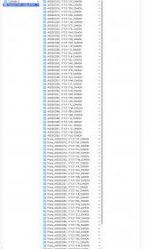
Screen Shot 2017-12-11 at 7.40.09 PM.jpg
 
Last edited:
Erik, your image is too small to be readable, so I can't refer to actual folder names... You're totally right that this output is ridiculous. But....

If you select the "parent" folder (it seems like you've done that already) and the enter any search term in the search field in Finder, you can filter the contents of the parent folder including any subfolders. Make sure to actually search the parent folder and not your whole Mac.

Once you search for .mov or whatever, all the subfolders "go away" and you just see the video files. These can then be easily dragged into a new single folder in one move. After that, just delete all the unnecessary structure.

So, it will take no more than a few seconds, but I agree this default output is insane...

How come you don't have Resolve? Anyway, let's hope the rest of the main NLEs get support soon.
 
Last edited:
Erik, your image is too small to be readable, so I can't refer to actual folder names... You're totally right that this output is ridiculous. But....

If you select the "parent" folder (it seems like you've done that already) and the enter any search term in the search field in Finder, you can filter the contents of the parent folder including any subfolders. Make sure to actually search the parent folder and not your whole Mac.

Once you search for .mov or whatever, all the subfolders "go away" and you just see the video files. These can then be easily dragged into a new single folder in one move. After that, just delete all the unnecessary structure.

So, it will take no more than a few seconds, but I agree this default output is insane...

How come you don't have Resolve? Anyway, let's hope the rest of the main NLEs get support soon.

Well thats a great trick! I have resolve but it doesnt support any Raw adjustments only export.
 
I have resolve but it doesnt support any Raw adjustments only export.

Yes, that's true... if you want to change gamma or gamut to something specific I guess you're stuck with Canon's software.

It's on Resolve's 'to-do list' for Q1 2018 to integrate that functionality, if I interpret Peter Chamberlain from Blackmagic correctly.
 
Off topic but anyone have luck using the Proxies in Premiere Pro?

Answered my own question. I had to remove the Proxy_ from each file name or it doesn't attach. Canon really dropped the ball on the Raw Development Software. No scopes for adjusting brightness or white balance makes no sense. Better to not mess with the file other than add some sharpening.
 
Last edited:
Canon really dropped the ball on the Raw Development Software. No scopes for adjusting brightness or white balance makes no sense.

Seems like it.

But to flesh out my thoughts behind my original reply: why would you want to fiddle with the data in Canon's software? Why not just import the .crm as is and then do all adjustments in context in for instance Resolve?

I can understand if someone wants to arrive at let's say Canon Log 2 specifically, because that may serve as a starting point for a LUT or something. But if there are no formal restrictions, why not just work directly on the .crm and bypass Canon's software altogether?
 
I have resolve but it doesnt support any Raw adjustments only export.

A while back I had a chat with PC of black magic about raw - and how you don't "need" raw adjustments because the other tools are powerful enough.

This chat was not about the c200 - whose files I'm not experienced with - but if you can pull a major colour swing with the other tabs (and not degrading the image) then you may not need that tab to function???
 
A while back I had a chat with PC of black magic about raw - and how you don't "need" raw adjustments because the other tools are powerful enough.

This chat was not about the c200 - whose files I'm not experienced with - but if you can pull a major colour swing with the other tabs (and not degrading the image) then you may not need that tab to function???

I dont have much experiance editing Raw video files. I think the idea of having so much control of the image after shooting is really great. With the C200 Raw Light, it's limited and I'm going based on what Canon has offered in terms of what we can do with the file. The Raw Development software could have easily been just a transcoder. In fact that is all I can do with it except add about +3 sharpness without a need for some other tool to confirm my adjustments. Brightness? How about ISO instead? White balance is to hard to adjust with a log image in Canon's software.

I haven't tested the mp4's yet because hey! the Raw thing is really new :-D That's next. The image is really nice and if it can stand up to basic color grading from a properly exposed image that would be great. Wow has 8bit 4:2:0 matured. Surprising how good it is in newish cameras.
 
But what can you do with them in resolve normal tabs?

Exposure = gain
Wb = red or blue boost

If you can bend these along way without breaking the file you are all good?
 
Maybe shoot a shot in both codecs - maybe outdoors with the camera set at 3200k "in error"

Try and correct the MP4 and the raw - does the latter work more smoothly?
 
But what can you do with them in resolve normal tabs?

Exposure = gain
Wb = red or blue boost

If you can bend these along way without breaking the file you are all good?

I haven't opened the files in Resolve since it also doesn't support editing with Raw controls.It will open them and you transcode.
 
I believe the native gamut and gamma of .crm files is Canon proprietary. What you get with Canon's raw development software is Canon's transforms between native .crm and the various Canon Logs and so on. That might be good, since support for Canon Log (and 2 and 3) is wide spread.

But in terms of adjusting the image, including exposure, contrast, white balance, primary and secondary correction and so on... there is no benefit in using the raw tab compared to the normal tools. Is it an expectation that it would be?

There is nothing inherently good about 'raw' as long as the alternative is highest quality debayer and the channels aren't clipped.

I can't imagine a single reason to go into the raw tab of a C200 file, unless I wanted to put it explicitly in a certain Canon Log-mode.

DaVinci Resolve has 'Auto Color', a WB picker and Temp and Tint scrubbers. Apart from that you have wheels for Lift, Gamma, Gain and Offset (Exposure) or you can switch to the Log controls for overlap free adjustments of shadows, mids and highs.
 
I believe the native gamut and gamma of .crm files is Canon proprietary. What you get with Canon's raw development software is Canon's transforms between native .crm and the various Canon Logs and so on. That might be good, since support for Canon Log (and 2 and 3) is wide spread.

But in terms of adjusting the image, including exposure, contrast, white balance, primary and secondary correction and so on... there is no benefit in using the raw tab compared to the normal tools. Is it an expectation that it would be?

There is nothing inherently good about 'raw' as long as the alternative is highest quality debayer and the channels aren't clipped.

I can't imagine a single reason to go into the raw tab of a C200 file, unless I wanted to put it explicitly in a certain Canon Log-mode.

DaVinci Resolve has 'Auto Color', a WB picker and Temp and Tint scrubbers. Apart from that you have wheels for Lift, Gamma, Gain and Offset (Exposure) or you can switch to the Log controls for overlap free adjustments of shadows, mids and highs.

I'm not trying to grade from the Canon software. Only surprised by how lame it is :-D
 
I'm not trying to grade from the Canon software. Only surprised by how lame it is :-D

No, sure. I meant more that I hear every now and then that Resolve doesn't really support the C200, since you don't have the raw tab. Or that it somehow is a great weakness, because there is an assumption that those raw controls are needed to "unlock the power of raw". I don't subscribe to that.

I welcome the integration of course, but you can already do anything you like with the files (except move between Log profiles as previously mentioned).
 
A frame grab from the C200 Raw file. Used the Canon compact servo 70-200. It's going to be tough giving that back...

Fishing-C200-Raw-web-.jpg
 
Back
Top