C200: Mono XLR input to stereo via HDMI

norway

Well-known member
Fellow Canon shooters, I can't for the life of me find a setting on the C200 which allows me to make the mono signal from the INPUT 1 terminal and duplicate it across both channels when sending it out over HDMI? (As a last resort, SDI.)

At the moment, I am only get sound on the left channel over HDMI.
 
I'm away from my camera at the moment, but there should be an option within the audio menu to select the channel 1 input and channel 2 inputs, map them both to input 1. That way you could potentially have the same source at two different gains to protect from peaking or just have the audio duplicated across both channels etc. Does this work for you? Maybe I'm misunderstanding the question.
 
I'm away from my camera at the moment, but there should be an option within the audio menu to select the channel 1 input and channel 2 inputs, map them both to input 1. That way you could potentially have the same source at two different gains to protect from peaking or just have the audio duplicated across both channels etc. Does this work for you? Maybe I'm misunderstanding the question.

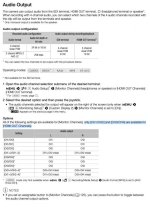
Thanks, Nick. I just had a look at the C200 instruction manual again, and I think the output is limited over HDMI. See highlight below:

"Only CH1/CH2 or CH3/CH4 are available for HDMI OUT channels"

I guess I have to buy a SDI to HDMI converter...


C200 manual - Click image for larger version  Name:	Screenshot-2023-09-28-at-23.25.12.jpg Views:	0 Size:	75.8 KB ID:	5706514
 
I've never touched a C200 before, but I see in the operation manual you can map XLR Input 1 to feed channels 1 and 2, and then both channels can be output over HDMI. Obviously, if you need to record a different source on CH2 then that wouldn't work.
 
I've never touched a C200 before, but I see in the operation manual you can map XLR Input 1 to feed channels 1 and 2, and then both channels can be output over HDMI. Obviously, if you need to record a different source on CH2 then that wouldn't work.

Thanks Doug, I just had a look at the menu again and it is indeed possible to map the output from INPUT 1 to INPUT 2. Now it works!

I'll get some much needed sleep now.
 
You probably already checked but in the software/audio do you have the right mic/line settings?

Hi Rob. I am not quite sure what you mean. I have tried various other ways of troubleshooting. Like recording audio and video in QuickTime and Adobe Audition. They all have sound in both LEFT and RIGHT channels.

Please note that the audio chain is:

Mic (mic level) -> (XLR IN) C200 (HDMI out) -> (HDMI IN) ATEM Mini (USB out) -> (USB in) Mac with MS Teams
 
Is there anything in the atem mini software that is sending mics 1/2 from the mini instead of the HDMI?

It’s very strange though that other software on the Mac gets the right audio signal, but not Teams.

But you’re right. I should try to plug a mic into the Mic 1 and 2 ports on the ATEM and see if it is any different.
 
Is there anything in the atem mini software that is sending mics 1/2 from the mini instead of the HDMI?

Just tested with Mic 1 and 2 inputs - the ATEM Software Control shows that it is picking up the audio. But the MS Teams "echo" service does not record any audio.

Must be a software issue, then?

That being said, I am expecting a Scarlett 2i2 audio interface today, I was just hoping to avoid adding more boxes and fill up my power strip.
 
Total no knowledge.

Ive had Teams going and thought I was getting an audio fail.

but the folk at the other end could hear it.
 
Total no knowledge.

Ive had Teams going and thought I was getting an audio fail.

but the folk at the other end could hear it.

Thank you, Morgan. Don't worry, I've asked my colleagues multiple times and they don't hear anything on the other end...

My next step is to either use the Scarlett 2i2 as the audio source, or see if I am behind on the firmware upgrades for my ATEM Mini (1st gen).
 
Just throwing it out there; you can always do testing to your phone (or another computer) as well. Meaning if you don't want to potentially inconvenience anyone or do thorough testing.

I did this with Meet when I wanted to see how a handful of stuff worked, including how the flipping feature looked in OBS when linked with Meet.
 
Back
Top
