C100: C100 Mark II Auto White Balance Issue

Barles

Member
I just picked up a C100 Mark II after owning a Mark I for a year. I've used the Mark I with auto white balance countless times and normally it is very accurate. After just a few tests, the Mark II seems notably worse. There's a magenta tint almost always. If I switch back to a custom white balance and then back to auto, the white balance seems to correct itself but can't seem to get it right otherwise. I realize that the tint can be adjusted in the custom profile menu but it doesn't seem to be an issue with the entire profile, just auto white balance. And I realize that I should just dial in the white balance myself and not rely on auto white balance but using auto white balance for certain run and gun shoots has been invaluable and I'd like to continue that practice, if possible.

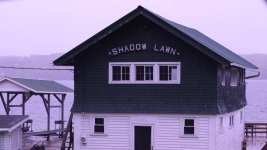
Anyone have any idea what the issue could be or should I just be adjusting the tint? Here's a sample of how bad the tint can be:
https://i.imgur.com/Medh40W.jpg
 
Wow. That looks like one of those "sepia toned" photos that someone shifted purple.

I don't have a 100(I have a 300), so when you say "auto white balance" are you talking about pointing the camera at white and telling it to WB or do you mean like an auto tracing white balance(like a home camcorder/cell phone) that continually adjusts? Because "dialing in a white balance" can net you poor results, as well, if there is a green or magenta push, because just "dialing it in" does not account for anything except blue/amber(unless you dive into the menu and adjust green/magenta).
 
By auto white balance I mean using the camera's built in auto white balance feature, IE the camera should continually adjust but obviously it's doing something incorrectly if I'm getting images that are so magenta on an overcast day. I'm just trying to figure out if this is a camera problem or user error. If I use custom white balance and set it to the same Kelvin as AWB is reading, it normally looks fine-no magenta cast.
 
Are you black balancing every time you shoot? Most Canon shooters have had color weirdness when NOT black balancing. For some reason, Canon cameras seem much more sensitive to not being black balanced.

Do you mean manual white balance by aiming at a white card? Auto WB is almost always a terrible thing for pros because it never locks and is always changing, which means no global color corrections for white balance correction.
Royal PITA to work with for an editor. Most pros use manual everything because you, the shooter, should be controlling what the camera does at all times.
While Autotrace WB can be useful for a quick exterior to interior (or vice versa) for a moving shot, in general, use manual controls.

I owned a C100MKI and used a C100MKII several times and the footage never matched and I did notice a bias toward magenta but nothing ike your image shows.
 
Last edited:
I did not black balance before the shot that I posted but I don't think it would make that drastic of a difference. And like I said, I realize that auto WB is not appropriate for most situations but there are times that I would like to be able to use it. I've done side by side tests with my Mark I and Mark II and the auto white balance color on the Mark II is totally different and unnatural.

Is it worth it to send the camera to Canon for an inspection?
 
I've encountered the same thing, same camera. Funny thing is, Canon's AWB on their DSLR's is usually pretty good, but on the C100 mkII it's.... well... kinda funny. I don't really know WHEN the camera looks for something to AWB to, but whatever it's looking for or at sends it way up the scale. Way to cold. For me, I've defaulted to using daylight when the sun is out; manually setting to 4200 or so for indoor or low light. I also use a grey card manual WB. Left to it's own on AWB, every now and then you can end up with a blue tint/purple tint. Manually re-balance and all is good. A black balance is also highly advised. The manual states to WB after lens changes and even after clicking on the ND filters - which lead me to suspect they know it can go apeshit without much provocation. Had the same thing with a few rentals. Think it could be nature of the beast on AWB which is why I seldom use it anymore!
 
I've encountered the same thing, same camera. Funny thing is, Canon's AWB on their DSLR's is usually pretty good, but on the C100 mkII it's.... well... kinda funny. I don't really know WHEN the camera looks for something to AWB to, but whatever it's looking for or at sends it way up the scale. Way to cold. For me, I've defaulted to using daylight when the sun is out; manually setting to 4200 or so for indoor or low light. I also use a grey card manual WB. Left to it's own on AWB, every now and then you can end up with a blue tint/purple tint. Manually re-balance and all is good. A black balance is also highly advised. The manual states to WB after lens changes and even after clicking on the ND filters - which lead me to suspect they know it can go apeshit without much provocation. Had the same thing with a few rentals. Think it could be nature of the beast on AWB which is why I seldom use it anymore!

Thank you for confirming it is a camera problem. Really glad to hear it isn't user error or an isolated problem with my camera. It is really discouraging that the camera can't auto white balance properly considering I've been using the Mark I for the last year and its auto white balance is near perfect. I feel like every time I "upgrade" a piece of equipment, I discover a new quirk that did not exist in previous versions, which is really frustrating. I guess I will stop using AWB.
 
I was thinking more about the C100mkII's AWB vs. their DSLR's. The DSLR's actually do a pretty good job so I was surprised that the C100mkII was so funky. I think it has to do when WHEN the camera auto white balances, and I suspect that the C100mkII may NOT do it as often as needed and/or does an initial when turned on. I've noticed if I turn it on indoors and walk outside into the sunlight I am almost always going to get a funky AWB. Turn it on outside in the sun and it is usually OK. In reality, if there is any sun I just lock it in the sun preset, same for indoors - I use the incandescent preset. At least it locks it to a known value. Minor variations can be corrected in post - even baked in stuff can be pushed about 2K kelvin without breaking anything. To be fair, when AWB is behaving itself, it's almost always spot on vs. a manual white balance against a gray card - maybe off by around 200K or so at most. Why AWB acts up is a bit of a mystery. It has got me in the habit of checking/setting manual WB against a gray card and black balancing regularly, which is probably a good habit to get into anyway.... I haven't used a lot of other cameras, mostly Panasonic's, and some Sony's, and I have to admit that the C100mkII is the touchiest about WB. But when you get it dialed in, it really does produce a superb image so all is forgiven!
 
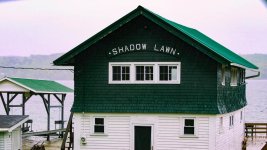
Curious what it should look like. Fixing WB, was surprised the tiles were green. On the lower left you can see normal black tiles, deck is brown; appears to be the correct. Perhaps the green tiles blew the mind of the camera AI's WB.
BoatHouseOrig.jpg
BoatHouse.jpg
Even that far off it was mostly fixable, which is kinda cool.
 
ALWAYS black balance all EOS C Canon cameras. Don't question why, just do it. Trust us. Signed, all Canon EOS Cinema camera owners.
 
Curious what it should look like. Fixing WB, was surprised the tiles were green. On the lower left you can see normal black tiles, deck is brown; appears to be the correct. Perhaps the green tiles blew the mind of the camera AI's WB.
View attachment 135671
View attachment 135670
Even that far off it was mostly fixable, which is kinda cool.

Nice job. I do think the camera seems to be over compensating when there is a lot of green or magenta in the shot, so that would make sense.

I honestly can't remember what color the building was. This is the only shot that I have of it. I don't remember it being so green but my memory could be wrong. I started reviewing other footage that I shot that day and any time there was grass, for example, in more than 1/4 of the shot the camera started introducing too much magenta. Definitely helpful to know that the image can be pushed that far, if need be but of course it isn't ideal.
 
Back
Top