
Navigation
Install the app
How to install the app on iOS
Follow along with the video below to see how to install our site as a web app on your home screen.
Note: This feature may not be available in some browsers.
More options
You are using an out of date browser. It may not display this or other websites correctly.
You should upgrade or use an alternative browser.
You should upgrade or use an alternative browser.
C100: C100 holds highlights better in AVCHD and shadows better with an external recorder
- Thread starter Policar
- Start date


OlegKalyan
Well-known member
interesting, could you elaborate, provide examples, as is or after decoding and grading?
Or maybe your NLE just clips highlights and shadows with AVCHD or Prores? Very common stuff where people flounder about.
Working in Color, which handles superwhites fine. I can't post this footage publicly, maybe I can post images of the waveform monitor and little thumbnails of pertinent areas, though with Ninja vs. 5DtoRGB vs. Final Cut's default import.
Working in Color, which handles superwhites fine. I can't post this footage publicly, maybe I can post images of the waveform monitor and little thumbnails of pertinent areas, though with Ninja vs. 5DtoRGB vs. Final Cut's default import.
I don't believe you on the avchd highlights being better
I don't believe you on the avchd highlights being better
You don't have to read any further then. If you have any grading tips to eek out that last bit of highlight saturation that's missing from the Ninja2 footage, I could use them though, because I can't recover it no matter how I finesse the footage.
Grading/importing now. I'll have waveforms and crops of pertinent areas for the C100 with AVCHD transcoded through FCP7, AVCHD transcoded through 5DtoRGB, and Ninja2 footage, all Canon log (which isn't really log at all, fwiw). Shadows are a lot better on the Ninja2 footage. We shot side-by-side with an Alexa (can't share that footage) and the C100 proved darker with less shadow detail but comparable highlight detail when superwhites are handled right. Alexa's log c sandwiches its 10 bit signal between 20 IRE and 95 IRE whereas Canon's 8 bit lives between 0IRE and 110+IRE it seems. Nice way to get a little more tonality but the colorspace is screwy for sure. Blows away the FS700 and I far prefer it to the Epic, possibly even the F3.
What ISO were you filming at because your IRE range doesn't seem right for canon log
850 ISO. I might be wrong about the IRE... can't see past 110 so don't know what's up there.

In color, under project settings tab there's a list on the right side of the panel. The first item is a check for broadcast safe. Is this checked and what is your CEILING IRE and FLOOR IRE? Interested to see your images and how this is playing out for you.
850 ISO. I might be wrong about the IRE... can't see past 110 so don't know what's up there.
Your low end is wrong not your high end
Your low end is wrong not your high end
What should it be?
I'm also seeing that my FCP7 import matches my Ninja footage whereas the 5DtoRGB import holds onto saturation better in the highlights. (No it's not a matter of broadcast safe.) So it might be Color's handling of superwhites being inferior to 5DtoRGB's. Looks like the problem is with Color, not Canon. I'm off base.
Last edited:
Barry_Green
Moderator
There is practically no way that recording externally is causing a loss of highlights; to think that it is, is to imply that the HDMI output itself is fundamentally flawed. So, run a quick test -- shoot something with extremely bright highlights, and view it on a monitor. Then, record it, and play back that recording to the monitor. They should be identical. Then, import the footage through your various import mechanisms and look at it on the computer. I almost guarantee you, that's where the error is -- something in the transcoding is causing a shift.
There's no way Canon would have screwed up the HDMI output such that the internal recording is preserving highlights better than the monitor displays. No way. And an HDMI recorder is recording a digital signal; the HDMI input is a digital input and it's being recorded digitally, so again, the recorder can't be messing that up. So therefore, the likely culprit is that you're introducing the famous Apple gamma shift bug, or some other 16-235 conversion or something, in the process of moving the footage to the computer...
That's my guess, anyway.
There's no way Canon would have screwed up the HDMI output such that the internal recording is preserving highlights better than the monitor displays. No way. And an HDMI recorder is recording a digital signal; the HDMI input is a digital input and it's being recorded digitally, so again, the recorder can't be messing that up. So therefore, the likely culprit is that you're introducing the famous Apple gamma shift bug, or some other 16-235 conversion or something, in the process of moving the footage to the computer...
That's my guess, anyway.

MattDavis
Well-known member
+1 - I see the results from a Pix recorder and the internal AVHCD as being visually identical in FCPX ("stop laughing at the back, Jenkins").
Grabs from NLE (view at 100% to compare)
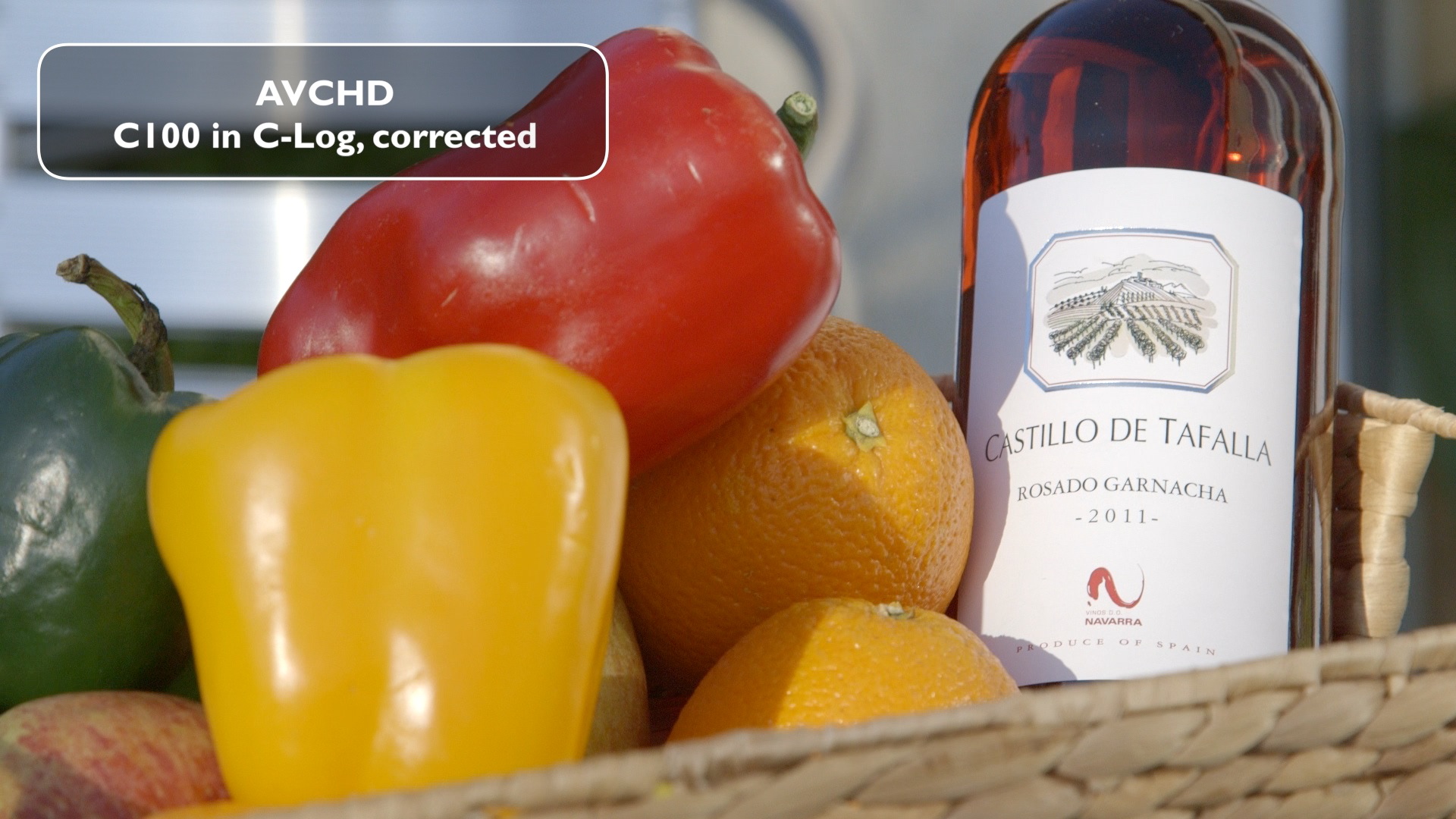
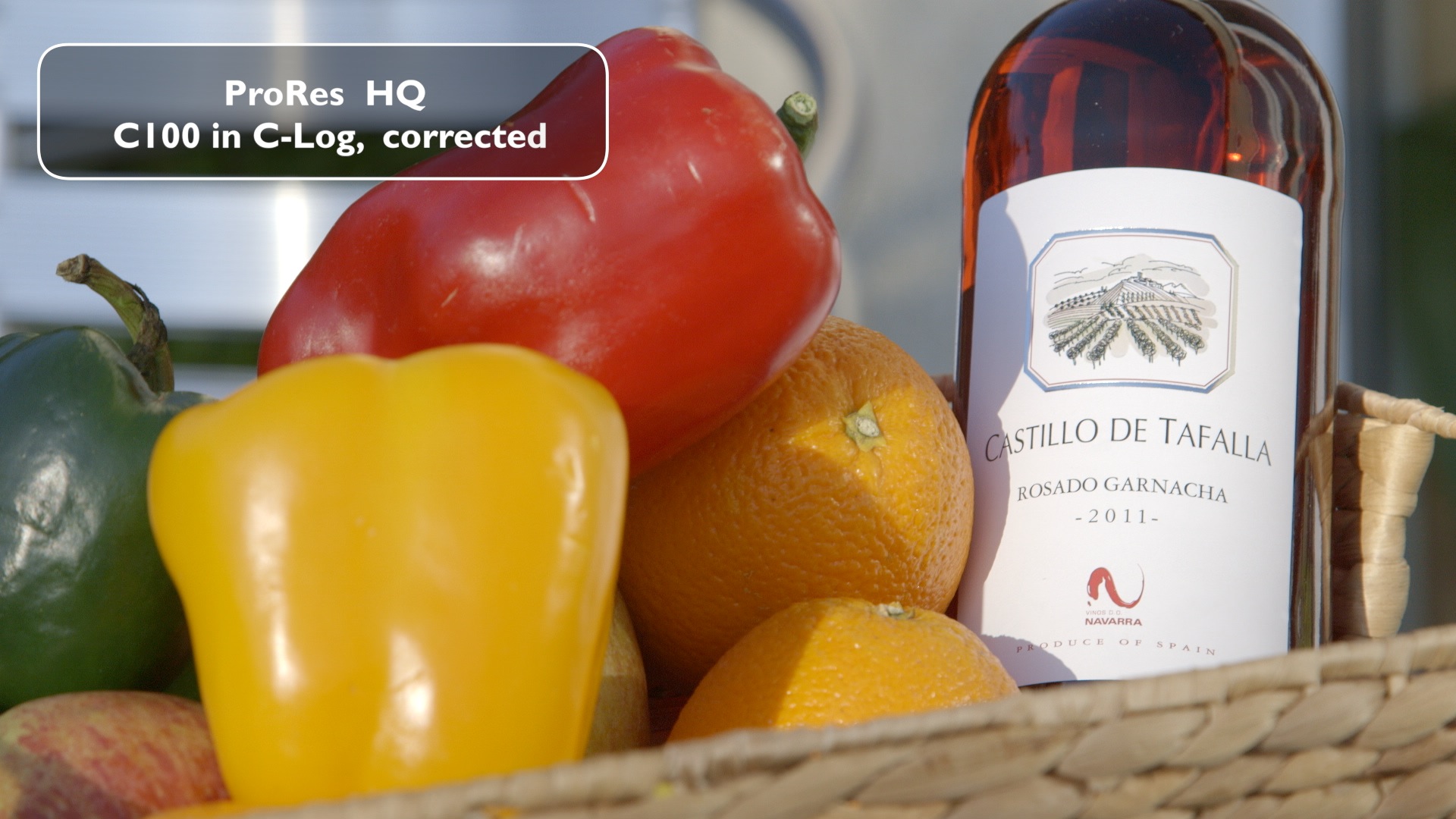
Both have exactly the same grade applied to them.
If there's a difference between AVHCD and ProRes, it's because the Transcode settings aren't correct. 5DtoRGB has 601 and 709 settings for SD and HD, and there's an option to bring superwhites down to 100% for NLEs that don't like SuperWhites (Premiere). I think that's where it went a little pear-shaped. Superwhites into Premiere Pro will clip.
Grabs from NLE (view at 100% to compare)
Both have exactly the same grade applied to them.
If there's a difference between AVHCD and ProRes, it's because the Transcode settings aren't correct. 5DtoRGB has 601 and 709 settings for SD and HD, and there's an option to bring superwhites down to 100% for NLEs that don't like SuperWhites (Premiere). I think that's where it went a little pear-shaped. Superwhites into Premiere Pro will clip.
Superwhites into Premiere Pro will clip.
They only clip for YUV sources if the user clips them.
e.g You can bring them down using YUV filters . Even older versions of premiere (CS4 and earlier) had this ability with "fast color corrector" . But if you applied an RGB filter before a YUV filter, then you will clip them due to the standard Rec601/709 conversion to RGB
 rogar-BigGrin(DBG)
Hi,it's because the Transcode settings aren't correct. 5DtoRGB has 601 and 709 settings for SD and HD, and there's an option to bring superwhites down to 100% for NLEs that don't like SuperWhites (Premiere).
PDR ant MattDavis, can you explain what are your workflows for working AVCHD please?
Is a transcoder is necessary or not, and what are the things to care about (like YUV filters)? I'm using Adobe Premiere/AE CS6 with Windows7 but I do not do anything special, just import and direct edit of my rushes .. Thanks!
Last edited:
MattDavis
Well-known member
@5mars: Glad to see you're really enjoying your new C100!
I'd better defer to PDR as I'm i) a Mac user, and ii) spend most of my time in FCPX rather than Premiere. For short-form and quick turnaround, I'm editing natively. I did try Prelude and AME, but prefer 5DtoRGB.
But if I have the time/budget I'll use 5DtoRGB using the Rec709 to ProRes and allowing 'Full Luminance Range' and managing my superwhites manually (and in a silly way, apparently). Having said that, there comes a point at which you'd need to ask yourself - should I use a Ninja?
I could bypass all this Premiere nonsense and use 'Broadcast Range' which would ensure peak white is at 100% rather than 109%, but I've not tested this out fully. I know shooter/editors (probably more shooter than editor) who swear by this, though. That would make all the RGB/YUV thing go away.
Do you need an encoder? 'Maybe'. Better still, 'Depends'.
I'm also (sadly from my Mac viewpoint) waiting to see how Magic Bullet Grinder and BulletProof work out - the former at the same cost as 5DtoRGB, the latter a little more and not even in Beta. Y'see, these apps do multi-threads and can make edit ready and BITC previews at the same time, and BulletProof promises to get metadata converted too. To me, that's useful. To others, maybe less so.
I'd better defer to PDR as I'm i) a Mac user, and ii) spend most of my time in FCPX rather than Premiere. For short-form and quick turnaround, I'm editing natively. I did try Prelude and AME, but prefer 5DtoRGB.
But if I have the time/budget I'll use 5DtoRGB using the Rec709 to ProRes and allowing 'Full Luminance Range' and managing my superwhites manually (and in a silly way, apparently). Having said that, there comes a point at which you'd need to ask yourself - should I use a Ninja?
I could bypass all this Premiere nonsense and use 'Broadcast Range' which would ensure peak white is at 100% rather than 109%, but I've not tested this out fully. I know shooter/editors (probably more shooter than editor) who swear by this, though. That would make all the RGB/YUV thing go away.
Do you need an encoder? 'Maybe'. Better still, 'Depends'.
I'm also (sadly from my Mac viewpoint) waiting to see how Magic Bullet Grinder and BulletProof work out - the former at the same cost as 5DtoRGB, the latter a little more and not even in Beta. Y'see, these apps do multi-threads and can make edit ready and BITC previews at the same time, and BulletProof promises to get metadata converted too. To me, that's useful. To others, maybe less so.
Hi,
PDR ant MattDavis, can you explain what are your workflows for working AVCHD please?
Is a transcoder is necessary or not, and what are the things to care about (like YUV filters)? I'm using Adobe Premiere/AE CS6 with Windows7 but I do not do anything special, just import and direct edit of my rushes .. Thanks!
Encoding to some other import format isn't necessary. But you might do so for specific reasons , such as ease of editing, maybe you want to convert to RGB with a different algorithm (type of chroma upsampling)
If you have a YUV source (such as native AVCHD), you must bring down the superwhites (above 100 IRE , or Y' > 235) , with a YUV filter, before you do anything that causes an RGB conversion (this means any RGB effect like curves, most 3rd party effects) . There are "YUV" labelled filters in CS5/6 , those don't cause conversion to RGB and are safe . The order is important. If you incur an RGB conversion before adjusting those superwhites, then they will be clipped
During native editing with AVCHD (cuts only, no RGB filters or anything) , the timeline in CS 5/6 works in YUV. It's YUV preserved workflow, so even if you have superwhites, they will be exported as superwhites if you export a YUV format, nothing clipped or clamped . But if you export an RGB format e.g. TIFF, PNG, BMP, quicktime animation, etc... they will be clipped , unless you adjusted for them beforehand
Thanks a lot for your answers. Your informations are very useful!
I felt that my files were properly managed in After-Effect CS6;
Here's some of my tests: https://vimeo.com/64385269
I export in mp4 (H264), it might be in RGB..
Edit: After reading some articles about it I think I understand better now. But is there a visual difference when I work YUV video, converted to RGB (for exemple .MP4 export) against a YUV file edited and exported (or encoded) in a YUV format? What will be the difference: In the superwithes only, for broadcast needs?
My major problem with the camera is to keep light sources while opening the focal .. For exemple when I use my Rokinon/Samyang open at T/1.5, lights will be too violents and "burned". To minimise this I set the camera to Cinema mode, and I sometimes add a ND filter more. But it seems to be a different problem, to solve during shootings and not in post.
it is true that I hesitate to buy a Ninja2 but I do not feel the difference in quality is so obvious.. Of course there is a greater tolerance for grading, but for my current projects it'll be light (a little of Colorista II only). And i find it nice to work with lightweight files.there comes a point at which you'd need to ask yourself - should I use a Ninja?
I did not know that, if I understand it is necessary to add an effect to correct the whites range in order to respect broadcast settings?I could bypass all this Premiere nonsense and use 'Broadcast Range' which would ensure peak white is at 100% rather than 109%
This is the first time I hear about an encoder (I had a GH2 but I was thinking .MTS files were natively ok).Do you need an encoder?
I felt that my files were properly managed in After-Effect CS6;
Here's some of my tests: https://vimeo.com/64385269
I've to learn and read more about YUV vs RGB.PDR; said:But you might do so for specific reasons , such as ease of editing
I export in mp4 (H264), it might be in RGB..
Edit: After reading some articles about it I think I understand better now. But is there a visual difference when I work YUV video, converted to RGB (for exemple .MP4 export) against a YUV file edited and exported (or encoded) in a YUV format? What will be the difference: In the superwithes only, for broadcast needs?
Is there a way to "conform" .MP4 or .MOV in YUV?PDR; said:unless you adjusted for them beforehand
My major problem with the camera is to keep light sources while opening the focal .. For exemple when I use my Rokinon/Samyang open at T/1.5, lights will be too violents and "burned". To minimise this I set the camera to Cinema mode, and I sometimes add a ND filter more. But it seems to be a different problem, to solve during shootings and not in post.
Last edited: