C100: C100 color matrix – bug or feature?

mrcodec

Member
I'm trying to combine C-Log gamma with Wide DR color matrix with no success. Once C-Log gamma is dialed in, I can only assign C-Log color matrix to it (yes, I can flip through all the other matrix settings, but nothing changes colorwise). I know, Canon recommends matching dedicated gammas and matrixes, but I prefer the color scheme of WideDR and the flatness of C-Log gamma.

Can anyone confirm it's not just me? I'm running the latest firmware on my C100. Does it work on a C300 neither?
 
It does work, you need to click the joystick button in when you select the profile.

In my opinion, canon log with WDR colour matrix is far too saturated and unnatural. I recommend CLOG with EOS profile, which seems to be the most natural.
 
Hi
I also found some odd behaviour regarding the C-Log gamma curve. Regardless of the color matrix, as soon as C-Log gamma is selected some certain dark greens turn towards blue. No other gamma curve does this, only C-Log. Or am I doing something completely wrong here?
 
Hi
I also found some odd behaviour regarding the C-Log gamma curve. Regardless of the color matrix, as soon as C-Log gamma is selected some certain dark greens turn towards blue. No other gamma curve does this, only C-Log. Or am I doing something completely wrong here?

This is why I need to assign a matrix other than C-Log to C-Log gamma. Green tends to blue (bad for green screen wok), red to orange. As I stated before, I cannot dial in WideDR or any other matrix, if C-Log gamma is selected.

@sebben – can you please check again? There is no need to click the joystick button, matrix changes on the fly by just flipping it. You can prove that by watching the LCD-screen. On any other gamma setting colors matrixes can be changed just by flipping the joystick, and colors change immediately. Or am I doing something completely wrong?
 
It does work, you need to click the joystick button in when you select the profile.

In my opinion, canon log with WDR colour matrix is far too saturated and unnatural. I recommend CLOG with EOS profile, which seems to be the most natural.

Thanks for your reply! Unfortunately, this doesn't do the trick.
 
Thanks for your reply! Unfortunately, this doesn't do the trick.

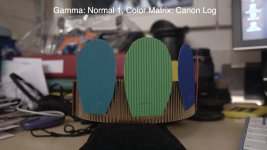
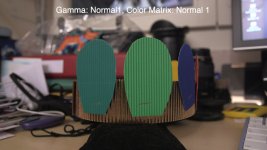
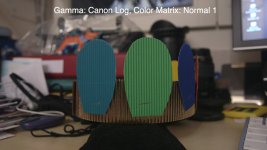
It seems as soon as either c-log gamma or c-log color matrix is selected, you get this color skew. All other combinations seem to be OK in this respect. I did a quick test just with Normal 1 and Canon Log combinations:

clog_normal1.jpg
normal1_clog.jpg
normal1_normal1.jpg

It's no chroma-du-monde chart, but I think my daughter did a good job nevertheless :D
I have not found a solution yet, fiddling with color area A+B did also not help...
 
Last edited:
Thank you for these comparison shots, the skew is quite obvious. And yes, your daughter did a great job! Seeing you were able to assign normal 1 matrix to c-log gamma, could you please do me a favor and post a comparison between c-log gamma + c-log matrix and c-log-gamma + normal 1 matrix? I just cant't get the second combination to work.
 
Last edited:
... could you please do me a favor and post a comparison between c-log gamma + c-log matrix and c-log-gamma + normal 1 matrix? I just cant't get the second combination to work.

Well this is interesting... with canon log gamma selected, I don't see any difference when changing the color matrix. With all other gammas I do. So this comes back to your original observation. It appears that with canon log gamma the color matrix behaviour is very special.
 
I wonder if this is a C100 only „feature“. I'm almost 100% certain the combination of C-Log gamma and other matrixes is not limited on a C300, which I rented a few months ago. It didn't have the latest firmware installed, but I remember testing C-Log gamma with the Normal 1-4 matrixes. Can a C300 user please confirm?
 
...I have not found a solution yet, fiddling with color area A+B did also not help...

I just found a kind of workaround. Now that C-Log gamma has become useless to me (don't like the color skew it produces in combination with C-Log Matrix, which cannot be changed!), I'm quite happy with WideDR Gamma and WideDR Matrix. It reproduces skin tones quite well and gives you rich and natural looking colors. The only thing I noticed is that the amount of red in the overall image is a little too high. Therefore I set the phase of R-G to -4.
 
Thanks a lot! So at least it seems correctable if needed :)
On outside shots I never noticed anything anyway, just some specific colors seem to be off.

I think that yes, log is correctable.

But I was shooting with wdr or cine1 gamma (for an easy output with less color correction). It seems that I can start with log now,
I want to shot one piece with Canon log gamma with the full color correction and then I will make "the last decision".
 
Back
Top