C100: C100 and Ninja 2 - ProRes or ProRes LT?

bronxjragon

Well-known member
I've been searching a lot online to see if there is any benefit to shooting the Canon C100 w/Ninja 2 at ProRes HQ vs ProRes vs LT and the only thing I could find is that it's important to maintain as much data as possible and that there's more behind it than just the bitrates the footage is recorded. Can someone explain to me why it'd be more beneficial to record in ProRes HQ 220Mbps versus ProRes LT 100 Mbps?

Obviously I'd rather save some money on SSD, but it's more about streamlining my workflow. I know Erik Naso shoots in regular ProRes (150Mbps) and his stuff looks incredible. He's advised me that he shoots in ProRes 150Mbps vs HQ. I'd like to know more in depth the benefits (or if there actually are no benefits) of one over the other. I'm secretly crossing my fingers ProRes LT actually gives you the exact data you get from ProRes HQ.

Thanks in advance all!
 
All depends on what you plan to do with the footage. No color grading, light grading, heavy grading, or effects. No, ProRes LT does not give you the exact data you get from ProRes HQ. Otherwise why would HQ exist? There is more data, that's why it takes up more space.
 
Simple answer. DETAILS.

I can see visible differences between LT and regular 422. I don't see a lot of difference between 422 and HQ so shoot regular 422 most of the time. If things are really busy in the scene then HQ can help, but you'd have to be nit picking.
 
So it sounds like Canon C100 w/ProRes Lt, ProRes, or ProRes HQ theoretically produces an image that has more data for grading/effects than a C300 internal?
 
I don't think LT is the right code to be using. The internal codec on the 300 is superior to LT. Don't confuse bitrates with being higher quality.

I'd take a 50mbps mpeg 4:2:2 over a ProRes LT file.
 
Last edited:
NOOOOO! ProRes LT gets swamped by the 8 bit nature of the C100. The AVCHD recordings from the camera have a certain amount of noise reduction applied before the video hits the AVCHD compressor, so it looks really rather good. The 422 output on HDMI has no noise suppression, so the recorder's codec must capture ALL of the noise - the '8 bit pixel boil' that the C100 relies upon to stop banding that 8 bit is so partial to.

We're not talking about difficult scenes that destroy the AVHCD codec quickly (but ProResHQ will cope with):

http://www.mdma.tv/c100/avchd_killed.html

We're talking about the noise in the picture in the low lights (and apologies to all who have seen it before - but hey, LOOK AT LT! Never mind that, LOOK AT PRORES422! Eeek!):


Watch it full-screen in HD. THAT's why we need ProRes HQ, THAT's why so many people don't see much difference between AVHCD and ProRes (though the trees above kind of clinch that situation).

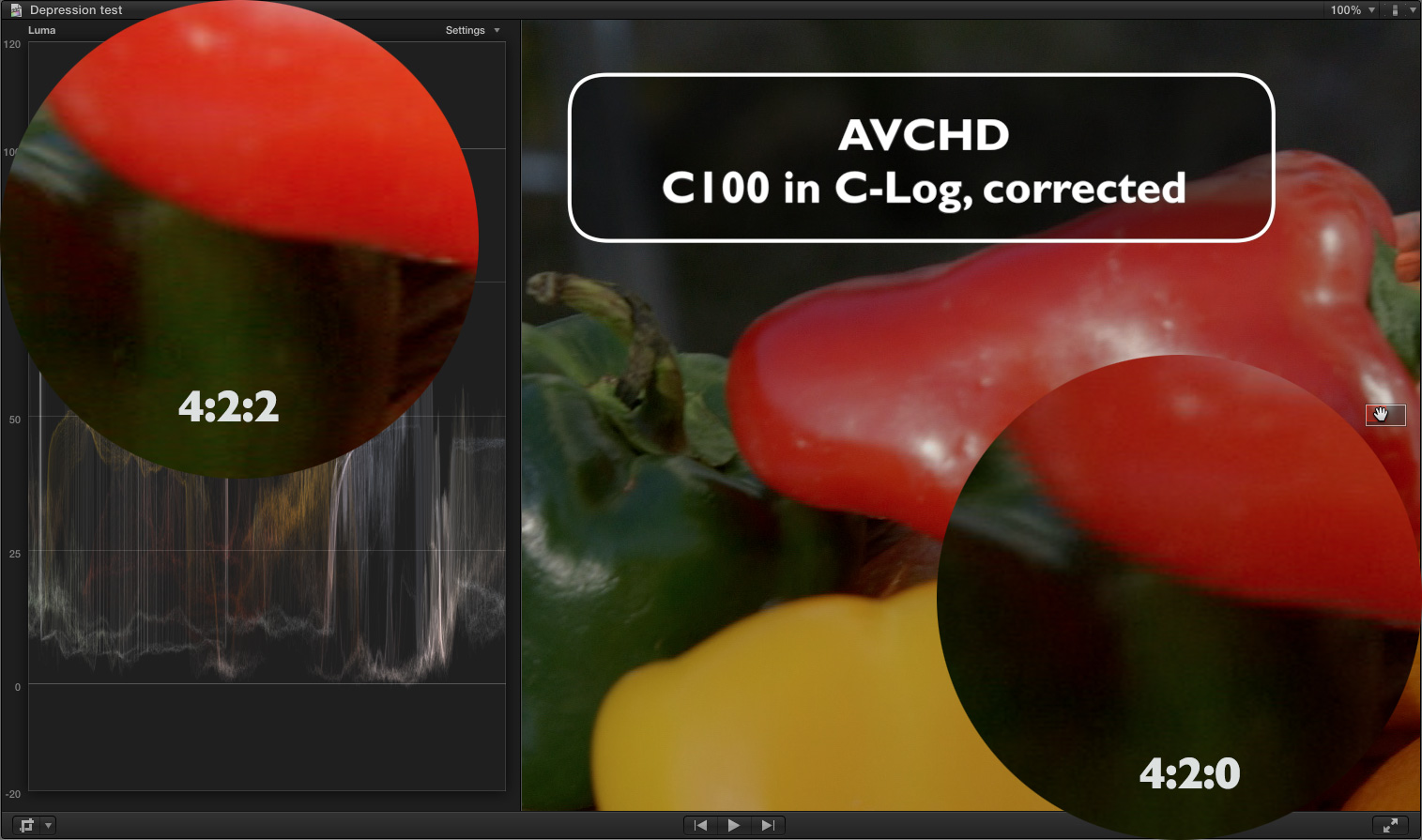
And remember - 4:2:2 - still important if your scene includes 'red' and 'detail' at the same time...

C100_422v420.jpg


Notice the noise in the green pepper on the left hand, 4:2:2 side. That noise needs to be captured accurately by the recorder, not smeared over. After all, it's a bit nastier than the noise on the right hand side with AVCHD.
 
Matt- In your waveform screen shot I see that you're using FCPX and have to ask. Is that example from 30psf or 24p footage? Because if it's PSF footage in FCPX one would expect that red artifact were as in 24p you don't see that.

EDIT: I see you're UK so I guess it's 25p. I'll just say that I see that artifact of red when I shoot 30psf but won't see it in 24p when using FCPX.
 
It's in 25psf - IIRC, 24p is true 24p, but 25p is 25PSF like 30PSF.

All part of Canon's malignant PSF issues. It sucketh rocks through straws.
 
Then that is why you see those reds doing what they are doing in FCPX. The ninja will clean that up or transcoding with 5d2rgb the AVCHD Psf footage. It's not the camera or the codec. It's FCPX.
 
If your going to go to the effort of using an external recorder it just makes sense to use the highest quality available.

Recording 25P to Prores HQ is only 84GB an hr !
 
You can't go wrong with ProRes 4:2:2. Lets be real. 400% crops to see some noise or pixel peeping to much isn't necessary. HQ is for better cameras like ARRI or Red. If you like eating up SSD drives and your client is a pixel peeper then go for HQ to cover yourself, but I have no need to shoot with it. Best to try both for yourself because we all have a different view on whats good enough.
 
You can't go wrong with ProRes 4:2:2. Lets be real. 400% crops to see some noise or pixel peeping to much isn't necessary. HQ is for better cameras like ARRI or Red. If you like eating up SSD drives and your client is a pixel peeper then go for HQ to cover yourself, but I have no need to shoot with it. Best to try both for yourself because we all have a different view on whats good enough.
Yes, standard PR422 is plenty enough when attached to the C100.
 
Without wishing to ignite any flame wars, dear chaps... How would you have handled the tonality and noise in the example I posted?

The C100 generates a certain amount of 'texture' - it is an 8 bit camera after all. That texture needs to be captured without noise reduction in-camera so it can be handled in the NLE.m Furthermore, areas of high motion containing high detail also give cause for pain in the codec.

In my 'easy' tests (talking heads, still life, etc) there's not much to choose from betwixt ProRes 422 and AVCHD taken through 5DtoRGB unless you use a vectorscope.

When things get tough, ProResHQ captures more than ProRes 422. And these are just the times when you need that.

I've done my tests, and presented my results - when things are difficult, ProRes HQ does a better job than ProRes422 - but when things are easy, AVHCD does very well indeed.

Whilst I don't tend to crop to 400%, my encodes with the X264 can do without being distracted by pictures with multicoloured noise, even though a little noise/grain (that follows the colour of the image below) can help 'wake up' the codec. This is an 8 bit camera - there will always be some boil. That can be good, that can be bad.
 
Without wishing to ignite any flame wars, dear chaps... How would you have handled the tonality and noise in the example I posted?

The C100 generates a certain amount of 'texture' - it is an 8 bit camera after all. That texture needs to be captured without noise reduction in-camera so it can be handled in the NLE.m Furthermore, areas of high motion containing high detail also give cause for pain in the codec.

In my 'easy' tests (talking heads, still life, etc) there's not much to choose from betwixt ProRes 422 and AVCHD taken through 5DtoRGB unless you use a vectorscope.

When things get tough, ProResHQ captures more than ProRes 422. And these are just the times when you need that.

I've done my tests, and presented my results - when things are difficult, ProRes HQ does a better job than ProRes422 - but when things are easy, AVHCD does very well indeed.

Whilst I don't tend to crop to 400%, my encodes with the X264 can do without being distracted by pictures with multicoloured noise, even though a little noise/grain (that follows the colour of the image below) can help 'wake up' the codec. This is an 8 bit camera - there will always be some boil. That can be good, that can be bad.

The simple answer?
Back up off the monitor and watch your footage as you and nearly 99% of humans would as if your were watching TV in your family room. (FOr me that is a 27 inch and 30 in monitor. When I want to get an idea of the quality of the picture I back up at least 5 ft from the monitors and take in the whole picture). Or, get more windex to clean the nose grease off the monitor.
 
Back up off the monitor and watch your footage as you and nearly 99% of humans would as if your were watching TV in your family room. (FOr me that is a 27 inch and 30 in monitor. When I want to get an idea of the quality of the picture I back up at least 5 ft from the monitors and take in the whole picture). Or, get more windex to clean the nose grease off the monitor.
Most people view web content on their computer monitors (or smart phones or tablets) and most people aren't five feet from any of those devices when viewing the content. For television broadcast, you may have a point, or for smart phones or tablets where the image is already lower quality and very small, it may also be hard or impossible to see the difference. I do mostly web content and probably the majority of it is viewed on computer monitors so your point which you've brought up before doesn't really resonate with me.

When I'm casually viewing web content on my 23" monitors, I'm typically about 2.5 feet from the monitor, and on my 17" laptop screen, I'm typically about 2 feet from the monitor. When I'm editing the distance from the monitor is the same as when I'm casually viewing videos or watching movies. I believe most people work at around this distance from their computer monitors. I upload everything at high bit rates at 1080p and upgrade it on Vimeo, so the results look quite close to the original recording.

I don't use an external recorder on my C100 as it doesn't fit my workflow, but I do do what I can to get a better image because I feel that it will be noticed by the end viewer either consciously or subconsciously.
 
Last edited:
Matt my comment of pixel peeping at 400% wasn't a dig on you in any way. It's a statement on obsessing in general over footage. I just haven't seen any issues in my real world use of the C100 with ProRes 4:2:2 to want to use ProRes HQ.

ISO levels and poor lighting conditions can cause different issues and if noise is a problem then a little denoiser fixes it pretty easy. I'm not one to say use this or that only what I found works for me. Everyone should do some test and trust what you find so you fell confident in your settings. With that I actually like shooting without the Ninja 2. I only use it if I need the extra color space that 4:2:2 offers.
 
No worries, Erik - and to round off both Eric's point and by inference Chris, almost all of my work goes onto the web, and therefore I do tend to obsess about things that compress well. The issue is that things that have faults at the very get-go - the master recording - have these errors compounded as we go through the last two stages: compress for Vimeo/YouTube, then that service will re-encode for all the versions required. Mosquito noise, banding and macroblocks all get 'enhanced' at these stages, and many of my clients won't buy 'pro' features from folks like Vimeo that use two-pass encoding.

There's obsessing, and... there's obsessing. A little bit of noise - a soupcon - can help a lazy encoder 'wake up' and stop skies from going too macroblocky - so sometime you're de-noising a shot, only to add a bit more 'grain' in post after grading. Go figure, but some shots really like it. I also shoot with EX1Rs - cameras with 'texture' to be sure. I haven't had as much to get excited about in their pictures when going to a PIX vs the XDCAM (apart from the lens and the distortion, the audio...), but then again XDCAM seems a little stronger than AVCHD in tough, nasty conditions (or maybe that's just the camera's image processor).

Bottom line for me, as a producer of web video, is that if *I* can see it, my client and their audience will see it. Whether they notice or not is another thing, but I have some very 'videoey' clients who really want their videos looking good. I'd prefer to test and test and test again so I don't have to find stuff like that IRE25035 stuff on an actual shoot. LOL
 
Thanks for all the great info guys. I find the Canon C100 and Ninja 2 offers many options and I have to choose my battles since, like many of you, I am a one man army. I guess it's a practice of disciplined shooting but also knowing when to use which tool and when. E.g. I love shooting in C-Log but I know that for this feature doc I'm working on I won't have crazy amounts of time to color correct and grade in post-production and have to choose Wide DR sometimes knowing that visually the footage will be near what I want in terms of color. Same goes for using the Ninja 2. From my past few days of shooting taking into account all your info I've actually chosen not to use Ninja 2 at all because I'd rather have the in-camera noise reduction (that doesn't happen with the Ninja 2). But shooting in Central Park I have no choice but to use the Ninja 2 for B-roll with so many trees, leaves, etc.

All that being said, I'm loving the C100 more and more.
 
Back
Top