Building editing PC questions

Joshua_G

Well-known member
I'm going to build editing PC for HD, 4K and HDR. Editing, grading and rendering is done on DaVinci Resolve plus Neat Video, on Windows 10 64bit. All will be done on this PC, no cloud and no collaboration with others.
So far, the chosen hardware is: Processor - Intel Core i7 8700;
RAM - at least 32GB DDR4;
for the Operating System - 5000Gb Nvme M.2 SSD;
scratch disk - 1TB SSD;
Graphics Card - GeForce GTX 1080 Ti.

My questions:
1. Is there any benefit to Windows 10 Pro over the Home version?

2. Choosing processor and Mother Board: will overclocking be a significant benefit?

3. Concerning RAM, will going to 64GB be a significant benefit?

4. Concerning RAM, is there any benefit for 3,600MHz over 3,200MHz or 3,000MHz and/or CL18 over CL16 or CL15?

5. Concerning scratch disk SSD, will Nvme M.2 one have a significant benefit over SATA III one?

6. Concerning Power Supply, will an 8,500 Watt do?

7. Any other suggestions?
 
1) Not sure anymore but pro used to give you the ability control Windows update settings. It might allow larger amounts of RAM but the number was well above 32GB. Hopefully others will reply.

2) Overclocking is only worth it if it is substantial. This requires above average cooling. I think it is worth it but requires a time investment to do it right.

3) I think 32GB is plenty. In reality, the only program that really needs a lot of RAM in the video space is After Effects. NLEs do not drain the RAM.

4) Faster the better to an extent. No point in spending big though. Stability is the most important factor for RAM.

5) Nvme is best for operating systems. Since the Nvme drive is plugged into the PCI-e system, it runs a lot faster than an SSD using the SATA connection. But, nothing else you will do can utilize all of the that speed. So normal SSDs are fine for the rest. Since there are some Nvme drives that cost the same as SSDs it is a no brainer. BUT, make sure you get the right kind with the 4x PCI-e hookup!

6) 850w should be fine but make sure the GPU does not put you over the top.

7) Motherboard/CPU choices in video need to factor in storage and card slots. The bitter pill with Intel systems is that the mid level CPUs come with motherboards that are starved for PCI-e lanes. Your GPU will take up 16. Your Nvme will take up 4. That is already maxed out with the CPU you have chosen. If you want any more cards like a preview monitor output or another Nvme you are toast. This is where the enthusiast boards come in. Just something to think about.

8) Storage. How much storage will you have for source files? I run a 12TB RAID just for video assets.

9) Sound card? Monitors?
 
I'm going to build editing PC for HD, 4K and HDR. Editing, grading and rendering is done on DaVinci Resolve plus Neat Video, on Windows 10 64bit. All will be done on this PC, no cloud and no collaboration with others.

5. Concerning scratch disk SSD, will Nvme M.2 one have a significant benefit over SATA III one?

Nvme is designed to let your flash chips run as fast as they can. Modern flash chips are basically all faster than the SATA III bus. But this speed has a cost. The "is it worth it" question will come down to how much does Resolve use its scratch space. Good luck finding that out. I doubt BMD can or will answer that question for you. So when in doubt, I usually opt for the fastest thing available, which in this case is the Nvme.

BTW, the designation "m.2" is just a form factor. It's not an electrical specification, so it doesn't have anything to say about how fast anything is.

7. Any other suggestions?

I'm thinking for a PC like this I'd want three main drives. An OS drive, a source drive (editing), and an output drive (rendering). You'll likely get some performance boost by not trying to read and write from the same drive at the same time. But with really high speed Nvme based drives, it's hard to gauge how much improvement you might get from adding a third drive to just be a rendering target for Resolve. IOW, you might want to research it a bit.
 
Thanks, Bassman.
Many thanks for all your answers not quoted below.

3) I think 32GB is plenty. In reality, the only program that really needs a lot of RAM in the video space is After Effects. NLEs do not drain the RAM.

Thanks. So, will 16GB do?

7) Motherboard/CPU choices in video need to factor in storage and card slots. The bitter pill with Intel systems is that the mid level CPUs come with motherboards that are starved for PCI-e lanes. Your GPU will take up 16. Your Nvme will take up 4. That is already maxed out with the CPU you have chosen. If you want any more cards like a preview monitor output or another Nvme you are toast. This is where the enthusiast boards come in. Just something to think about.

Thanks. So, which CPU and motherboard will you recommend? Will Core i9 9900K be a worthy option?

Also, will going up to RTX 2080 Ti be worthy?
 
Last edited:
Thanks, Bruce.
I asked only about the new items I'm about to purchase. I have already few 'mechanical' or 'magnetic' hard drives, as well as a monitor which suffice my present needs and decent sound card.
 
I am an Edius user along with some Premiere and After Effects CS6. I am not sure of Resolve but I would guess if you do not use After Effects or Blackmagic's compositor very heavily 16GB should be fine. Edius only ever uses 2-4GB. But I would troll around the resolve forum and ask people specifically about what the program likes. Premiere likes a lot of GPU. Edius does not have GPU accelereation. That is about a $500-$1,000 swing between the two programs just on the graphics card. From what I have heard, Resolve does utilize the GPU quite a lot for playback. So you are in for some spending but the forum hopefully can let you know what is overkill and what is best.

The choice between and i7 or i9 is often aorund the PCI-e lanes and encoding speed. With the GPU help, NLEs can get by with an i7 a lot better for playback but exporting needs the higher core count for speed. I built an i9 system last year and it is a large step above my previous i7 system. But, the i7 8700 is a great processor. Tough call to make as the dollar difference is quite large. Asking resolve users will probably be your best bet with the CPU choice as well.

If you do get an i9, overclocking is more important as these chips come in pretty conservative at stock speeds. I run my 10 core CPU at 4.3 GHz which is about a 39% overclock from factory. The i9 chips are hearty and are kind of made to be run a little harder. So without overclocking you might be leaving some performance on the table. Although the turbo modes are better and better.
 
Last edited:
It might be worth checking these Puget Systems tests. As you can see in the RAM Preview and Final Render settings with Adobe After Effects in particular the i7 8700K 6 core is about 30% faster than the i97940X (Extreme.) Why? A lot of NLE and FX software just can't make much more headway in the way of efficiency gains across many cores. Fewer cores at higher clock speeds tend to give you better performance contrary to some belief out there. Premiere's performance drop off really starts to drop over 6 cores for example. On the other hand Resolve loves more GPU assistance and thrives on multi GPU builds.

After Effects
https://www.pugetsystems.com/labs/a...ormance-Core-i7-8700K-i5-8600K-i3-8350K-1055/

In pure frames per second there appears to very little difference in performance. Especially look at the UHD resolutions top of screen. Have a look at this:
https://www.youtube.com/watch?v=VGtTd5mLec8

On pure benchmark tests you will see the i7 8700K stacks up very favourably against the i9's
https://benchmark.unigine.com/leaderboards/superposition/1.0/1080p-extreme/single-gpu/page-1

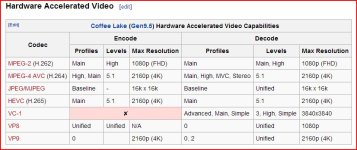
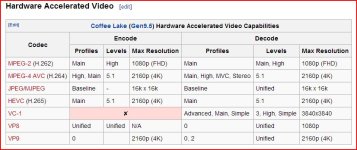
Another thing to consider is do you require Intel QuickSync H.264 hardware acceleration on renders? If yes the i7 has integrated video. The i9 doesn't have an integrated Video, which is required for Quick Sync H.264 accelerated rendering. This can be up to 40% faster. Personally I'm finding very little difference in QuickSync, which needs to be enabled in BIOS and have drivers installed vs Nvidia's NVENC GPU H.264 hardware assistance. Edius for example takes great advantage of the i7 8700K's on board Intel UHD Graphics 630 processor. There are also a number of other codecs supported by the i7's integrated 630 engine, codecs that have no hardware render/playback assistance on th i9s. As a number of Adobe editors have found out to their dismay. Resolve is a different story as GPU gives you the best performance.

i7 hardware Graphics.JPG

If it's of any help to you working out which way to jump my experiences may help. After dissecting many hours of research I ended up going for the 8700k, delidded and overclocked to 5Ghz. With the necessary tweak in BIOS to AVX, voltages and RAM optimizations the performance price ratio has been very acceptable. Basically the hardware and settings I'm running are 99% covered in this video:

https://www.youtube.com/watch?v=CoUtA7DKXhU&t=339s

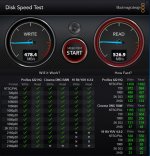
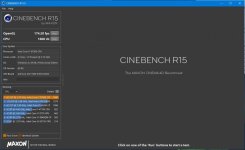
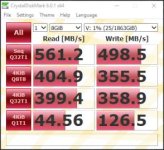
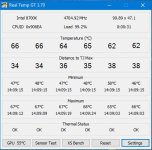
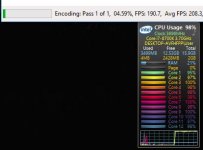
One word of warning if you go the 8700k it runs very hot. The heat problem was sorted by the deliding with liquid metal and running three input fans along with two fans on a Noctua NH-D15 air cooler plus an extractor fan on the rear. The D15 is way quieter than liquid cooling and has no danger of a pump failure cooking your CPU. On a hot Sydney day using HandBrake using 98-100% CPU activity on all 12 threads my temps never go above the high 60's which is 30+ degrees below TJ Max. Very safe. SD ProRes to H.264 renders average around 200fps. 4K 50p renders at between 60-70fps. More than acceptable. Using a 2TB SSD for video can give you the following throughput. You can of course RAID SSDs. Two giving youaround 800MB througput. I use normal 2TB 7200rpm drives to render off to and and also to store finished projects on.

BM speedtest.jpgCinebench R15 CPU CYV 8700k.jpgCrystalMark Speed Test 30.06.18.jpg

Resolve, Adobe AE and MAGIX Vegas Pro 16 all perform well on the above 8700k CPU coupled up to a GTX-1080Ti

Chris Young8700K temps.JPGHB MP4 Render.JPG
 
Last edited:
All great information from Chris. The only thing to watch out for is that Quick Sync only works with 8 bit codecs. If you shoot in 10 bit it will not help you.
 
Sorry I could have been a bit clearer. Quick Sync is great for H.264 encodes. Most of which are 8-bit. The Intel Integrated Video 630 on the i7 series supports the following codecs with hardware acceleration. None of which get help from the current i9 CPUs. If I was going around again I would wait for the 9th Gen i9 9900k due early October as that does have support for hardware accelerated codecs as it will have the 630 graphics engine. Same codec chart applies. Bit of a write up here:

https://hothardware.com/reviews/intel-core-i9-9900k-9th-gen-cpu-review

EDIT: Just realized the new i9 9900k has gone back to a soldered TIM which eliminates the need for de-lidding the CPU which is a great move forward. This should drop temps by 20-25 degrees straight away.

Chris Young
 

Attachments

  • i7 hardware Graphics.JPG
    i7 hardware Graphics.JPG
    75.8 KB · Views: 0
Last edited:
I realized I am mistakenly using the term i9 to represent the enthusiast level processors like the 7900x 10 core I have. Looks like Intel is putting the new i9 9900k sort of in the middle with a price of ~$500. PCI-e lanes still look limited but you get 8 cores with Quicksync. Not a bad trade. It would be nice if 10 bit codecs were included with hardware acceleration.
 
Exactly not a bad trade off. I may go for this when I have a bit more info as the price performance equation looks pretty decent.

Chris Young
 
Back
Top