broadcast legal fuzzy logic

acrochordon

Well-known member
I don't know if there is a way to do this, but is it possible for a camera to make the colors broadcast legal when the camera is recording to media? It takes a long time to edit color levels in post production. My prosumer Canon GL1 is known for sucking at recording the colors red and orange. It records red way outside the broadcast legal range. Maybe I should by pro equipment instead of consumer junk. I want RED to have some type of fuzzy logic that can analyze a vectorscope/histogram and adjust the brightness so that all colors are recorded within broadcast legal limits. I want colors to be reproduced accurately. I don't want greens made greener, like on Fuji film. I don't want skintones tanner, like on Kodak film. I don't want the saturation tweaked up either. I don't want blacks to be made super black. And definetly no super whites.
 
That's a "maybe" choice for an option, and some cameras can already do this with its image settings. But a 4K camera shouldn't need to bother with broadcast standards in-cam. I mean, if you're spending that much money on both the camera and a means to edit the video, then you most likely have the means to do proper color correction. Plus, many RED users will want to make or at least hold on the possibility of making a film transfer (assuming theatres are not all using digital projectors by the time RED comes out), and film (as well as HDTV, for that matter I think) has no restrictions on color like NTSC does, because it uses full three-dimentional RGB color space instead of two-dimentional (Y)IQ color space.

It would be a waste of resources to develop this feature.
 
It can be done of course, *but* there are some things to consider:

1. Legalization for NTSC requires a different color space than for HD. This is because NTSC has been designed for CRT displays while HD for the modern flat panel displays.
2. Someone that intends to make a film transfer will have different needs.
3. Those who produce for DVDs, Blu Rays etc, either SD or HD, might prefer to use a color space more suitable for todays displays, (mostly LCDs) because CRTs are soon going to be extinct.
4. Although this might consume much CPU as you said, if you are going to do a lot of image processing on your footage you'd want to convert to a limited color space like NTSC and legalize, *after* the image processing, to preserve the maximum quality and avoid noise and possible color banding artifacts.
5. If you record to a limited color space, you can't go back while the opposite is true.

So even for broadcast, it will give you better image quality if you edit and make all heavy image processing in a larger color space (preferably with a linear gamma) and just before export, make any color space conversions (always working with a calibrated display) and legalize the colors. So if it will be done in camera, definitely it should be switchable.

EDIT: I agree with Noble Robot, I posted w/o refreshing the page so I didn't see his reply.
 
Last edited:
thanks for the comments

thanks for the comments

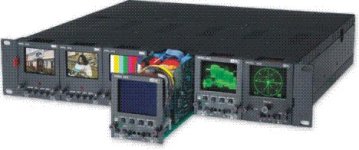
I am fairly new to video filming and editing. I don't know too much yet. It is my expensive hobby. Professional broadcasters that film live television must have something to make their signal broadcast legal in real time. I am guessing it is some expensive piece of equipment. I don't know because I am just some average Joe with a camcorder. Maybe all I need is a "live histogram." Maybe it would be nice to have a seperate external LCD screen that displays a live histogram. Maybe a live vectorscope too. I would like to measure my chrominance with a live vectorscope. PAL and NTSC vectorscopes are slighty different. It would be nice to have both. I think all my Canon GL1 has is a zebra mode, that warns if the image is overexposed.
Please comment, do others think a live histogram and vectorscope are a good idea. Do most pros have or use them? I think someone else already posted that as their entry into the contest, so my idea is not original or eligible.
 

Attachments

  • 20000.jpg
    20000.jpg
    35.5 KB · Views: 0
Last edited:
scrap that idea

scrap that idea

Sorry for not researching more before I post things, but I was brain storming.
It seems all I need is Joe' Broadcast Legalizer. Final Cut Pro sucks as far as their broadcast safe filter. I sure could have used Joe's or a similar product insead of editing every clip manually. I feel like an idiot. Apple needs to improve FCP like they improved QuickTime when they incorperated Sorenson codec into it. Joe's makes a noise ruduction filter too.

My idea might take too much computing power to be realistic. Maybe in the future it will be possible. The Digital ICE on my Nikon scanner takes a while just to remove the graininess from one slide. I wonder how much computing power would be required to have a realtime noise reduction filter applied to video. I wonder what kind of computing power the RED camera will have.

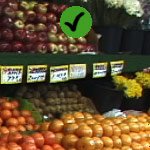
The following is coppied from Joe's website. I found it just now by Googling it. I don't know if their company or product is any good.
www.joesfilters.com

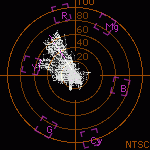
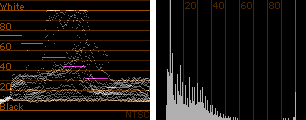
Joe’s Broadcast Legalizer uses a different strategy than Final Cut Pro’s Broadcast Safe filter. Joe’s Broadcast Legalizer performs a slight full-range correction to the entire image while FCP’s Broadcast Safe filter rolls off out of range values. There are advantages and disadvantages to both strategies and both can be used to bring video within NTSC broadcast standard levels.

All corrections are based on the on the maximum reported value range of 0-116 IRE. Output values have been calibrated against Final Cut Pro’s Video Scopes. Please check your output levels on external equipment whenever possible.

Joe’s Broadcast Legalizer also works with Final Cut Express and all versions of Final Cut Pro since 1.2.5.
 

Attachments

  • joes_broadcast08.jpg
    joes_broadcast08.jpg
    10.5 KB · Views: 0
  • joes_broadcast-scopes8.gif
    joes_broadcast-scopes8.gif
    4.1 KB · Views: 0
  • joes_broadcast-scopes2.gif
    joes_broadcast-scopes2.gif
    3.6 KB · Views: 0
Last edited:
Back
Top