Bought a Marshall 5 inch Monitor V-LCD50-HDMI Not sure if it is worth it

draven4

Well-known member
Hello all,

Yesterday after much thought on what I should spend money on next I purchased a Marshall HDMI 5 inch monitor. Now I'm not sure if it is worth it. Maybe some of you can help by letting me know if I am missing something in the settings but here's the issue.

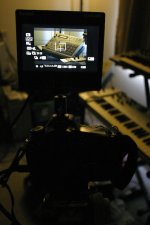
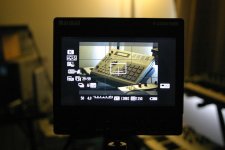
1) when I power it on and see though the monitor, even though it technically is showing 16x9 there is still some pillar boxing. Now I've went through the menu and I made sure I set up the monitor correctly. I just noticed that while the monitor is using most of the space in the LCD it does not fill it completely up. Now is this just the way it is? If so we are kind of loosing out because the camera is not using the full LCD so the image is slightly smaller that what it can be if it filled the whole screen. So what am I paying for? Also I pressed the info button on the 7d and I can see it affect how much fills the screen. Like when all the info is being displayed it shows all of it on the sides, taking up more pillarbox space making the image smaller.

2) not terribly happy about having to power this thing with AA batteries. I know the more expensive versions can accept all different types of batteries including Canon but why could they not have added this feature on this model too. I know many will say cost but if it were 200 more I would have paid for it still.

The image is slightly bigger than the LCD on the body of the 7d but it's not a huge difference even though it is a difference. Am I the only one who feels this way.
 
Last edited:
With the info display this is how much I'm left with. It is literally slightly bigger than the LCD on the 7d.


Marshall_5inch__00003.jpg
Marshall_5inch__00002.jpg
 
I'm liking my LCD50. Ya the image is a bit smaller, but it's still better than the 7d lcd. Just for the fact that it's so small and light, throw it on a noga arm and you can put it anywhere.
 
Marshal makes a great monitor. But like you say, it's only slightly bigger than the stock LCD. I guess if it helps you to focus better it was a worth while purchase. I wouldn't go smaller than 7". But thats me. I agree about the AA batteries though. I wouldn't purchase a monitor with AA batteries unless I knew I could get at least three hrs with them. If your not happy, can you retun it?
 
Yeah, hear you on the noga arm. That's a great thing about it. As for the quality of the image it is great and I am not complaining in that category. It's Just the size is what bothered me and how it seems like there is wasted space on the LCD. Even if I turn the INFO display off the image will fill in better but still leaves some black space so you're not really getting all the LCD you pay for IMHO.

I think I'm gonna take maran's advice and return it. (which I can) I bought it at Sammy's Camera and they have a 14 day return policy and they are usually really good about that. I think I'm gonna go ahead and spend some more and get the 7 inch Marshal V-LCD70XP-HDMI. That way I can have some more space and use a Canon rechargeable battery on it.

I am going out of town for the week but when I get back I will return it for the other one. I will post if I like the new one better or not in case this will help anyone on buying it.

I read the article that naveenmedia posted and I think the DP6 monitor might be something to think about too. I especially like that it has a USB connection built in for firmware updates, something that I was shocked to see that the Marshall didn't have since it seems like firmware updates might be a good thing nowadays.

Also if anyone had a better recommendation than the 7inch Marshall please let me know.
 
Last edited:
Return it. There is a lot of documentation available online that speaks to exactly what you are describing regarding the amount of the image that fills the screen on the external monitor. I personally own a 7D and a Small HD DP6 and I feel that is the best combination of camera to monitor size. You want something larger than the camera lcd, but not so large that your center of gravity is affected. Also, I highly doubt Marshall will be as quick to come out with feature-adding firmware updates like SmallHD is.
 
In doing some more reading, I have to ask if you're setting the pixel-to-pixel mapping on the monitor. If so, you should be getting exactly what the 7D outputs on the monitor. So if there is pillar-boxing (the black bars on the sides), that's what you'll get with ANY monitor (unless you want a stretched image to fill the screen).

What is the output resolution of the 7D? With the 5DMkii and the T2i it's only 480p. If the 7D is the same you're not going to get anything better than what you have (I think).
 
I had some of the same issues with the monitor and my T2i, but I am keeping it because of the False Color exposure mode. With the push of a button, it gives me an equivalent to zebras that the DSLRs don't have naturally. It also does make focus a lot easier to find than using the LCD.

I think the SmallHD with it's automatic frame-size correction would probably be a better monitor for the T2i, but it is $900 vs the $500 Marshall.

I just wish the T2i could keep the LCD and HDMI output up at the same time. It would have been nice to use my LCDVF for focus, and be able to glance at the Marshall for exposure, but it was not to be.
 
After looking into things I will be returning the Marshall tomorrow and ordering a DP6 monitor. It has so much more to offer at 900 bucks. It has the option to be powered by two canon batteries giving 4hrs worth of time, usb port for firmware upgrades, good resolution, good build, lots of slots for presets and a pretty well designed menu and hardware button for the menu.

Seems worth it to me. Only thing that sucks is that they are on back order but I think I can wait it out in the meantime.


naveenmedia
As for the Pixel to Pixel setting, that has nothing to do with resizing to fit the screen. What that does is it basically shows pixel for pixel the image, so it actually will appear to zoom in and you will only see a portion of the image that is able to fix on screen but it will be 1 to 1 pixel so you can focus if you need to on whatever is exactly dead center. So for example if you were in photoshop and you zoomed in at 100 percent on a monitor that is less than the pixel resolution of the image you would only see a portion of it and the rest of the image would run off screen and you would not see whatever is off screen. So that doesn't solve it. Hope this makes sense.
 
Back
Top