Blue Channel Blocking With EVA1 and oversaturated yellow

Amulet Man

Well-known member
Very strange problem.

Bright yellows lose information in the blue channel more under certain white balance than others.

Panasonic LUTs handle this surprisingly well. I have no idea how the NICEST LUT manages to address this, but it does quite well. However, it leaves a dramatically oversaturated yellow image that was an issue with the Varicam, too.

Still annoying and a bit difficult to work with.

https://www.dropbox.com/sh/ai1eankbprw1rfx/AADtUa8d_R_3MXco_bKHERY9a?dl=0

These are different white balance settings at 2500 ISO. Oddly 4300K I think it is blocks up the worst. Is this a problem or a feature?
 
Here's a couple of dumb questions for you:
- What was the white balance of the room (and/or the practical, itself?
- How did you go about matching each shot?
- Cake or pie?
 
Here's a couple of dumb questions for you:
- What was the white balance of the room (and/or the practical, itself?
- How did you go about matching each shot?
- Cake or pie?

It's a fluorescent. Unmarked but looks like 2700K.

These are ungraded V log.
 
I can see that the 4300K is the worst. Is this 4300K an untreated native VLOG grab? If so I find I can balance the RGBs in Resolve although the shot would be useless for further grading. The drop in Blue and the over driven Yellow bias is so strong it makes me think something very funky is going on at the sensor to outputting this sort of image to LOG. Generally if I get footage coming in looking like this which I have had in the past is to create a correction LUT purely to fix the Yellow deviation. This I then apply this to the LOG image first to bring the image back to a "neutral" LOG starting point. After which I can manually grade using LGG adjustments or apply a 709 LUT or whatever.

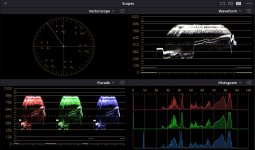
Below is a scopes image of the balanced RGBs in Resolve but as I say the image was useles for any further grading. Or that's my experience at least.

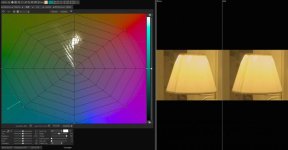
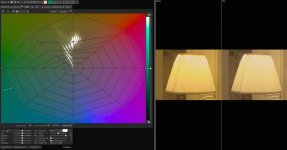
The further two images are the VLOG4300K you supplied and the VLOG4300K with the Yellow bias corrected to a closer match to your VLOG5600K image. If you look at the Spider web vectors you will see how much deviation has to be corrected in the Yellow/Green channels. Adjusting this generally allows me to create a bias correction LUT I can use in Resolve or most any other NLE that accepts LUTs.

Can you supply an untouched VLOG image of the whole scene with skin tones in it if possible? If you can it would be interesting to see if a correction LUT could be created that allows further decent grading on an image that starts this far from neutral. It would be an interesting exercise!

Chris Young

Resolve correction on VLOG4300.jpg Yellow original.jpg Yellow reduction.jpg
 
The 27H and 2700 would go very yellow with high white balances. We had to start balancing on grey instead of white, a lot of times. It was really weird and frustrating(not to mention Fn you) in the beginning, because the cameras just didn’t behave the way you expected after all the years of conditioning, knowing how and what your “Betacam” would do and look like in those same situations.

I also remember running across an article, maybe on a home theater forum, years ago. Go back and look at a lot of movies from 10-15 years ago when DI and HD really started to take hold and notice how yellow the skin tones are.
 
Back
Top