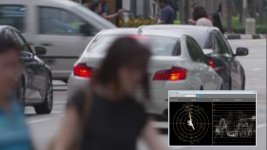
EVA1: Bleeding colours on Scene 2 on EVA1

Hi all,

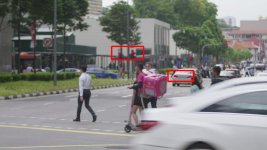
Would like to check if anyone have experienced such issues on "SCENE 2" profile on the EVA1. It happens alot when I am shooting against strong blue stage light LEDS or rear brake lights on cars or traffic lights.

1080 422 all i.jpg

1080 422 all i 2.jpg

Let me know if anyone has issues with this.

Thanks!
 
I can only offer a theory here, but it appears to me blown out luma is what may be causing the "bleed." Scene 1 and 2 may appear closer to rec709 than V-log, but bright white should still only be exposed to around 70/80 ire, respectively, with those settings.

Do the green and yellow traffic lights in that same shot "bleed" as well? Where do these lights fall on your waveform (untreated footage)? I'm guessing that you are past the point of recovering detail when dialing down the extreme highlights because those lights were shot at 80+ ire.
 
Last edited:
I can only offer a theory here, but it appears to me blown out luma is what may be causing the "bleed." Scene 1 and 2 may appear closer to rec709 than V-log, but bright white should still only be exposed to around 70/80 ire, respectively, with those settings.

Do the green and yellow traffic lights in that same shot "bleed" as well? Where do these lights fall on your waveform (untreated footage)? I'm guessing that you are past the point of recovering detail when dialing down the extreme highlights because those lights were shot at 80+ ire.

I do not notice on the yellow light, but i remember the green light was fine. It's always the Red lights thats bothering me and the offline editor feedback to me on this portion. I remember shooting stage lights as well and the blue bleed as well. even when i expose way under the proper exposure. It got me worried so I did not shoot that in EVA1. Had to use another camera to just shoot those cutaways.

Same setting. Using the SCENE 2, 1080p 422 ALL I.
 
A quick view on the Vector scope on a cropped section of picture #1 shows the red channel saturation is off the planet. Regarding the luma levels it doesn't look too far off. I find this quite common with some of the Sony cameras as well. So much so that I only run my own custom 709 type scene files. This chroma overdrive and phase vector of channels can usually easily be fixed in the Matrix and Sub Marix or Multimatrix if the EVA1 has one.

Red channel clip Scopes.jpg

Chris Young
 
Last edited:
A quick view on the Vector scope on a cropped section of picture #1 shows the red channel saturation is off the planet. Regarding the luma levels it doesn't look too far off...... This chroma overdrive and phase vector of channels can usually easily be fixed in the Matrix and Sub Marix or Multimatrix if the EVA1 has one. Chris Young

You're right: the chroma channels can be affected by tweaking the Matrix settings (and yes, EVA1 has them). However, before you start diving in to paint your shots at that level, I would highly recommend that you eliminate all other potential causes for the red bleed first.

For one, and this is assuming that the still that was scoped above is from untreated/ungraded footage, it's clear that the exposure is about 17-20 ire too hot for the Scene 2 (V-504580L1) gamma, which should be shot at about max 80 ire, not 100. Before you start playing around with the matrix settings, I would first do some exposure tests with a color chart (which you should use for tweaking the matrix anyway). You really don't want to go there unless you have to.

I find this quite common with some of the Sony cameras as well. So much so that I only run my own custom 709 type scene files.

Like the EVA1's Scene 1 and 2 gammas, some of Sony's Cine/Hyper Gammas also require you to shoot a little under (100 ire). Generally speaking, if you expose each gamma how it was designed to be exposed, you rarely have to do any fiddling with the matrix settings.

Screen Shot 2018-02-06 at 3.39.27 PM.jpg
Screen Shot 2018-02-06 at 3.39.56 PM.jpg
 
Last edited:
You're right: the chroma channels can be affected by tweaking the Matrix settings (and yes, EVA1 has them). However, before you start diving in to paint your shots at that level, I would highly recommend that you eliminate all other potential causes for the red bleed first.

For one, and this is assuming that the still that was scoped above is from untreated/ungraded footage, it's clear that the exposure is about 17-20 ire too hot for the Scene 2 (V-504580L1) gamma, which should be shot at about max 80 ire, not 100. Before you start playing around with the matrix settings, I would first do some exposure tests with a color chart (which you should use for tweaking the matrix anyway). You really don't want to go there unless you have to.


Like the EVA1's Scene 1 and 2 gammas, some of Sony's Cine/Hyper Gammas also require you to shoot a little under (100 ire). Generally speaking, if you expose each gamma how it was designed to be exposed, you rarely have to do any fiddling with the matrix settings.

View attachment 130754
View attachment 130755

Thanks alot for the info guys! Will do more tests and find the sweet spot somewhere.
 
... should be shot at about max 80 ire, not 100.

Agreed. It's interesting to hear your 80 IRE comments re the Panasonic. With most of the modern, and especially the single chip CMOS cameras in general, I'm finding around 80-82 IRE to be a good max exposure limit. 90 IRE is generally my absolute max. Anything above that I find is generally recoverable if I stick to these IRE levels as a general rule. As always there are and can be exceptions. :)

Chris Young
 
So to be clear, these exposure limits that I mentioned aren't really a function of the camera/sensor, itself... rather, they pertain to different gamma settings. As I understand it (please somebody correct me if I am mistaken!):

- V-Log is about 60 ire
- V-255570L1 (Scene 1 default) is about 70 ire
- V-504580L1 (Scene 2 default) is about 80 ire

All of the above are different ways to squeeze in the full 14 stops of DR.

- VIDEO (Scene 3/4 default) is probably 110 ire. This is the straight out of the camera to broadcast look, so it probably won't clip within legal range 0-100 ire (I'm assuming).

- HLG (Hybrid Log Gamma) is rec 2020. I have no earthly idea how to shoot this, but I have a feeling I will need it someday :p


Obviously, you can push these a little bit depending on what is important in your scene, how you will grade, to reduce noise, etc. The important thing to remember is that your rule(s) of thumb should apply to the particular gamma setting that you are recording with, NOT the camera, itself.

In Charger_sar21's video, it looks like it was shot at 98-100 ire... about 20 ire above the recommended limit for V-504580L1 gamma (Scene 2). I think that is why the chroma over saturated and blew out. I've used Scene 2 a couple of times, and it is amazing how good it looks when you shoot it to spec, and then simply bump the exposure level about 1.5 stops in post. The difficult part is that, unlike recording to V-Log, there is no "V709" equivalent M-LUT to output to the LCD monitor. Therefore, when you expose for Scene 1 or 2 properly, it looks incredibly flat and under-exposed in the monitor. You really have to be vigilant about using zebras/waveform to remain disciplined. If, however, you are using an external EVF/monitor/recorder, you could probably just make your own M-LUT to provide a little reassurance :)
 
Last edited:
Back
Top