Blackmagic HyperDeck Shuttle - comments please

Shooter

Veteran
Anyone able to comment /review on the BM HyperDeck Shuttle based on their experience of the device please.

Just purchased one and awaiting delivery. I have an Intel 120GB SSD all ready for it.

I have an up coming production for which I require 4:2:2 media ....so that has driven my purchase.

Any info will be welcome and appreciated.

Something I am interested in, in advance is.....can one create folders and then select each one as the specific record folder?

Interested in ways to mount device to the camera as well. (I will fabricate a mount.)
 
Theres no file structure that you can set.

File sizes are VERY huge.

You'll get 8 tracks of audio for every video file.

Quality is great.

Right now you have to manually stop and start, there's no trigger from the sdi.
 
Anyone able to comment /review on the BM HyperDeck Shuttle based on their experience of the device please.

Just purchased one and awaiting delivery. I have an Intel 120GB SSD all ready for it.

I have an up coming production for which I require 4:2:2 media ....so that has driven my purchase.

Any info will be welcome and appreciated.

Something I am interested in, in advance is.....can one create folders and then select each one as the specific record folder?

Interested in ways to mount device to the camera as well. (I will fabricate a mount.)


I will be curious to see how this works for you, I've been holding off on buying one until I read something about the workflow within CS5.5.
 
Thanx Matt

Thats all good with me ( never understand the 8 audio tracks but no problem).

I bought the device because one upcoming shoot has some CGI elements to it and the CGI guys were all but demanding 4:2:2 uncompressed.
Option was hiring a RED ...until I had a brainwave.

This will work out great for my budget and also having the facility for the future. Buying it easily fits into the existing budget and is far more cost effective than hiring a RED and all the costs that goes with that workflow.

Looking forward to testing it early next week.

Got to figure how to format it from my Win7 PCs some how.

Letzring - I will let you know but I dont expect any issues at all.
 
Thank you.

I see Macdrive 9 is available ( $49.00) so I guess thats what I will buy and use to format the SSD and subsequent ones I will end up buying.

http://www.mediafour.com/store/

Already aware I should have bought a larger one initially.
120GB is 12 minutes ....which will do fine for my up coming shoot where only some of the shots need to be 4:2:2. uncompressed.
 
OK...

BM Hyperdeck Shuttle arrived and was duly unpacked.

First impressions...

Device is stylish, solid and robust. Built from a billet of aluminium.

Control buttons are precise (click action) , rubberised , back lit and recogniseable as familar tape deck controls.

Device has no obvious mounting points to anything!( A rubber pad needs to be removed to observe mounting points that will require something additional .)

WTF...the device is designed to capture from a camera. Design fail IMHO. There is an optional plate that can be purchased that does allow standard mounting points.

Operating Manual is brief and to the point but kind of thin on detail.
Lazy information provided IMHO. Just like the BM web site.

Manual does not explain the accompanying software! 'Hyperdeck Utilities and Tools'. What do they do? One needs to mount the device to find out what the app does but no idea if connection is by USB or by a docking device.

Pretty lame IMHO!

Here is the kicker...

The SDI connectors require a special adapter connector! Din to SDI-HD. Approx $80-100 for the 2 required ( SDi in / out)
Despite the space for standard SDI - HD connectors ... BM chose something weird. WTF!
Go figure designers that never have to use this stuff.

Once I get the ordered adapters ...I will report on how the device actually does its job.

I will be fine with the device as long as it performs as promised and is better than the original impression about its design flaws.
 
Yeah, the mini SDI connectors and the need to format it as a HFS+ drive are a PITA.
Macdrive 9 works good so far - I tried other solutions, but it´s the most transparent one, since the drive shows up and behaves in your explorer as a normal PC drive

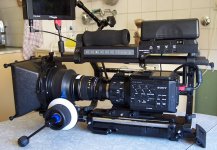
I got mine mounted this way in the moment:

Rig2.jpg

Not the most elegant way, but works pretty well for me.

I don´t have a problem with 12 minutes of recording time, that´s what film magazines used to be.
What you need is a laptop with two esata connectors, a esata docking station and a portable raid system to dump your files on, while shooting.
Loading down files via USB2 takes forever, USB3 shpuld also work, but I haven't tried yet.

When the first Thunderbolt docking stations, mobile RAIDS and PCI cards for PC hit the shelves, that will be a real game changer for the workflow.

@Letzing: I dont know how the BM footage behaves without a BM card in the computer (should work fine with just the software codec though) - even with just two software striped 2 GB drives it really flyes in Premiere. The most snappy timeline you have ever seen.

Frank
 
Thanx Frank.

I see you understand the limits of the design ( which were also immediately apparent to me).
I am going to fabricate a bracket and mount.

Macdrive 9 and my docking station using esata will not be an issue I suspect.

I have no issue with space limitations of 120GB ssd drives. I also come from a film BG and I still shoot accordingly. (roll and cut)
Whatever...12 minutes on SSD for less than the price of a roll of 35mm film is nothing.(and its re useable.)
 
Shooter, keep us posted on your results as I have been looking into this option as well.

Sure thing. I will shoot tests as soon as the SDI adapters arrive (tomorrow probably) although I could already shoot using HDMI connectors.


I am really, really hoping I can dual record to SD card and Hyperdeck simultaneously so I have comparison and ....I expect that would be my workflow in a real world situation as well. ie. shoot to both and edit with the AVCHD file. Depends if I get T/C on both clips.
 
I'd like to know the workflow, benefits of the Hyperdeck too. I don't have any uses for it at the moment, but it'd be nice to know for future shoots.
 
Frank,
I use a Ninja with my AF100 and I don't own the Hyperdeck, but I noticed this set for the BM on my local dealer's website
This is the link to the bundle BM+DIN-to-BNC cables http://www.adcom.it/product/28813_HYPERDECK+SHUTTLE+KIT.html
And here is the link to the rig http://www.adcom.it/prod_acc/28857_JOLLY+SHUTTLE.html and http://www.adcom.it/prod_acc/28891_JOLLY+SHUTTLE+ROD.html
Hope this helps
Diego

p.s. the website should have an english section, otherwise feel free to ask if you need a translation
I tried to attach images but I don't know how to do it.....sorry
 
Sure thing. I will shoot tests as soon as the SDI adapters arrive (tomorrow probably) although I could already shoot using HDMI connectors.


I am really, really hoping I can dual record to SD card and Hyperdeck simultaneously so I have comparison and ....I expect that would be my workflow in a real world situation as well. ie. shoot to both and edit with the AVCHD file. Depends if I get T/C on both clips.

Any progress?
 
Question: Is the HyperDeck Shuttle uncompressed only? Can it record Prores 422(hq)?, and if so can it record on a spinning hd instead of a ssd? I'm assuming the answer is no as there is no mention of such functionality on their website.
 
O.K ...got around to testing it yesterday with Chris


Had to wait for the adapter cables to arrive!
( Dont know why they did not use standard HD-SDI connectors!)

Immediately the fact the device has no mounting points became an issue!
(Rectifiable by fabricating a plate or buying one from BM ....but its dumb design in the first place)

Hyperdeck needs to be ON at all times to enable pass thru signal to the external monitor. Battery life is about 1 hour so that would mean a constant power supply reuirement or disconnect / reconnect when required.

Functioning of the controls on the Hyper deck - excellent. Transport buttons could be back lit a little more. They are a bit hard to see in the dark behind the camera.

Image:

Direct from camera to the Panasonic 1700 monitor there is a very subtle difference in image quality (sharpness) and a very subtle difference in color saturation.

Camera will record to internal camera SD card and the Hyperdeck simultaneously. Thats cool. Both require on / off independently ( no problem)

Playback to external monitor works from camera and Hyperdeck as one would expect .

The same image quality subtleties were observed in playback on set and also in the edit suite once clips were ingested.

Hyperdeck plays back in a linear fashion. ie No thumb nails but it is simple and works fine.

Audio is recorded to the Hyperdeck via the SDI cable.
12 tracks of audio recorded to the clip ( wtf). Easy to modify and map in Premiere.

Timecode is not recorded to the Hyper deck. I was hoping that it would to make dual recording workflow easy.
(I am investigating why TC is not recorded. Maybe its not possble via SDI or maybe its a camera setting or maybe the Deck can not do it)

File sizes are massive from the Hyperdeck . uncompressed QT movs - 10bit 4.2.2

Movs : 11 sec clip = 970.4 MB
AVCHD: 13 sec clip= 33.2 MB

(Same shot but Camera was rolled to record before the Hyperdeck

Total media for this very short test ( 3 clips total duration approx 30 secs)
Mov = 2.9GB
AVCHD = 96.2 MB

Test: Clips will be taken into a Resolve Suite to see if there is any advantage in the 10bit 4.2.2 files over the AVCHD files.

Ingesting from the SSD via a docking station (esata) is rapid and an efficient workflow.

My conclussion to date :

The AVCHD codec is excellent and the high compression stands up visually so well compared to the uncompressed movs. The visual difference is so subtle and needs very intense scrutiny to see it at all.. I am wondering if there is any value at all in using the Hyperdeck for anything regarding acquistion ( via camera) .

Darn... I forgot to test VFR (Will do so next time).

BTW: the uncompressed file played fine in Adobe Premiere CS5.5x but I would not wish to manage the file size. Thats why I had hopes of dual record and match TCs.

It is not even worth posting screen grabs. The subtleties would be lost and un apparent.
 
Thank you for that. My questions now are, can the MOVs be pushed around harder in post? Not at all, a little, a lot? Given the added complexity, overhead, etc., would you say the main remaining reason (redundant recording) is worth it? Would a simpler device such as the Ninja/Samurai/NanoFlash, or even the PIX 240, possibly be better?
 
O.K ...got around to testing it yesterday with Chris


Had to wait for the adapter cables to arrive!
( Dont know why they did not use standard HD-SDI connectors!)

Immediately the fact the device has no mounting points became an issue!
(Rectifiable by fabricating a plate or buying one from BM ....but its dumb design in the first place)

Hyperdeck needs to be ON at all times to enable pass thru signal to the external monitor. Battery life is about 1 hour so that would mean a constant power supply reuirement or disconnect / reconnect when required.

Functioning of the controls on the Hyper deck - excellent. Transport buttons could be back lit a little more. They are a bit hard to see in the dark behind the camera.

Image:

Direct from camera to the Panasonic 1700 monitor there is a very subtle difference in image quality (sharpness) and a very subtle difference in color saturation.

Camera will record to internal camera SD card and the Hyperdeck simultaneously. Thats cool. Both require on / off independently ( no problem)

Playback to external monitor works from camera and Hyperdeck as one would expect .

The same image quality subtleties were observed in playback on set and also in the edit suite once clips were ingested.

Hyperdeck plays back in a linear fashion. ie No thumb nails but it is simple and works fine.

Audio is recorded to the Hyperdeck via the SDI cable.
12 tracks of audio recorded to the clip ( wtf). Easy to modify and map in Premiere.

Timecode is not recorded to the Hyper deck. I was hoping that it would to make dual recording workflow easy.
(I am investigating why TC is not recorded. Maybe its not possble via SDI or maybe its a camera setting or maybe the Deck can not do it)

File sizes are massive from the Hyperdeck . uncompressed QT movs - 10bit 4.2.2

Movs : 11 sec clip = 970.4 MB
AVCHD: 13 sec clip= 33.2 MB

(Same shot but Camera was rolled to record before the Hyperdeck

Total media for this very short test ( 3 clips total duration approx 30 secs)
Mov = 2.9GB
AVCHD = 96.2 MB

Test: Clips will be taken into a Resolve Suite to see if there is any advantage in the 10bit 4.2.2 files over the AVCHD files.

Ingesting from the SSD via a docking station (esata) is rapid and an efficient workflow.

My conclussion to date :

The AVCHD codec is excellent and the high compression stands up visually so well compared to the uncompressed movs. The visual difference is so subtle and needs very intense scrutiny to see it at all.. I am wondering if there is any value at all in using the Hyperdeck for anything regarding acquistion ( via camera) .

Darn... I forgot to test VFR (Will do so next time).

BTW: the uncompressed file played fine in Adobe Premiere CS5.5x but I would not wish to manage the file size. Thats why I had hopes of dual record and match TCs.

It is not even worth posting screen grabs. The subtleties would be lost and un apparent.

Somehow I'm not surprised by your results although I am interested in hearing your impressions after looking things over in davinci/resolve. What is your QC monitor?
 
Back
Top