
Navigation
Install the app
How to install the app on iOS
Follow along with the video below to see how to install our site as a web app on your home screen.
Note: This feature may not be available in some browsers.
More options
You are using an out of date browser. It may not display this or other websites correctly.
You should upgrade or use an alternative browser.
You should upgrade or use an alternative browser.
Other: BlackMagic Cinema camera!!!! 2.5k for 3k...
- Thread starter Mickey G
- Start date

PaulVortex
Member
Someone suggested that the D16 from Digital Bolex doesn't have HD-SDI (which will come later as an addon module), and then compared that to the fact that the BMDCC does have HD-SDI at the same price point. I think that's an interesting feature to note.
However, I would ask that we bear in mind the fact that Digital Bolex are a very small scale startup who would have to buy in SDI at a certain price point... Blackmagic Design on the other hand, have a large number of products which already make use of SDI. As such, they can leverage their stronger buying power in order to bring the HD-SDI to this camera at a lower price point than would be possible for Digital Bolex.
The Digital Bolex will provide HD-SDI as an optional module at a later date. As I understand, it will be priced similarly to the camera itself. So, it looks like an added bonus on the BMDCC. Even so, it would be wrong to compare the two situations as if they were like for like. In essence, the HD-SDI is superfluous to the goals of the D16. So, it's absence from the camera ought not to be viewed as a "missing feature".
I think the BMDCC looks amazing... I'll definitely be picking one or two up at some point.
As one of the circa 100 people who put down their hard-earned on the D16, I want to point out that I'm most certainly not banging my head on the keyboard at this announcement. I am over the moon. Look at where we are now... Six months ago, with the disappointment of Scarlet, I think there were not many of us who could have predicted that we'd be in this incredible position today. Having TWO digital cinema Raw cameras to choose between. It's a good time to be a filmmaker.
The D16 and the BMDCC both have a lot going for them. Personally, I'm leaning my preference towards the D16 at the moment, simply because it has a sensor size much closer to my desired S16 format, as well as the lens mount options to suit that format. However, I very much rate the fact that the BMDCC shoots straight to a removable SSD. That is a great feature.
So, basically, I'm over the moon with this announcement - I've really enjoyed reading everyone's enthusiastic discussions here on the boards (and elsewhere). Here's to both, Digital Bolex and Blackmagic Design. What a year!!!
However, I would ask that we bear in mind the fact that Digital Bolex are a very small scale startup who would have to buy in SDI at a certain price point... Blackmagic Design on the other hand, have a large number of products which already make use of SDI. As such, they can leverage their stronger buying power in order to bring the HD-SDI to this camera at a lower price point than would be possible for Digital Bolex.
The Digital Bolex will provide HD-SDI as an optional module at a later date. As I understand, it will be priced similarly to the camera itself. So, it looks like an added bonus on the BMDCC. Even so, it would be wrong to compare the two situations as if they were like for like. In essence, the HD-SDI is superfluous to the goals of the D16. So, it's absence from the camera ought not to be viewed as a "missing feature".
I think the BMDCC looks amazing... I'll definitely be picking one or two up at some point.
As one of the circa 100 people who put down their hard-earned on the D16, I want to point out that I'm most certainly not banging my head on the keyboard at this announcement. I am over the moon. Look at where we are now... Six months ago, with the disappointment of Scarlet, I think there were not many of us who could have predicted that we'd be in this incredible position today. Having TWO digital cinema Raw cameras to choose between. It's a good time to be a filmmaker.
The D16 and the BMDCC both have a lot going for them. Personally, I'm leaning my preference towards the D16 at the moment, simply because it has a sensor size much closer to my desired S16 format, as well as the lens mount options to suit that format. However, I very much rate the fact that the BMDCC shoots straight to a removable SSD. That is a great feature.
So, basically, I'm over the moon with this announcement - I've really enjoyed reading everyone's enthusiastic discussions here on the boards (and elsewhere). Here's to both, Digital Bolex and Blackmagic Design. What a year!!!
Last edited:

KyleProhaska
Veteran
Yea I wish I had the money to plop down on a pre-order at the moment but I don't. I've bought too much gear in the last 2 years that I was really sure about, purchased then wasn't as satisfied when it showed up in the mail. I like to be really sure before I plop down the cash even if that means I'm last in line. I trust Kholi's word more then most, so if he says it's better then GH2 then I'm pretty well sold LOL...but that doesn't mean I would turn down the op to see a RAW DNG out of this thing. With all the mistakes I've made with gear lately, it's hard for me to swallow putting anything down for ANYTHING lately haha.
Congrats to the early adopters...
Congrats to the early adopters...

refocusedmedia
Veteran
Exclusive interview with John Brawley:
http://www.eoshd.com/content/7943/n...ohn-brawley-panasonic-af100-successor-deleted
http://www.eoshd.com/content/7943/n...ohn-brawley-panasonic-af100-successor-deleted
from John Brawley blog
"Arief B says: April 17, 2012 at 2:32 pm
I’m curious with frame rate option this camera offers. Does it offer above 60fps for slo-mo work?
Reply - johnbrawley says: April 17, 2012 at 9:42 pm
They really can’t troll yet exactly what the frame rate options will be. It’s more to do with the processing in the camera rather than the sensor. I believe the sensor is certainly capable of doing much higher frame rates."
hardware can't sustain high fps...
maybe we can get higher frame rates in crop s16mm mode ....
"Arief B says: April 17, 2012 at 2:32 pm
I’m curious with frame rate option this camera offers. Does it offer above 60fps for slo-mo work?
Reply - johnbrawley says: April 17, 2012 at 9:42 pm
They really can’t troll yet exactly what the frame rate options will be. It’s more to do with the processing in the camera rather than the sensor. I believe the sensor is certainly capable of doing much higher frame rates."
hardware can't sustain high fps...
maybe we can get higher frame rates in crop s16mm mode ....
anyone used davinci resolve on windows?
Is it user friendly like Magic Bullet Suite?
thanks
Please stay on topic. This thread is about the camera.
That said, DaVinci Resolve is far more complex than MBS, and works as a standalone app (outside of your NLE). It's userfriendly for what it does, but it does way more than MBS so it's harder to learn and master. You can download and play with the free version (wich have very few restrictions) if you have a compatible GPU.
Please don't follow up on this post (stay on topic ;-)
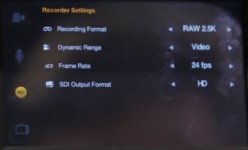
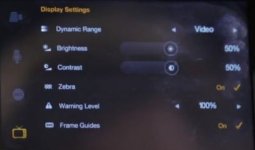
I got the feeling he thought that they looked worse than average -- muddy, poor dynamic range (even for video).I noticed a "dynamic range" setting in the menu was set to video on the nab demo cameras (from this video). I'm guessing that could explain the images from them looking pretty average to Mcgee who saw it in person. I'm guessing there's a film or a raw setting.

Hectorxd
Well-known member
Please stay on topic. This thread is about the camera.
That said, DaVinci Resolve is far more complex than MBS, and works as a standalone app (outside of your NLE). It's userfriendly for what it does, but it does way more than MBS so it's harder to learn and master. You can download and play with the free version (wich have very few restrictions) if you have a compatible GPU.
Please don't follow up on this post (stay on topic ;-)
The camera comes with DaVinci Resolve to process the footage, right? Why can't someone ask a question that might benefit others and why not attack the 100+ post that say, "WOW, Cool camera, cant wait!"
The camera comes with DaVinci Resolve to process the footage, right? Why can't someone ask a question that might benefit others and why not attack the 100+ post that say, "WOW, Cool camera, cant wait!"
thanks for backup. I ALREADY bought the camera - Im on to post - LOL

Mark Williams
Veteran
DaVinci Resolve comes with the camera. Does it work with windows or not. Simple question.

No issue about inquiring about Resolve, so far as it relates to processing post acquisition footage.
After all, it is part of the package and directly related to raw footage.
Here is the DaVinci Resolve product page.
After all, it is part of the package and directly related to raw footage.
Here is the DaVinci Resolve product page.
yesDaVinci Resolve comes with the camera. Does it work with windows or not. Simple question.

Cory Braun
Well-known member
View attachment 52106View attachment 52107
Both recording and display is set to video. Remember it's an aquisition device, not a monitoring or playback device. Shooting raw really negates the need for an acurate display. Can't wait to get a raw DNG file to play with to really see what this is capable of.
I think I saw on twitter a couple of stills have been released. I think it was EOSHD who retweeted it.
The best thing about this camera is that BM (as they tend to do) used more user friendly recording options- no more 10x overpriced P2 cards, heavily compressed XDCAM HD, AVCHD formats or Canon MJPEG format (which is terrible). Simple SSD drive with RAW, ProRes or DNxHD. Another thing is Thunderbolt port- Sony, Canon, Arri create some fancy ways of passing 4K data/high bandwidth- BM added Thunderbolt port and this give massive 10Gbit/sec bandwidth, which can also be used in many ways- not only to pass recorded data. It can even pass power to camera and also does not look like it cost a fortune to implement- maybe less than SDI port? Yes- only MACs have it for now, but in next months there should be wave of new PCs with Thunderbolt.
There will be probably problems with to slow SSD drives, but this is easy to sort out, by buying good SSD drive.
BM puts simple ideas together, where other companies to often complicate thing without any reason- like Canons idea of 8bit 4K MJPEG recording- total nonsense for me.
I think it's the most innovative camera and BM deserve credit for it.
There will be probably problems with to slow SSD drives, but this is easy to sort out, by buying good SSD drive.
BM puts simple ideas together, where other companies to often complicate thing without any reason- like Canons idea of 8bit 4K MJPEG recording- total nonsense for me.
I think it's the most innovative camera and BM deserve credit for it.
Last edited:
Re- powering with drill batteries. Long Valley Equipment used to make an adapter for the Arri Sr2 that allowed it to run on standard Dewalt 12v batteries. Which are much cheaper obviously than film/video industry battery packs. This was back in the Nicad days, they've gotten so much better since lithium. Things got complicated when the drill batteries got bigger than the max input voltage of cameras, so you would need some kind of voltage regulator to control the output. But with this input that allows from 12-30v dc, this should be a non issue.
I just checked the rating on my rigid 18v lithium batteries and they are rated for 26wa, or 26 watts for an hour. Now I don't know what the power requirements of the camera are, but can't be very much given the run time of built-in cells. The biggest broadcast type camera I ever had ran on less than 26w and that was with a tape drive.
So for those DIY types that are handy with a soldering iron. Go out and get a nice cordless drill kit with charger, 2 batteries and a bonus flashlight. The flashlight is the important part as you'll tear that apart to make the adapter. When you get all frankenrigged you should be able to run your monitor as well. If you spring for a contractor grade kit the batteries will recharge in about 15 minutes. The drill is always handy around the house too.
I just checked the rating on my rigid 18v lithium batteries and they are rated for 26wa, or 26 watts for an hour. Now I don't know what the power requirements of the camera are, but can't be very much given the run time of built-in cells. The biggest broadcast type camera I ever had ran on less than 26w and that was with a tape drive.
So for those DIY types that are handy with a soldering iron. Go out and get a nice cordless drill kit with charger, 2 batteries and a bonus flashlight. The flashlight is the important part as you'll tear that apart to make the adapter. When you get all frankenrigged you should be able to run your monitor as well. If you spring for a contractor grade kit the batteries will recharge in about 15 minutes. The drill is always handy around the house too.
No issue about inquiring about Resolve, so far as it relates to processing post acquisition footage.
After all, it is part of the package and directly related to raw footage.
Here is the DaVinci Resolve product page.
Yes- and even latest 8.2.1 beta adds support for DNG files.