Black Friday Specials

Symbolism is one we often overlook, and yet it is often the most prevalent one. They make cameras that look like they embody the ideals of the consumer. Boxy and utilitarian was all the rage when the F5/55 came out, and told camera buyers that the F5/55 was a modern and utilitarian tool... they just got so excited about their new fresh design, they forgot a few more traditionally proven ways of doing things. Combine that with manufacturing limitations, or short cuts, whichever, and you get the enigma that is the F55. A good camera that is also a not so great camera? Haha. The blocky design was not particularly adaptable or modular, except for the one option, the R5 and the replacement R7 recorders. So, in the end, the design served little function.

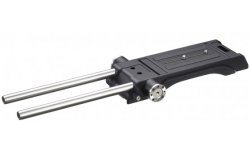
Sony offered VCT-FSA5 from the start.
ezgif.com-webp-to-jpg (2).jpg

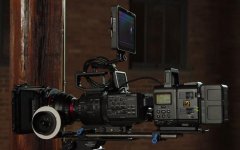
F55 came quite 0K, if you remember FS700 with HXR-IFR interface and R5 attached.
ezgif.com-webp-to-jpg (3).jpg

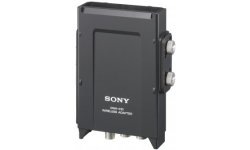
For two channel slot-in wireless audio, just use DWA-01D digital wireless receiver adaptor.
ezgif.com-webp-to-jpg (4).jpg

I use it on with switch set to AES/EBU, both on adaptor and my CANON camera.
 
White Balance and Preset and Memory should be physical switches. .

I understand the advantages of physical switches for gain and WB. But I much prefer a wheel. I have wheels on A7SIII for WB Kelvin, iso, and aperture. Very fast to fine-tune everything. The only bear is it can take a little time to make a big jump in WB. But the advantage is I can fine-tune.

On GH5 in WB submenu (accessible with physical button) you have 4 presets adjacent to variable Kelvin setting. That was best, although it took one push to get into the menu and start switching around. But you could do it all without looking
 
I understand the advantages of physical switches for gain and WB. But I much prefer a wheel. I have wheels on A7SIII for WB Kelvin, iso, and aperture. Very fast to fine-tune everything. The only bear is it can take a little time to make a big jump in WB. But the advantage is I can fine-tune.

On GH5 in WB submenu (accessible with physical button) you have 4 presets adjacent to variable Kelvin setting. That was best, although it took one push to get into the menu and start switching around. But you could do it all without looking

What I mean is an actual switch/button to activate the “auto white balance” function(what it’s actually called on the camera)(or what most people on here would actually call a manual white balance)(it’s not actually putting the camera into some sort of auto tracing/tracking white balance mode). On ENG cameras, there is a three position toggle switch on the side of the body for the A, B and preset WB memory. There is a toggle switch on the front of the camera that activates the black balance and white balance function. If you move the side toggle to say ‘A’ and then hit the WB(while pointing the cam at something white or grey[or cheating a balance on another color]), it balances and then stores that in the ‘A’ bank. Same thing for ‘B’. And obviously the ‘Pre’ position is the preset WB corresponding to the filter wheel position(i.e: 3200k, 4300k, 5600, 6300, etc.). A lot of cameras also allow for customization of the preset color temp of a given filter wheel position. And also “dialing in” of the WB on one of the memory positions(usually by the menu dial). But the real usefulness of that depends on the camera. It’s all very quick and allows you to move between stored and preset WB’s incredibly quickly. It’s very useful, too, when making “live” transitions between spaces with different lighting/color temps. An example is if I’m shooting outside and I have to follow or precede someone inside, then I can set my WB for outside in one position and the WB for inside in the other position (there is also an internal menu option for the camera to “dissolve” between the WB positions instead of just jumping and I always leave that on) and as I make my transition between the two spaces(say crossing through the door or just inside as I get more away from the daylight) I simply switch between the two positions and the camera transitions from one WB to the other and you get a smooth, essentially seamless transition from daylight to tungsten or whatever the temp may be inside.
 
I understand the advantages of physical switches for gain and WB. But I much prefer a wheel. I have wheels on A7SIII for WB Kelvin, iso, and aperture. Very fast to fine-tune everything. The only bear is it can take a little time to make a big jump in WB. But the advantage is I can fine-tune.

You can’t really compare ergonomics for the right hand with ergonomics for the left.

Because mirrorless cameras settings are primarily controlled by the support hand (right), the hand never leaves that position. Once it does, the whole interface becomes compromised and less efficient.

The controls on, say the P2 Varicam, allow the left hand to return and very quickly make a change. It is designed to allow the free hand (left) to leave and return without losing much efficiency.


Both systems are great, but they are designed with different philosophies in mind.
 
I'm just talking about toggle vs dial. I like having a WB dial and find a toggle somewhat limiting. It depends on how careful you need to be with your WB due to SOOC or not. But even in a single mixed-lighting location, you may want to employ 3 color temps - one favoring window light, one favoring tungsten, one splitting the difference. And then the sun may be setting, and there could be different colored artificial lights in play.
 
The toggles are for activating and also moving between the memory positions, not “dialing it in”. Or are you saying that the system you use has more than three memory positions and the dial allows you to access those “more than three” memory positions?
 
I'm just talking about toggle vs dial. I like having a WB dial and find a toggle somewhat limiting. It depends on how careful you need to be with your WB due to SOOC or not. But even in a single mixed-lighting location, you may want to employ 3 color temps - one favoring window light, one favoring tungsten, one splitting the difference. And then the sun may be setting, and there could be different colored artificial lights in play.

I get that. Just like we all like to set up our office the way we set it up. It is personal. You know how you like things, and where to find things.


I did like the Canon implementation on their DSLR's. Usually a fairly quick two or three step process of finding the buttons for iso or WB up top, and then a quick rotation to the desired setting, and some sort of confirm.


The Varicam and most modern ENG cameras have a 3 position toggle for the white balance. A, B, and Preset. As well as having an AWB and ABB lever on the front of the camera.


With how many different types of synthetic light we have, ENG layout would have to modernize a little bit, (and I am sure they have, but I've not used one yet) maybe add a hue shift to the layout. Or a universal dial that allows quick access to some lesser used features, and fine tuned settings. But I generally had Tungsten, Daylight, and Flo/LED... but...

...Here is the thing you do not understand because you have never use a professional news camera, and that is how good and fast setting up custom white balance is. You get into a tricky situation, either use a grey card, a white shirt, or clouds or concrete, or something and at the press of a button, you have a white balance that is incredibly nuanced and accurate.... it takes all of 1 second.
 
Last edited:
Sony offered VCT-FSA5 from the start.

View attachment 141566

F55 came quite 0K, if you remember FS700 with HXR-IFR interface and R5 attached.

View attachment 141567

For two channel slot-in wireless audio, just use DWA-01D digital wireless receiver adaptor.

View attachment 141568

I use it on with switch set to AES/EBU, both on adaptor and my CANON camera.

Wow, these are relics. The FS700 was one the ultimate symbolic design. It wasn't even really a box design, but they tried to make it look like one. haha.
 
The toggles are for activating and also moving between the memory positions, not “dialing it in”. Or are you saying that the system you use has more than three memory positions and the dial allows you to access those “more than three” memory positions?

No, I understand the toggles. I think my fs7 is the same way. My issue is it's hard to change the "preset" unless I'm doing something wrong

On the A7SIII, I can map my front wheel to color temperature in kelvins if I'm in that mode (c. Temp or whatever they call it) and just start spinning the wheel to make changes. There are 3 custom color balances I can save. But I need to push a WB button and then joystick or rear-dial button up and down to switch between them

There is also "shockless WB adjustment" with 3 settings from fast to slow

I have ISO mapped to rotating the rear dial with no button pushing necessary. I have SS unmapped and need to push a button to change my buttons mode to access it
 
No, I understand the toggles. I think my fs7 is the same way.

On the A7SIII, I can map my front wheel to color temperature in kelvins if I'm in that mode (c. Temp or whatever they call it) and just start spinning the wheel to make changes. There are 3 custom color balances I can save. But I need to push a WB button and then joystick or bottom-of-rear-dial button up and down to switch between them

There is also "shockless WB adjustment" with 3 settings from fast to slow
Yes, it is a nice feature.
 
...Here is the thing you do not understand because you have never use a professional news camera, and that is how good and fast setting up custom white balance is. You get into a tricky situation, either use a grey card, a white shirt, or clouds or concrete, or something and at the press of a button, you have a white balance that is incredibly nuanced and accurate.... it takes all of 1 second.

This i have done, oh wise one.

But there are times where I'd like more than 2 or 3 settings to work with. My preference is to dial in kelvins unless the light is very tinted.

So, if you're running around a room with more than 3 WB situations in play, you're not going to keep balancing to a grey card. And AWB sucks
 
Btw there are a few cool things you can do with the Imaging Edge Mobile app. You can set aperture, ISO, color temperature, focus points, toggle between MF and AF. Maybe go to custom WBs, I forget. And of course you could do it all with your free hand. The only problem is it's your phone. No tactile button feedback, sometimes a bit twitchy to operate. You can zoom as well, albeit fixed speed
 
A deal: HBOMax is 20% off for 6 months if you sign up for 6 months by Jan 15.

Has anyone seen Raised by Wolves? Its getting bad reviews but I wish it were good
 
Has anyone seen Raised by Wolves? Its getting bad reviews but I wish it were good

I loved it, and binged my way through it in just a few days. It’s strange, but also the most original sci-fi I’ve seen in a loooong time. I found the originality really refreshing.
 
A deal: HBOMax is 20% off for 6 months if you sign up for 6 months by Jan 15.

Has anyone seen Raised by Wolves? Its getting bad reviews but I wish it were good

I loved it, and binged my way through it in just a few days. It’s strange, but also the most original sci-fi I’ve seen in a loooong time. I found the originality really refreshing.

Finished it up a few weeks ago. It's out there, but I like it. I hope there is a season two, because that last episode...
 
No, I understand the toggles. I think my fs7 is the same way. My issue is it's hard to change the "preset" unless I'm doing something wrong

On the A7SIII, I can map my front wheel to color temperature in kelvins if I'm in that mode (c. Temp or whatever they call it) and just start spinning the wheel to make changes. There are 3 custom color balances I can save. But I need to push a WB button and then joystick or rear-dial button up and down to switch between them

There is also "shockless WB adjustment" with 3 settings from fast to slow

I have ISO mapped to rotating the rear dial with no button pushing necessary. I have SS unmapped and need to push a button to change my buttons mode to access it

I can roll up and down through Kelvin temp, as well, from both preset and memory. I have a button on the side mapped to that function. Push it and then just roll the menu dial up or down.
 
This i have done, oh wise one.

But there are times where I'd like more than 2 or 3 settings to work with. My preference is to dial in kelvins unless the light is very tinted.

So, if you're running around a room with more than 3 WB situations in play, you're not going to keep balancing to a grey card. And AWB sucks

You just keep going on about how the ENG setup cannot do things... but it seems like you have never used one. You can layer on the extra sass, but I am being straight forward with you. It isn't about being smart or wise, it is about experience with a camera you've not spent much or any time with. Not sure why you have to tell me and RnG how they work.
 
This i have done, oh wise one.

But there are times where I'd like more than 2 or 3 settings to work with. My preference is to dial in kelvins unless the light is very tinted.

So, if you're running around a room with more than 3 WB situations in play, you're not going to keep balancing to a grey card. And AWB sucks

Something to think about, and you may be aware, when you just roll up and down through the Kelvin scale, you are only adjusting blue and amber. It's not like a actual white balance that also measures for and adjusts(if necessary) green and magenta offset. Some cameras do let you manually tweak those parameters, as well, but it's not usually a "front panel" adjustment. That's one of the things that always bugged me about my Vari's, you can roll through the Kelvin scale "manually", but you don't get any green/magenta compensation that way. Now on the other hand Sony cameras(even my last Betacam did this) let you manually roll up and down the color temp/Kelvin scale AND when you do it from an "auto white balance" memory position, it keeps the green and magenta offset applied.

What I would LOVE to see, since on single chip large sensor cameras, they do not use actual filters to adjust for color temp., is the same functionality and controls that we have on ENG cams. Give me the Color Correction Filter Turret Dial(but it won't actually be rolling actual filters, it will just be a control dial with indentions/positions) from our ENG cams with 3200K, 4300K, 5600K and 6300K presets(that can be set to whatever you like) and the memory position toggle(A, B, Pre). So just like on our ENG cams, you have your preset color temp for each of the four filter positions, you also have two memory positions for each of the four positions. As it stands now, on my VariCam's, I have a possible 12 color temp/WB positions.

So, for example, if the turret is on 3200K, in that position I have 3200K Preset available, as well as two memory positions(keep in mind the preset position can be dialed into whatever you like as well), then if I roll it to 4300K, it's 4300K Preset(or whatever you would like it set to) and two more memory positions tied to it. Repeat two more times for the other two turret positions.
 
That series of filter turret dial/memory positions sounds interesting.

Spinning the wheel to adjust color temp will maintain green/magenta and amber/blue hue offset. You need 3 button pushes to get into the hue offset menu. But I think it's less of a problem than perhaps it used to be as CRIs have risen. But it sounds like your turret dial would handle impure mixed light better.

I can store 3 different white balance from image presets though and switch between that and a numerical color temp setting, so that's what I'd have to do.

But certainly - running from direct sun to shade, sun going behind clouds, random fluctuations in color temp like that are good for a few hundred kelvins or so. Sun setting and the balance of power shifting to candles can cause a gradual decline from 5600 to 2500 a few hundred kelvins at a time.
 
That series of filter turret dial/memory positions sounds interesting.

Spinning the wheel to adjust color temp will maintain green/magenta and amber/blue hue offset. You need 3 button pushes to get into the hue offset menu. But I think it's less of a problem than perhaps it used to be as CRIs have risen. But it sounds like your turret dial would handle impure mixed light better.

I can store 3 different white balance from image presets though and switch between that and a numerical color temp setting, so that's what I'd have to do.

But certainly - running from direct sun to shade, sun going behind clouds, random fluctuations in color temp like that are good for a few hundred kelvins or so. Sun setting and the balance of power shifting to candles can cause a gradual decline from 5600 to 2500 a few hundred kelvins at a time.

But you shoot Sony, why bother to white balance?

I kid, I kid... ;-)
 
Back
Top