GH4 Best Low Light Profile?

Hey guys,

I have been play around with a ton of the stock profiles and I was wondering is there a good custom setting for low light? And would it make sense to turn NR on if you will be using ISO 800-1600? New to the GH but interested in hearing how how people handle the situation. Looking to invest in a speed booster and a faster prime, but my local camera store is closed for the next 10 days (Jewish Holidays in NYC) so I am looking for a setting to help get me through a weekend shoot.
 
The speed booster + fast prime combo will get you a significant improvement in low light performance. A handy tip is to drop the shutter speed down to 1/40 or 1/30 to eke out some extra exposure, more motion blur will be introduced but if your scene doesn't have much motion in the first place it prolly won't matter much.

You could try reducing the contrast on your picture profile setting and bumping the shadows by 2-3, though you will most definitely introduce additional noise if you do so. I like to keep NR at 0, though if you are going to denoise a lot in post perhaps you can go down to -5.
 
Does the NR make the image more "muddy" or less detailed? I have been shooting a ton in daylight or studio stuff, but always had the NR dialed down because I heard the NR compromises image detail, even at zero. I have seen some nice low light footage around, but no clue how their settings.
 
Does the NR make the image more "muddy" or less detailed? I have been shooting a ton in daylight or studio stuff, but always had the NR dialed down because I heard the NR compromises image detail, even at zero. I have seen some nice low light footage around, but no clue how their settings.

NR at 0 ain't too bad for me unless you pixel peep a lot, you'd be hard pressed to notice too much going on.
 
huh. I just did a low light test last night messing with NR. I'll post pics tonight when I get home. It's a picture of a bight lamp in a park with mostly black around it. I found at -5 the dark is basically looking "grainy", lots of tiny dots there and some typical movement, at 0, the dark grain kind bubbled and was a mix of fuzzy blobs and grain, and +5 most of the black grain had gone like a soft focus, unsharp, and still bubbled a little more. While examining the actual detail in the lamp itself, MOST OF THE TIME, it's bright detail remained untouched - which is good. Some darker, slightly less focused areas in the bright lamp defocused just a pinch at +5.

Seems like a choice: more solid grainy (-5), or unfocused dark areas that percolate (+5), or the mix at 0

MAYBE NeatVideo or other works better with the grainy setting? A Neat owner could speak up about that

PS I was shooting CINE-D as it yielded the brightest/flattest while shooting directly into a bright lamp in black of night
 
Last edited:
PS I was shooting CINE-D as it yielded the brightest/flattest while shooting directly into a bright lamp in black of night

Just for fun you might go back and shoot the same test series with CINE-V, see what you get with that and let us know. CINE-V is supposed to be a bit more contrasty, I've seen some recommendations it be used for high ISO low light work for that reason.

With previous cameras I've found that if I got noise I could suppress it some by crushing the blacks a bit in post, which of course added some contrast to the scene.
 
I was trying to see how much detail I could get facing right in to the light. But, I see what you are saying though because I would have to bring everything down more, darkening the dark even more, to see the light detail. I was a fun compromise: center highlights obviously washed out a bit, but retain the glass protector detail, but the background was mostly black - where to the eye, it was a well lit area - thus DR limitations of GH4 and probably most cameras. Maybe I'll try it with low contrast and shadows boosted, high lights lowered, and pedestal at +15, 16-235. and see what I can get! :D
 
CINE-V is supposed to be a bit more contrasty, I've seen some recommendations it be used for high ISO low light work for that reason.

Cine-V is a lot more contrasty than Cine-D, which may not be a good thing with high contrast subjects. ( i.e. dark areas go jet-black, sharp fall-off of highlights and mid-tones, etc... )

I would normally only use Cine-V to shoot flat low contrast subjects which need the extra contrast of Cine-V mode.
 
he means USE that extra contrast to reduce/remove dark areas that are mostly noisey. makes sense if the scene calls for that - dark stuff, instead of noisey dark gray stuff you need to fix.
 
he means USE that extra contrast to reduce/remove dark areas that are mostly noisey. makes sense if the scene calls for that - dark stuff, instead of noisey dark gray stuff you need to fix.

Yes, I got that, but I think it's better to do this sor of thing in post with your NLE's gamma/levels controls. Once lost in camera your image tone and details are gone for good. ( unless you're shooting RAW )
 
Two things that can be said for sure:

1. Do NOT lift the knee. This does nothing to add shadow detail. It only makes black grey. It is really only useful for matching cameras or meeting obscure post requirements.

2. DO shoot at 0-255. This will spread the recording of the captured DR over the most bits, giving you the most info to work with in post.

My opinion on NR:

1. In a really challenging low light situation, I let the camera do more of the work and rely less on NR in post. (Which is the opposite of what I do with well lit shots.) Here's why: The camera processes NR BEFORE it applies compression. Shadow areas are HIGHLY compressed. By the time a low light shot makes it to post, it's already compressed to hell. A tool like Neat, no matter how good, has a lot less usable information to work with than the camera had before recording.

2. I shoot "available light" shots at a NR of 0. I also shoot 4K whenever possible. The noise "grain" becomes very fine and I don't find it objectionable until I get to very high ISO's.

3. Look at your shots through the intended delivery medium before determining if noise is even an issue. For example, if Vimeo or YouTube are the delivery medium, it is very likely the noise will be compressed away, anyhow. If you're shooting 4K and delivering 1080P, or even DVD, then it is likely that the fine grained 4K noise will get interpolated down in a pleasant way. I see a lot of people wasting a lot of time dealing with noise that will never even be seen.

4. Neat is amazing at what it does, but it will leave artifacts, too. Especially in those deep shadows. I think the early days of DSLR video and in camera processing have lead us all to assume ... it's ingrained in us ... that any in-camera processing must be inferior. Doing real world tests with the GH4 (and the GH3 before it) I found this to not be true anymore.

5. I second the advice to shoot Speed Booster (or cheaper clone) and fast glass. This is the BEST solution ... avoid the problem in the first place.
 
I'll admit I was impressed with the internal NR... it seemed to take care of the "noise" and leave the lit up visual detailed stuff alone - which is exactly what I would like. How it finds the noise over visual detail is beyong me, but appreciated. I don't have NEAT so I plan to test to figure out what will look best in dark shots for me use.
 
I'm a big fan of cineV 16-235 all zero's for lowlight. Here's a couple frame grabs from some ISO1600, 1/60th, f/1.8 in UHD 4K 30p. It was with an Olympus 17mm f/1.8 in the predawn. To me these are astonishing considering it was nearly pitch dark out still.

I will say from my testing that 16-235 in cam is actually doing a much better job before the codec with the limited bit rate than using the full range and working with the lesser information in post. It seems to me as though it's using raw sensor data to push the image down to a narrower range before the codec and makes both the push and accuracy of the output at 4.2.0 8-bit a lot cleaner. It's not wasting any of the 100mbps on the top and bottom we will most likely throw out in post anyway.

Just my experience so far.

Cheers,
Pete
 

Attachments

  • Image8.jpg
    Image8.jpg
    18 KB · Views: 0
  • Image9.jpg
    Image9.jpg
    37.9 KB · Views: 0
are you saying the final look of low light precompression 16-235 is better than 0-255? Have you tested that directly? I may have to try that. I prefer 0-255 and then compress levels to 16-235 in post losing less bandwidth from the original. Easier to crunch it down than expand what isn't there. But maybe darker 16-235 compresses nicer than dark 0-255 - in camera I mean? I know it is flatter, but is it really better visually?
 
Last edited:
Yes I have tested it directly and I find 16-235 to always be better in cineV on the GH4. I don't think 100mbps is enough to cover all 256 steps regarless of the light levels. It spreads that 100mbps much more cleanly over 217 steps when in cam processing does the push before compression.

It's exactly opposite of what you'd expect, except that 4k at 100mbps is severely limited. Spend all 100mbps in the middle that we are going to actually keep and you get a great image. Spread 100mbps over highlights and shadows that we eventually throw out and you get less clean image in the middle that you really want.

Obviously YMMV, but for my outdoor landscape/wildlife type work this is proving to be very true. I'd be interested to see other styles compared. In my testing 0-255 clips hard in the highlights and show's a way smoother roll off with 16-235. Dark shadows are just thrown out, thus leaving much more bit rate available for the middle that we actually want.

It seems strange with such a limited codec, that you'd want to do the conversion after compression, when Panasonic is doing it amazingly well from raw sensor data in cam before compression.

Cheers,
Pete
 
hmmmm, you are speaking sense to me. I see the point: More in the middle, less on the ends, compressed and there ya go. I will definitely look into it. My goal is to NOT crush back to 16-235 in post, but prepare for the next wave in the future with wider color spaces etc.... but what you say makes sense, less to compress in camera, more for the middle part that is more important. (plus it yields a tad flatter look for post anyway) I'm defintinly gonna play with this idea, since I pushed big for 0-255 use: use if it you got it.... but maybe that is not the BEST quality with the 420 8-bit, comrpession in camera.
 
I agree! Shooting on a compressed format like 4:2:0 8bit I think it's best to get as much of your look baked in camera as opposed to treating it like its RAW and try to push and pull in post.
 
k, so I took some video last night under some fairly controlled conditions. set everything up at 0-255, and then did some 16-235 also, which, of course, brought up the lows and lowered the highs: flatter look. only big difference in the video was position of the leaves on the trees as the gentle wind blew a little. I opened both in Vegas, pulled up my SCOPES and adjusted contrast to stretch the range of the 16-235 out to 0-255. I do this by eye ball first, THEN tweak with scopes if needed.
Then I took the 0-255 and brought it back within 16-235 range.

I viewed in FULL 4K size mode (no 4k monitor yet, so larger than my HD screen, but full pixel sized) for about an hour of pixel peeping, and for the life of me I could not see any difference in the quality of compression from either one. To me, they looked the same, just slightly different since "noise" is sort of random, and also slightly different positions of the tree leaves in the backgroud. Didn't seem like I gained or lost anything either way. If ANYTHING that I felt I saw, I felt the 16-235 was smoother looking - less detail, less "grain", noise cleared a little more - but not nessarily in a good way... unless that was the desired effect. I personally prefer more detail.
*I don't claim to even come close to professional color correction and grading... this is just me pushing the CONTRAST only.

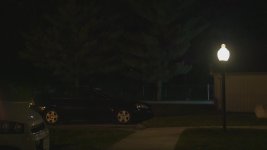
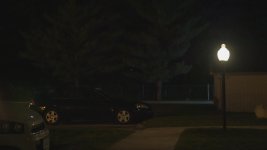
Here's the pics. I'll post the full rez for download some where if any interest.

GH4:
CineD - gave me the brightest detail at night in low light conditions. Everything else was darker on the histo and visually. CONT -2 SHARP -2 NR -2
3840x2160 4k 29.97p
mp4(Lpcm)
shutter 30
ISO 800
WB "Incandescent" (the lest yellowy looking one at night, truest to the live view)
Lens: Sigma 18-35mm (I forget if I was zoomed in or out) @ 1.8
FOCUS: On and just past that lamp pole
Zhongyi LENS TURBO

(these website degraded examples really don't show very well. in the end, they look nearly identical in hi rez mode too)

1. 16-235
2. 0-255 reduced contrast into 16-235 (reduced, not clipped away)
3. 0-255
4. 16-235 contrast expanded out to 0-255
16-235.jpg0-255 to 16-235.jpg

0-255.jpg16-235 to 0-255.jpg

So, now, I'm undecided, but seems to me that capturing 0-255 is still preferred even though pushing LESS through camera compression does sound like it makes a ton of sense. I can't SEE the difference though, so, shouldn't I stick with the one the COULD capture more range initially?

EDIT: wow this website REALLY trashes pictures
 
Last edited:
Back
Top