Banding when looking at levels of video 7D

superk

New member
Hello,

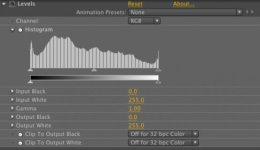
I just got a Canon 7D and love it so far. When I import movies into After effects if I look at the levels I see noticeable banding. I've attached a picture! Does anyone know what's going on with that?

Also, any chance future firmware updates will increase the compression bitrate?

Thanks.
 

Attachments

  • Picture 1.jpg
    Picture 1.jpg
    14.6 KB · Views: 0
It's a highly compressed 8-bit codec. Banding is part and parcel of how it works. Any time you have blue skies or swaths of a similar color (white walls, whatever) you'll get banding because the codec rounds off the differences in those areas to make them as similar as possible for compression efficiency.
 
Yup... but who knows perhaps the codec will be refined in future firmware revisions. Don't hold your breath waiting for that. In the meantime your best weapon against banding is careful contrast control. Use variable ND filters, use fill lighting, etc.

Noah
 
That's what I had feared! Compression! The picture styles won't change this at all I guess. So far it looks like the footage from my 7D is just a little soft, like I need to add a bit of a sharpen for it to feel right. Don't know if it's related.

Noah, could you elaborate a bit on how the variable ND filter and fill lights come into play vis a vis compression?

Thanks guys!
 
Well the greater the range of luminance and chroma values in a given shot, the harder the compression has to work to attempt to capture all of it. Banding is sort of a shortcut that can occur when the compression is overwhelmed. If you can flatten out that range via contrast control and fill lighting within a shot you'll help the compression's efficiency and generate a nicer looking image.

It's also just a good, professional practice to get into. Don't let your eyes fool you- they can see a far greater range of colors and brightness values than your camera can. So if you help out by flattening that contrast down a bit you'll get a final image that looks a lot better and ultimately closer to what your eyes saw.

Noah
 
Just want to add if you add more contrast in post you will see the banding a lot more. Just be aware of that. Not that you shouldn't add contrast in post. I do all the time but I'm just letting you know when you get to these kind of shots just know you will have banding. You will have banding on shots that have a gradient in them such as a light bulb dropping off into shadow on a plain wall for example. This is a small price to pay with such great images you can get from the 7d in my opinion. But obviously adding contrast in post is common. I do it all the time, but I just know that when I run into a shot like this I'll have to just be careful because of the banding.
 
It's a highly compressed 8-bit codec. Banding is part and parcel of how it works. Any time you have blue skies or swaths of a similar color (white walls, whatever) you'll get banding because the codec rounds off the differences in those areas to make them as similar as possible for compression efficiency.

The 5d MKII have same issue compression?
Same artifact?

thanks.
 
Also remember that if you use a picture profile that expands the range too much you will get a lot of banding once you put the contrast back in.
 
Hint: don't be grading the native footage

native 7d mov imported, AE 16bpc mode
http://i41.tinypic.com/2w2065d.png

same 7d clip converted v210, AE 16bpc mode
http://i41.tinypic.com/xc9ixw.png

As explained earlier, the banding is from 8-bit video. When the video is decompressed to RGB, The R,G,B components each are expressed with 2^8 = 256 "shades" or intermediate values, so you get quantization and posterization or banding when you shoot gradients , like shadows or sky. 10-bit video (10 bits per channel) would have 2^10=1024 "shades" and this would improve the results because the intermediate values have a greater range of expression

AE can interpolate the footage and work in 16bpc (bits per channel) or 32bpc mode, and often you can see the banding disappear immediately; BUT - it doesn't work with the native 7D files in .mov container , at least on Windows. The reason I say this, is that even if you re-wrap the native video into a .mp4 container, the banding will disappear. (However, it has other issues when the native h.264 stream is wrapped in .mp4 container ; AE and PP interpret the dynamic range incorrectly - it clamps the levels when it performs it's internal Y'CbCr conversion to RGB)

No doubt you've heard of people saying you shouldn't grade the native footage and/or it "falls apart" - well this is one big reason why - and it REALLY falls apart as soon as you push gamma curves or make levels changes when you are stuck in 8-bit precision (I put in 2 levels instances in the screenshots , the 2nd one to see the effects, but didn't make any adjustments. If you did make some adjustments or curves etc..., you would really see the footage fall apart)

On Windows, if you convert to v210 (uncompressed 10-bit 4:2:2), you will get much better results in terms of quality, but beware the filesizes are huge (about 20x the size), and you need a RAID0 array or some SSD's to work with v210 properly. There are other intermediate formats than can work as well (e.g. 16-bit tiff sequences, open EXR sequences), but v210 tends to work the best with Adobe suite, because it retains levels (there isn't some funky levels clamping), retains BT.709 coefficients (other Y'CbCr intermediates tend get converted to BT.601 and you get a slight color shift), and is 10-bit 4:2:2.

Once exporting to an 8-bit distribution format (e.g. blu-ray, AVC for flash, MPEG 2 for DVD), some banding will come back. As explained earlier, this is the nature of 8-bit video. The only way to improve this is to pre-process with some form of dithering or noise.
http://en.wikipedia.org/wiki/Dither#Digital_photography_and_image_processing

Of course, shooting native 10bit is better, because the banding isn't already "baked in" or recorded into the 8-bit footage, but working at a higher precision will still give better results, ie. You still will get better quality when your intermediate color corrections and calculations are done in something higher than 8bpc precision - but in order to take advantage of 16bpc or 32bpc mode in AE, it can't be native .mov wrapped footage.

Perhaps CS5 will improve this behaviour
 
PDR: great post :)
It is like if you are a painter, an artist. You go around with a bag which contains only 8 slots for 8 cans of colors (just an example). You set your canvas and you paint what you see around you, using only 8 colors (which actually could be chosen from a larger set).
One day you enter a special place for artists where you can use the local facilities, you set up your canvas and suddenly you realize you can use hundreds of colors which are now available for you.
You get very happy and you make all kind of new colorful compositions and modifications to your existings canvas using lots of colors.
Then you have to leave but to be able to bring your own painted canvas with you there is one rule/price to pay: you are allowed to take them with you as long as there are only 8 colors on each of them. So you must decide which colors can remain on the canvas and the rest needs to be stripped off.
The benefit in all this is that you can change the 8 colors that originally formed your painting but you can't increase its number. But you can pick them from a much larger number.
 
Back
Top