
Peter Reynolds
Well-known member
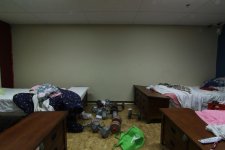
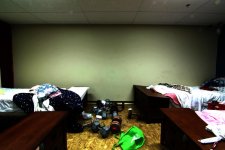
I shot a timelapse over the weekend with my T2i and notice a "banding" pattern on the wall.
I may not be using the right term, but it was stepped - like there were too many colours for
it to blend smoothly. Considering it was a blank wall, I'm confused.
The camera was set to Large, Fine. It was a 2-second exposure at I believe F18.
I've never experienced this before. Any advice on what I did wrong would be appreciated. I've included two photos below. The first is the original, the second has been graded to made the banding more prominent for you to see.
Thanks in advance for any advice you can provide.
P.
I may not be using the right term, but it was stepped - like there were too many colours for
it to blend smoothly. Considering it was a blank wall, I'm confused.
The camera was set to Large, Fine. It was a 2-second exposure at I believe F18.
I've never experienced this before. Any advice on what I did wrong would be appreciated. I've included two photos below. The first is the original, the second has been graded to made the banding more prominent for you to see.
Thanks in advance for any advice you can provide.
P.

