GH5 Bad Experience Up-Grading GH5 Firmware to Version 2.0……….Need Help

Vardalos

Well-known member
I had a hint of a problem a few days ago. The Live View screen on my GH5 was not as bright as it should have been, but when I pushed the shutter button down half way it returned to normal, however if I released the shutter button it would go darker again. Not totally Black but about 4 stops darker.

All of a sudden this problem seemed to go away and I thought it was something I had done so I promptly took it off my mind.

This morning what might be connected or another problem showed up when Up-Grading my GH5 Firmware to Version 2.0, as follows.

I went through the up grading process carefully and Version 2.0 is now installed, however after I confirmed that Version 2.0 was in fact on the camera and then went back to live view the camera automatically powered down…………..I tried turning it on and off several times with the same result. When I get out of the menu to use the camera in live view, it automatically powers down every time. Oddly enough, as long as I’m using the menu it stays on.

Is anyone else having this problem and if so is there a solution???
 
Last edited:
No at this point I haven't, I think I'll send it in to Panasonic for repairs or replacement as I had a hint of a problem a few days ago. Live View was not as bright as it should have been, but when I pushed the shutter button down half way it returned to normal. If I released the shutter button it would go darker again. All of a sudden this problem seemed to go away and I thought it was something I had done so promptly took it off my mind.

I suspect the problem encountered this morning and the previous one may be connected, so it's probably best that I don't mess with it and leave figuring it out to the experts.
 
Last edited:
My problem:

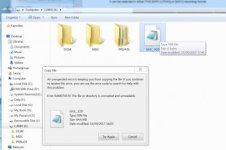
When I try to copy Bin file to SD card, it'll say the file is already there but the file is 0byte. Formatted on pc and then in GH5 multiple times with different cards, same error.

My colleague updated smoothly earlier on in the day, so I'm going to get him to send me his bin file to see if that's the issue.

corrupted directory.jpg
 
Hi

I had a hint of a problem a few days ago. The Live View screen on my GH5 was not as bright as it should have been, but when I pushed the shutter button down half way it returned to normal, however if I released the shutter button it would go darker again. Not totally Black but about 4 stops darker.

All of a sudden this problem seemed to go away and I thought it was something I had done so I promptly took it off my mind.

This morning what might be connected or another problem showed up when Up-Grading my GH5 Firmware to Version 2.0, as follows.

I went through the up grading process carefully and Version 2.0 is now installed, however after I confirmed that Version 2.0 was in fact on the camera and then went back to live view the camera automatically powered down…………..I tried turning it on and off several times with the same result. When I get out of the menu to use the camera in live view, it automatically powers down every time. Oddly enough, as long as I’m using the menu it stays on.

Is anyone else having this problem and if so is there a solution???

I'm another one seeing the issue. If a cycle around the menus using the DISP button, when on the quick settings menu it crashes and powers off. I have to turn on and quickly use the DISP button to cycle around to another view and it's okay. Definately a bug, it is also triggered when recording and if the DISP button is cycled around to the same menu.

I had thought well at least I can lock the [DISP] button now as I always ended up pressing it by mistake, but that doesn't work either! I've gone to Custom - Operation - Operation Lock Setting and set [DISP button] to ON to lock it, and it makes no difference, it will still cycle around the screens if pressed even when doing a recording and will crash in the same place.

I think I might try a complete reset of the camera.

Also what is IS Lock (Video) about, what does it lock, when would you use it? Panasonic manual update doesn't really help, it says: "Allows you to enhance the image stablization effect during motion picture recording. This effect can keep the motion blur in the composition minimal when you want to perform recording from a fixed perspective". It goes on to say, "To change the composition during recording, set the effect to [Off] first, then move the camera." What is a fixed perspective, presumably do they mean hand held but not panning or moving the camera, like a virtual tripod?

Regards

Phil
 
In the menu, there is a setting that sets the Liveview screen time out to 1 second. I guess this was reset to default to 1 second after the latest firmware. Have you checked this? It's under the Economy menu mode.

Edit:
Setting is called Power Save LVF Shooting
 
Hi

Thank you, that's it. I've set it to 10 seconds and it stays on for 10 seconds now then goes off, fancy defaulting it to one second! I had set back to defaults and it was fine, then it started again as soon as I reloaded the saved profile. Why on earth have they put that setting in there, why would anyone want it going off after 1 second, given this button gets knocked all the time as well, and when it's recording it also goes off also. Locking the display button doesn't seem to lock the [DISP] button as I thought it would. How do I turn that off, it isn't obvious.

Regards

Phil
 
I've tried to update to 2.0 a couple times and am having difficulty. I've tried separate cards, reformatting, even re-downloading the .bin file, but I can't get the camera to see anything other than No Valid Picture to Play. Is there a trick I'm missing? I'm currently Ver 1.0. Is there a step in between I missed?

thanks for the assist.
 
Is there a step in between I missed?

I format a reliable card in my camera, then move it to a card reader to write the BIN file to the root directory of the SD card, then move the card back to my camera, switch my camera on, and finally press the camera play button.

I've been doing it this way since my GH2 days and have never had any issues.

Also make sure you are using a fully charged Panasonic battery in your camera when doing the firmware upgrade.
 
I've tried to update to 2.0 a couple times and am having difficulty. I've tried separate cards, reformatting, even re-downloading the .bin file, but I can't get the camera to see anything other than No Valid Picture to Play. Is there a trick I'm missing? I'm currently Ver 1.0. Is there a step in between I missed?

thanks for the assist.
There is a version 1.1 which solved various problems, perhaps you need to update to 1.1 first.
 
Hi


I'm another one seeing the issue. If a cycle around the menus using the DISP button, when on the quick settings menu it crashes and powers off. I have to turn on and quickly use the DISP button to cycle around to another view and it's okay. Definately a bug, it is also triggered when recording and if the DISP button is cycled around to the same menu.

I had thought well at least I can lock the [DISP] button now as I always ended up pressing it by mistake, but that doesn't work either! I've gone to Custom - Operation - Operation Lock Setting and set [DISP button] to ON to lock it, and it makes no difference, it will still cycle around the screens if pressed even when doing a recording and will crash in the same place.

I think I might try a complete reset of the camera.

Also what is IS Lock (Video) about, what does it lock, when would you use it? Panasonic manual update doesn't really help, it says: "Allows you to enhance the image stablization effect during motion picture recording. This effect can keep the motion blur in the composition minimal when you want to perform recording from a fixed perspective". It goes on to say, "To change the composition during recording, set the effect to [Off] first, then move the camera." What is a fixed perspective, presumably do they mean hand held but not panning or moving the camera, like a virtual tripod?

Regards

Phil
About the DISP. button, another member in here gave me this answer earlier today: "There is a bug with the DISP. on-off switch in this update. Hopefully they will fix it soon in the new update".
 
In the menu, there is a setting that sets the Liveview screen time out to 1 second. I guess this was reset to default to 1 second after the latest firmware. Have you checked this? It's under the Economy menu mode.

Edit:
Setting is called Power Save LVF Shooting

The Live View isn't timing out, whatever the problem is it literally turns off power to the whole camera.
 
I thought that might be the case, but there doesn't appear to be a way to get to 1.1 anymore. Everything takes me to 2.0 update.

I know I'm updating correctly because I just updated my 12-35 lens the same way without issue. Anyone still have the GH5 update file from April in Mac format?
 
Update: After downloading the PC version, the update worked fine. Perhaps the Mac download is a corrupted file. The camera doesn't care which one you use. You just got have both computers to make it work.
 
Sorry about thatt. Just reporting what I saw. Other's were saying it was turning off too and then they changed that setting and realized it wasn't actually turning off just going into a sleep mode that made it look like it turned off.
 
Sorry about thatt. Just reporting what I saw. Other's were saying it was turning off too and then they changed that setting and realized it wasn't actually turning off just going into a sleep mode that made it look like it turned off.

Thanks I appreciated your comment, the GH5 is on it's way to be repaired or replaced by the Panasonic Factory Service center in McAllen Texas. At this point I have no idea how long it will take so I'm keeping my fingers cross that it won't be more than a week or so.
 
Pretty detailed step-by-step on getting the Disp lock to work. Haven't tried it myself yet.

"Tinkered with this for a while, and here's what I found. It's a two-step procedure.
1: Go to C+wrench menu - "Operation" - "Operation Lock Setting", select what to lock when activated. "On" means it will lock.
2: Go to C+wrench menu - "Operation" - "Fn Button Set", select a button to assign as a lock toggle (on/off).
When done, exit menus, and use the selected Fn-button to toggle the lock. This works for me."

https://www.eoshd.com/comments/topic/25966-released-4-panasonic-firmwares-gh5-gh4-and-two-lenses/?page=2
 
I stuck the v2 bin file on a new 128GB Sandisk V30 card and did the upgrade without any issues then used the same card to upgrade my Leica 42.5mm F1.2 to v1.3 without issues. I then stuck my pair of 2000x Lexar cards back in for shooting in 400Mbps mode without issues.
 
Back
Top