B&W for DVX100

jpastuch

Carbonite Member
Hey, I'm sure this topic has been covered before (if so, link me- I did a few searches and only found stuff for HD cams), but I'd like some tips for shooting B&W for DVX100. I know, I know- buy that guy's book. I'm broke at the moment. I've never shot and lit IN color FOR B&W (why didn't they make a B&W mode for this? Sorry, I'm ignorant to this stuff), and I'm not much of a cinematographer. But does the camera have any features as far as guiding me in these directions? Any cheap lights to reccomend off the bat?

I'm going for a more greyish, dull B&W rather than contrast.
 
well, You can shut the color off on your viewfinder and get a black and white image like that. The recorded image will still be color, but you get a good idea what it will look like.

go to: MENU -> DISPLAY SETUP -> down to EVF COLOR -> switch to OFF

Note: the LCD will still be in color
 
Oh good. I don't have the camera yet, but the seller told me there was no B&W. I figured there had to be some way to preview it.

Thanks.
 
thats what he will be doing. changing the veiwfinder to black and white doesnt affect the actual recorded footage. I'm assuming he wanted some kinda reference during production so he can light it and have some idea what he'd end up with when converting it in post.
 
thats what he will be doing. changing the veiwfinder to black and white doesnt affect the actual recorded footage. I'm assuming he wanted some kinda reference during production so he can light it and have some idea what he'd end up with when converting it in post.


Precisely. I don't think there is a way to actually record in black and white....
 
Yeah, I'm just using the viewfinder as a preview. Like I said, haven't gotten my paws on the cam yet, so just wanted to know.

Though it seems sort of strange that you can't just adjust the color in camera to record black and white. Whatever though, thanks for the help guys.
 
hmmm...i duno...i havent messed with the scene files that much to see if it can be done.


I tried, lol. I can't figure it out. Why would anyone want to though? Doing it in post is just as good, and on top of that you don't have to strain the camera with more processing it would have to do. You have way more options just doing it in post.
 
A couple suggestions.

1. Setting proper white balance is still important, even if you plan to convert to B&W in post.
2. In your scene file, Set the CHROMA LEVEL all the way down, and MATRIX to NORM, to minimize DV color issues.
3. In post, deartifact your color footage FIRST, before converting to black and white. This will remove blockiness that will leak through into your B&W footage if you don't deartifact it FIRST.
 
So I've been messing with scene files today, trying to get something that might be good for B&W (again, I'm sure there is a post somewhere for this but I cannot find it, if someone could link me if there is one- until then...)

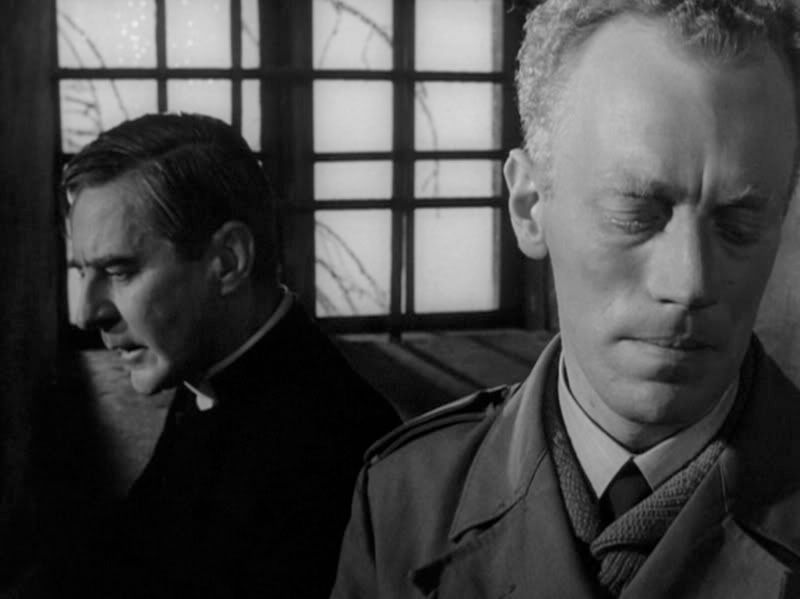
I'm not looking to try and emulate Sven Nykvist or anything, but I'm looking for a greyer, softer black and white, still retaining those harsh blacks though (so less of a contrast):

winter_light.jpg


or, Jarmusch as an example:

StrangerThanParadise-Bild02.jpg


Again, not looking to COPY these looks- but obviously it's a bit different from the crisp, Raging Bull b&w that's popular- I want a very drab, soft sort of look.

Anyone want to give me some starters for scene files?

P.S.- It seems that the DVX100 can't change the Viewfinder to BW like someone said- is this option only on models 100A and 100B?
 
i also have the original dvx100! woooo!

i'd shoot with either normal gamma or high gamma.
normal gama gives a smooth roll off into white when there are over exposed bits in your picture. high gama is even smoother and it also lifts the mids so you have more under-exposure room but it does make the picture a bit grainier.

in black and white, over exposed bits look absolutly fine. which means you can light really contrasty and not care too much about hot spots. i've never liked how cine gama deals with the highlights... i think the 100A and B fixed this with more gama options though....

colour should be normal 1.
master ped should be -3 for a normal look. -6 for a contrasty look.
detail -4 for normal or -7 for soft.
frequency thin (has the most resolution).. thick is to stop hard edges flicering on a CRT tv when you watch your film or somthing...

i'd set everyything else to 0 and use the preset white balances. though setting the chroma to -7 might help with artifacts like someone posted earlier :)

oh and make sure it's in progressive mode!!!! and shoot with 1/48 shutter or 1/50 if you're in PAL land.

if you want truely awesome looking footage. you need to colour grade it as well as use a good scene file!!!! but the MOST important thing is lighting and composition!!!
 
Last edited:
I know in the menu that there may be a setting to put the lcd in black and white mode. Its under the display settings than go to lcd set.
 
Thats interesting Joshua!so deartifact only affects the color and not the overall quality of the video?
 
The real trick to what you want comes in how you light what you shoot. Lighting for B/W, especially the stylized look you're after, just isn't the same as lighting for color. You have only lightness and darkness to work with, so you have to create your own contrasts and differentiations that color would normally allow you to do. You can't just light a scene so it looks good in color and expect it to come out fine in B/W.

Sure, different gammas will yield different results, but if the lighting isn't there, the camera can only do so much.

My suggestion -- find some old noir or something which is close to what you're looking for. Really pay attention to what all is going on in the shot, from a lighting point of view. Look at points of contrast and how they might differ from a color shot of the same thing. Figure out where the light is coming from, and how hard or soft that light is (how harsh are the shadows). Try to recreate it yourself.
 
I know in the menu that there may be a setting to put the lcd in black and white mode. Its under the display settings than go to lcd set.

Yes, go to MENU > DISPLAY SETTINGS > LCD SET and push COLOR all the way to the left. The LCD goes completely black and white so you can preview what your image will look like.
 
Yes, go to MENU > DISPLAY SETTINGS > LCD SET and push COLOR all the way to the left. The LCD goes completely black and white so you can preview what your image will look like.

Must only work for the A and B models, I have the DVX100 and there are no settings that cause either the EVF or LCD to go black and white.
 
Back
Top