GH2 awful video artifacts: Are these caused by chroma sub, AVCHD or a faulty camera?

alspacka

New member
I've noticed that any time i try to apply some color correction to gh2 footage, i get awful horizontal jaggies on top of the already irritating chroma sub sampling.

The attached image was shot at 720/60p with ETC on (so i dont think it is line skipping), 1/4000ish shutter speed and i believe 800 iso. On the left you can see the effects of what i believe to be chroma sub sampling, but on the right are the mysterious horizontal strips i get in all of my high contrast video. Is this normal for a gh2? should i hack it to eliminate this? should i shoot in mjpeg?

http://i.imgur.com/f3oVu.jpg full res here


On a separate note, GH2 hacking is very... un-guided. I have yet to see a good step-by-step guide or a blog that keeps people up to date on the latest news. I find personal view to be a very confusing forum.


edit: forum uploaded re-compressed my image. ignore the thumbnail below
 

Attachments
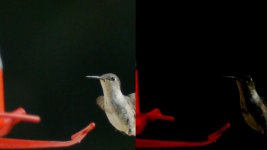
  • 00031 3 (0-00-02-01).jpg
    00031 3 (0-00-02-01).jpg
    25.7 KB · Views: 0
Last edited:
update: it only happens when directly importing the .MTS files into after effects. The plot thickens...
 
I know its possible to edit the files directly with premier but i would still transcode avchd footage. It might help. 8bit 4:2:0 is what it is tho. I have a few minutes waiting to leave to go see planet of the apes(hopin to see some apes kick some human a$$!) PM and i ll walk u thru the hack. its really simple.
 
Trying to find a good, free AVCHD-Raw video encoder is a pain in the butt so far. So many one of apps written by chinese dudes for 30 bucks
 
I'm on a cellphone tonight and can't view the images, but it sounds like this : http://www.dvinfo.net/forum/adobe-creative-suite/480465-cs5-avchd-chroma-bug.html Try transcoding with the free trial of Cineform and see if the jaggies go away.
 
Hi guys,

I've been suing 5dtoRGB to convert and it works great. Pain in the workflow butt, but it works!

Thanks
 
I know its possible to edit the files directly with premier but i would still transcode avchd footage. It might help.
Actually, it won't help to transcode, unless you happen to like the way a particular transcoder resamples and filters the images. Importing the original MTS files into Premiere or After Effects CS5 will losslessly convert the original 8-bit 4:2:0 color depth into 32-bit RGB in memory, and there is nothing that can improve on that.

The OP's color grading problems are likely due to shooting in ETC mode, which is noticeably noisier than non-cropped video modes. Dark backgrounds are also problematic, as the effective bit-depth in dim areas drops to 4-bits or less. In addition, ETC mode magnifies the thickness of the horizontal bands as well.
 
Actually, it won't help to transcode, unless you happen to like the way a particular transcoder resamples and filters the images. Importing the original MTS files into Premiere or After Effects CS5 will losslessly convert the original 8-bit 4:2:0 color depth into 32-bit RGB in memory, and there is nothing that can improve on that.

The OP's color grading problems are likely due to shooting in ETC mode, which is noticeably noisier than non-cropped video modes. Dark backgrounds are also problematic, as the effective bit-depth in dim areas drops to 4-bits or less. In addition, ETC mode magnifies the thickness of the horizontal bands as well.

It had nothing to do with ETC., It was a bug in CS5. The answer was posted above.

http://www.dvinfo.net/forum/adobe-creative-suite/480465-cs5-avchd-chroma-bug.html

5d-rgb fixes it. The crap i posted in the OP ONLY shows up in CS5
 
This helps out a lot, Thanks Ipowell. It's nice to know I don't have to transcode in cs5 progs. to get the best.
Just to clarify, Adobe CS5 products on the Mac won't render AVC/H.264 as well as 5DtoRGB. CS5.5 improves the chroma upsampling, but CS5's upsampling is just as bad as Apple's.
 
Would you suggest using 5DtoRGB instead of CS5.5? Also, what settings are you using with .mts files for 5DtoRGB? I'm not getting audio when converted.
 
Unfortunately 5dtorgb won't work with hacked GH2 files. It stops transcoding a couple of frames before finishing. Anyone having the same issue?
 
Unfortunately 5dtorgb won't work with hacked GH2 files. It stops transcoding a couple of frames before finishing. Anyone having the same issue?
This should be fixed in the latest versions, which I just released. The latest versions as of now are 1.5.1b for Mac, and 1.5.4 Preview for Windows.


Would you suggest using 5DtoRGB instead of CS5.5?
It's easier on the CPU to use transcoded files rather than having the CPU to decode the video in realtime as is the case with CS5.5. If your system is fast enough, then you may be fine with realtime decoding. CS5.5 is a huge improvement over CS5 when it comes to chroma upsampling, so if you decide to edit in realtime with AVC/H.264 I recommend using CS5.5. Otherwise, transcode with 5DtoRGB first.


Also, what settings are you using with .mts files for 5DtoRGB? I'm not getting audio when converted.

This only affects the Mac version. This should be fixed soon. The Windows version shouldn't have any problems with MTS files and audio.
 
It had nothing to do with ETC., It was a bug in CS5. The answer was posted above.

http://www.dvinfo.net/forum/adobe-creative-suite/480465-cs5-avchd-chroma-bug.html

5d-rgb fixes it. The crap i posted in the OP ONLY shows up in CS5
I'm not sure if I follow the details of your workflow, but I gather from a post in the following thread (GrahamH, 06-07-2010, 10:00 PM) that the AVCHD file was transcoded via Adobe Media Encoder CS5 into Cineform HD?

http://www.dvxuser.com/V6/archive/index.php/t-212800.html

I'd be interested to know whether the AVCHD decode chain in that CS5 installation was routed through Quicktime, or instead through the bundled MainConcept decoder?
 
This should be fixed in the latest versions, which I just released. The latest versions as of now are 1.5.1b for Mac, and 1.5.4 Preview for Windows.

Hey Thomas,

I'm getting an error that 5DtoRGB can't find my Prores codecs when I launch 1.5.1b on OSX Lion. Is this a known issue? I've got FCP7 and FCPX installed by the way.
 
... I gather from a post in the following thread (GrahamH, 06-07-2010, 10:00 PM) that the AVCHD file was transcoded via Adobe Media Encoder CS5 into Cineform HD? I'd be interested to know whether the AVCHD decode chain in that CS5 installation was routed through Quicktime, or instead through the bundled MainConcept decoder?

The "Cineform decode" image was created by converting from the raw AVCHD directly to Cineform avi using Cineform's HDLink transcoder. The "CS5 decode" image was created by importing the raw AVCHD clip into a Premiere CS5 timeline, and then exporting to Cineform avi via AME. I am on a PC, and any time recently that I've checked, my CS5 (and CS3 and CS4) apps have been using the Mainconcept decoder.

Ever since that old post, I've wondered if this was a general CS5 issue, or a quirk of certain system configurations.
 
This should be fixed in the latest versions, which I just released. The latest versions as of now are 1.5.1b for Mac, and 1.5.4 Preview for Windows.

Unfortunately I'm still getting the error. I'm using windows version and it stops transcoding 10 frames before the end...
 
Back
Top