AVCHD high bitrate tests- MUD FREE footage

I have been reading almost every post to understand what is the best settings for may camera... even I am a programmer its hard to follow.


I got myself a new SUNDISK class 10 30meg 16 gig, I want to get the best safe setting that is possible...

I don't have time to test every scenario, can someone please say if the C settings is reliable with this card?

I want to user 24N, Pal.

For now I am using B settings for all the 5 patches (from video bitrate simplified to limited bitrate)

Thanks.
 
Last edited:
SanDisk 16GB, Class 10 - settings

SanDisk 16GB, Class 10 - settings

Hi, I have the same card and I tried some differnt settings. The C-settings are not stable with the 24p-patch in PAL and NTSC Mode , I got card errors. I tried it without 24p, but only the B settings are running stable.
 
Hi, I have the same card and I tried some differnt settings. The C-settings are not stable with the 24p-patch in PAL and NTSC Mode , I got card errors. I tried it without 24p, but only the B settings are running stable.

Thanks

and what with the B settings with 24p-patch?
 
Hi guys. After many trials...
Last test working :
50,56,60, Native 24p/25p > FHP worked and SH worked
Long shots about 5/6mn to 30mn on tripod and handheld.
Filming static view and trees with wind in leaves. No mud.
Using a SANDISK Extreme III class 6, 16 GB card.
I think am going to stay on these settings so far.
 
What did you put for

Video Bitrate Adjustment H
Video Bitrate Adjustment L

?

I have insert the same value as in Video Bitrate Adjustment FHD/SH Simplified.

is that ok?

I went for B setting for all AVCHD patches
 
What did you put for

Video Bitrate Adjustment H
Video Bitrate Adjustment L

?

I have insert the same value as in Video Bitrate Adjustment FHD/SH Simplified.

is that ok?

I went for B setting for all AVCHD patches


Hey Adis, No needs to fill
Video Bitrate Adjustment H
Video Bitrate Adjustment L

It's working just filling
Video Bitrate Adjustment Simplifiedwith with 50.000.000
 
Hey, first post.

Hacked my GH1 and used the following settings:

If you shoot in 720 60p mode, D settings probably won’t work with high detailed scenes and camera will interrupt recoding after few seconds. For 720 MODE use the following settings that will work without problems:

Video bitrate adjustment 38000000
Overall bitrate adjustment 40000000
Limiting bitrate adjustment 42000000

For these settings avg. bitrate in 1080 MODE is 34.4 Mbps and for 720 34.5 Mbps.
There are no problems with recording of any kind either with 1080 or 720.
No MUD with this setting also.
I should say that these are stable settings and I would recommend them for normal users that want to shoot with 1080 and 720.

i am using a SanDisk EXTREME 30MB/sec 16GB Class 10 Card, and i got Errors at 1080p 24fps (native 24p enabled) and 720p 60fps while filming with kit-lens handheld (without static)...

Video looks great but Error after about 14-15sec.
any suggestions? bitrate is at ~34mbit/sec, so there should be no problem for the Card.

it doesnt crash every time, but its kind of annoying.
 
Hi guys. After many trials...
Last test working :
50,56,60, Native 24p/25p > FHP worked and SH worked
Long shots about 5/6mn to 30mn on tripod and handheld.
Filming static view and trees with wind in leaves. No mud.
Using a SANDISK Extreme III class 6, 16 GB card.
I think am going to stay on these settings so far.
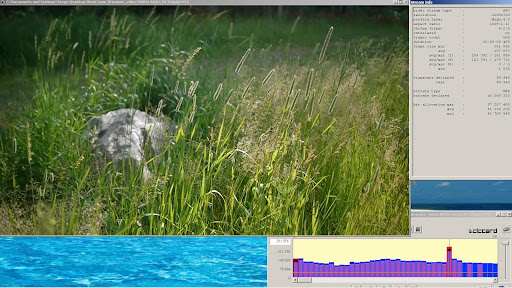
Over the weekend I was shooting with 60,62,70 settings setup for FHD/SH mode with no native patch, which by all means are "extreme" settings, but footage looks so good!

00054%2060%2C62%2C70%20720p60.JPG


Full clip is here . This one I shot as long as I wanted, but once in a while would hit card speed limitation with very detailed scenes. However, since I'd set the H mode to your FHD/SH setting (50) I was able save the shot by "dialing down" to "H" mode. Dialing down only works if you shoot 720p60, but it beats having to swap SDHC cards with different versions of firmware. Perhaps in the future SH mode can be switched to 1080p so two bitrate levels are available for each mode.
 
I used these settings with non-24p

I used these settings with non-24p

I don't see any issues, I filmed close-ups of my tree and also my outdoor chairs that have a weave pattern. No issues. I even did rapid back and forth with the camera and it didn't freeze. I also bought a 2gb class 2 card and tried it with the 50,56,60 and had no issues with it keeping up. I'm wonder about folks with issues if it purely is the card, errors or fragmentation. I recommend formatting the card in camera and not just pop in a card from a different camera. Also cards have a shelf live of reading/writing. A heavily used card can contain errors.

Everyone says that jello is gone but I see some very slight jello but definitely not terribly noticable.

I'm also dissapointed that I can't see the output on my TV with the cables Panasonic provided. Where is the mini-HDMI cable Panasonic! The SD output looks terrible.

Hi guys. After many trials...
Last test working :
50,56,60, Native 24p/25p > FHP worked and SH worked
Long shots about 5/6mn to 30mn on tripod and handheld.
Filming static view and trees with wind in leaves. No mud.
Using a SANDISK Extreme III class 6, 16 GB card.
I think am going to stay on these settings so far.
 
I don't see any issues, I filmed close-ups of my tree and also my outdoor chairs that have a weave pattern. No issues.

How long did you film the close ups of the tree for and was the tree in bright sunlight?
 
When one person can get consistent failures with certain settings and a certain card, there isn't really much reason for too many other people to test the same setup. All that means is that their subject has less detail, or something else like that. We've already established that the failure occurs.

I'm going to start testing out different buffer ratios. I've noticed that nearly everybody is testing buffer parameters at similar ratios. What happens if you go with 50,52,70, for example, instead of 50,52,60? Who knows, I might discover a thing or two.

It seems to me if person does the exact same test as somebody else - who has already found a failure - the subsequent test is meaningless. It makes sense to test something that is thought to work, but once a failure has been proven it's time to move on.

It's not my call, though - Vitaliy is the boss.

Chris


I have been shooting with bitrate settings of 50,52,70 and as long as native 24p is not checked, I get no errors whatsoever with those settings.
 
I have been shooting with bitrate settings of 50,52,70 and as long as native 24p is not checked, I get no errors whatsoever with those settings.

Same thing for me, but only with FHD!
when switching to 720p 60fps it stops after 6-7 seconds.

decreased bitrate and 24p disabled, now its working flawlessly.
 
Hahaha! I've only been shooting in 1080. I haven't wandered into 720 on this cam yet. I'm going to shoot 24p native on C settings again, now that I have a Sandisk class 10 card and compare that footage to the 54,64,74 24/60i footage I've been shooting and see if the quality is better.
 
For 720 MODE do not use shutter speed 50 or slower ( bitrate drops to 2MBps resulting in horrible picture).
USE ONLY 60 AND FASTER.


Why should the bitrate drop so much using 50 or slower? I'm in PAL-land, and 1/50 is supposedly the standard shutter speed for 50 fps (1/100 for slomo in postproduction, I believe). Shooting at 1/60 doesn't seem to make sense.


Thanks for any insights.
 
I've been testing since the hack came out. The thing I am most interested in is increasing the minimum bitrate at 24fps. I haven't been able to accomplish even a small improvement on static shots.

MPEG doesn't do real 24 fps.
AVCHD minimum bitrate cannot be changed.

Is that about right? Is there any reason to think this will change any time soon? Thanks.
 
I've been testing since the hack came out. The thing I am most interested in is increasing the minimum bitrate at 24fps. I haven't been able to accomplish even a small improvement on static shots.
Are you unhappy with image quality results when upping AVCHD bitrate settings?
 
Are you unhappy with image quality results when upping AVCHD bitrate settings?

I think it's great that the bitrate upper limit has been raised for moving shots, but this doesn't help static shots. I can achieve an upper bitrate of 44-50 mbps when walking through grass and foliage, but when it comes to just putting the camera on a tripod the bitrate drops back to previous rates of around 8-10 mbps and the ugly compression shows up again. I understand that banding may not be solved simply through bitrate, but I sure would love to have a static shot that maintains a high bitrate to get rid of the blockiness.
 
Not sure if you would achieve what you are looking for, but below is the setting I have recently started using. It will not get you the highest bitrate, but it is stable, Native 24P, and it gets me around 20mbps for low detailed scenes and 24-25 for high detailed scenes. I tested this setting with a couple charts with no error. Let me know if or when you try.

[Settings]
Prevent version compare=Checked
Third-party battery=Checked
720p30 420->422 color sampling=Checked
E1 Quality=150
E1 Table=86
E2 Quality=130
E2 Table=56
E3 Quality=115
E3 Table=26
E4 Quality=100
E4 Table=4
Native 24p/25p=Checked
Video Bitrate FHD/SH=26000000
Video Bitrate H=22000000
Video Bitrate L=18000000
Overall Bitrate=30000000
Limiting Bitrate=34000000
Preset bitrate=234

I think it's great that the bitrate upper limit has been raised for moving shots, but this doesn't help static shots. I can achieve an upper bitrate of 44-50 mbps when walking through grass and foliage, but when it comes to just putting the camera on a tripod the bitrate drops back to previous rates of around 8-10 mbps and the ugly compression shows up again. I understand that banding may not be solved simply through bitrate, but I sure would love to have a static shot that maintains a high bitrate to get rid of the blockiness.
 
Back
Top