GH4 Audio

Any suggestions for testing on-board mics like Rode's VideoMic Pro, or Shure's LensHopper?

The results you get from testing with a mixer should make it pretty clear about how to set your Rode mic. My guess is that the +20 dB setting is still probably going to deliver the cleanest sound, as I doubt the mic pre-amps on the GH4 are better than the GH3, but it would be a happy surprise.

I would try shooting a quick interview with the Rode set to 0 and +20 dB, and monitor your audio levels with headphones while you shoot. Then bring the footage into your editor and see which one you like best.
 
When you perform the LINE level tests you may find the signal is too strong, so that even at it's lowest audio level setting the GH4 may show the 1 kHz test-tone as louder than -12 dB in your NLE. If this is the case, then I would try repeating the LINE level test but add a 20 dB inline XLR pad ( these cost less than $20 ), and see if the audio level sits where it should be.

Ran the tests today but haven't analyzed them yet. Hope to have an Editor dig thru these tomorrow.

What was immediately apparent was even with the GH4 set to -12 dB the test-tone was far too hot for Line level & maxed out the cam's VUs. Somewhere in my archives I have a Switchable Attenuator & when I find it will re-test.

Best,
Bern
 
Last edited:
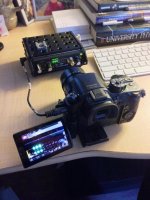
I had some time this morning so I ran some audio tests. Here's my set up.

IMG_4808 (1).jpg

I ran a 1kHz tone from my SoundDevice MixPre through a Sescom LN2MIC-ZOOMH4N -25dB L Pad Attenuator cable to my GH4 recording 4K 100Mbps LPCM with the audio limiter set to OFF. I began by setting the GH4 audio recording setting at -12dB, recording a 10sec clip, then moving up the audio setting by +1dB and repeating. I did this all the way up to the +6dB level. Then I imported all those clips into Premiere Pro and took note of the audio levels as they played. My results are as follows:

GH4 Setting : Noted Audio Level
-12dB : -15dB
-11dB : -14dB
-10dB : -13dB
-9dB : -12dB
-8dB : -11dB
-7dB : -10dB
-6dB : -9dB
-5dB : -8dB
-4dB : -7dB
-3dB : -6dB
-2dB : -5dB
-1dB : -4dB
0dB : -3dB
+1dB : -2dB
+2dB : -1dB
+3dB : 0dB
+4dB : 0dB
+5dB : 0dB
+6db : 0dB


For my next test I removed the MixPre and attached my Rode Videomic Pro to the camera. Same recording settings for the GH4. The Videomic Pro is at its +20dB setting. I positioned myself about 2ft from the front of the mic and recorded some voice tests and room tone tests at difference audio level settings. My computer's fan was running so it provided a soft ambient tone. Then I imported the clips into PP and took notes. Here's what I found:

-12dB : My voice peaks at first and then drops to around -4dB. I'm obviously too close to the mic. Room tone is around -37dB. After waiting 20 seconds of silence the audio levels did not increase.

-9dB : My voice peaks at first and then drops to around -4dB. Room tone is around -35dB. After waiting 20sec of silence the audio levels creeped up to -33dB.

-6dB : The same as before, my voice peaks and then drops to -4dB. Room tone is around -31dB and creeps up to -29dB after a while.


Those tests were running so loud that I decided to do more tests with the Rode Videomic Pro set to +0dB. Here are my notes:

-12dB : My voice registers from -29dB to -24dB. Room tone is bouncing around -55dB. After 20sec it does not creep up at all.

-6dB : My voice is around -24dB to -18dB and sounds a little noisy. Room tone is around -50dB. After 20sec it does not creep up.

0dB : My voice is -18dB to -12dB and sounds noisy. Room tone is around -46dB. After 20sec it does not creep up.

+6dB : My voice is -12dB to -4dB and sounds very noisy. Room tone is around -39dB. After 20sec it does not creep up.


So after running all these tests I'm not sure what to think. The GH4 seems to be reducing my voice when it gets too loud, pushing it down to around -4dB, and it's doing that regardless of the internal audio level settings. I'm familiar with that as my GH3 does the same thing. The GH4 also seems to have an AGC when the Rode Videomic Pro was at its +20dB setting, but the AGC seemed to disappear when the Rode was set to 0dB. Anyone have any other insights into this situation?
 
I am seeing the exact same thing. Limiter turned to off, and yet the GH4 still seems to be applying some adjustments to the signal. I hope that a firmware update will add an option to remove auto gain control, as I suspect something is being done along those lines. At this point I have it at -10db and my lavalier seems pretty solid. I am really surprised that with the limiter disabled we are still seeing traces of tampering... This is the ONLY area I am disappointed with the camera so far. However, coming from a GH3 background this is not the end of the world. The audio is still very useable. I just wouldn't tap into a soundboard and expect the same results as my my MOTU interfaces!

Thank you for your tests!
 
With the help of TheDingo I was able to run a noise floor test of the GH4 (Thanks, TheDingo!). I used the same set up as before with a 1kHz tone running from my SD MixPre through a -25dB L Pad cable into the GH4 with its audio levels set to -12dB. After a few seconds of recording the tone I turned off the tone from the MixPre but left the GH4 recording. This produced a noise floor of about -63dB.

Also of note, I've been using my Rode Videomic Pro set to +0dB and the GH4 set to -12dB and have been getting great levels for audio. So far I'm happy with this camera's audio quality.
 
With the help of TheDingo I was able to run a noise floor test of the GH4

Ben's set-up was recording the -10 dB MixPre TAPE OUT connection with a Sescom cable with a built-in 25 dB pad, so he's recording a -35 dB audio signal from the MixPre with his GH4 audio setting at -9 dB. This combo produces a 1 kHz test-tone at -12 dB, which is exactly where most of us will want it to be.

Based upon how the Rode Video Mic records, it looks like the GH4 audio preamps are stronger than previous GHx cameras. The GH4 audio circuitry looks like it wants a real -50 dB MIC level signal, where the GH3 functioned best with a stronger -30 to -20 dB signal.

The -63 dB RMS noise-floor Ben mentioned is the same as the Panasonic GH3 and HMC-150 cameras, which is pretty good for a DSLR/Mirrorless camera.
 
Minor update: Just picked up Panasonic's "DMW-MS2 Directional and Stereo Microphone" for on-board use. It's MUCH longer than the VideoMic Pro, or LensHopper(s), & I'm unsure it sounds better, but phantom power is a Killer Feature I couldn't look past.

99% of my professional work is done with the assistance of a dedicated Sound Recordist so on-board sound rarely makes the cut, but is sometimes used in syncing via PluralEyes. One error I make too often is shutting down mics to save their battery & in the heat of the moment forgetting to turn them back on, so a phantom powered option is very attractive.

The mic's directivity (Stereo, Lens Auto, Shotgun, & Super Shotgun) can be modified thru the GH4 menus & in a quick tryout seemed promising, but needs real testing. It lacks a shock mount but in Super Shotgun mode seemed to reject much of the handling noise, & it appears the mount could be removed allowing the mic to be inserted into a 3rd party shock mount if desired.

Combined with Peaking, & Zebras, the phantom powered mic makes the GH4 feel so much more a proper documentary motion camera & much less a dSLR kludge. And running just one small battery to power the whole setup is a dream.

Best,
Bern

PS: Still need to do additional tests for recording a feed from a mixer.
 
Bern, what's the phantom powered option ? ( you can power the mic via phantom power ?, or it supplies phantom power to another mic ? )
 
Ok. This is the 5 volt "mic" power that many devices with a 3.5mm mic input have. This can power many lav mics too. ( never thought of it as phantom power, but I guess it works the same way )

"Line powering, or plug-in-power (PiP), is the low-current 3 V to 5 V supply provided at the microphone jack of some consumer equipment, such as portable recorders and computer sound cards. It is unlike phantom power since there is no shield connection on these jacks. Instead, a low voltage (around +5 volts) is connected to the tip and ring of the 3.5 mm jack through resistors around 2.2 kilohms, with return through the sleeve; the DC power is in common with the audio signal from the microphone. Capacitors are used to block the DC from subsequent audio frequency circuits. It is often used for powering electret microphones, which will not function without power. It is suitable only for powering microphones specifically designed for use with this type of power supply. Damage may result if these microphones are connected to true (48 V) phantom power through a 3.5 mm to XLR adapter that connects the XLR shield to the 3.5 mm sleeve. [11] Plug-in-power is covered by Japanese standard CP-1203A:2007[12] A similar line-powering scheme is found in computer sound cards. Both plug-in-power and soundcard power are defined in a not-yet-released version of IEC 61938.

Some condenser microphones can be powered with a 1.5 volt cell contained in a small compartment in the microphone or in an external housing.

These alternative powering schemes are sometimes improperly referred to as "phantom power" and should not be confused with true 48-volt phantom powering described above."


http://en.wikipedia.org/wiki/Phantom_power
 
Back
Top