GH4 Audio

Bern Caughey

Veteran
The GH4 has a slew of new features that make it feel much more like a proper motion camera but many are not well documented in the 420 page manual.

Audio has never been my fortee but I learned to limp along (mostly with a dedicated SoundPerson, Plural Eyes, & the kind help of DVX forum members) on the GH3.

The "Mic Level Adjustment" in the GH4 menus is now displayed traditionally with a scale that goes from -12 to +6 dB & they've also added an option to turn On/Off the "Mic Level Limitor".

What settings would be recommended for use when the SoundPerson is feeding audio thru an A-Box directly into the cam?

http://woodencamera.com/A-Box-Pocket.html

And what about if using an onboard mic such as Rode's VideoMic Pro or Shure LensHopper? And what about the setting on the mic?

Sorry for jumping on this topic when so few cameras are in circulation but I have documentary job next week where once again we're asked to only travel with small cameras, & the GH4's feature set will make it a much better option then the GH3.

Thanks,
Bern
 
Last edited:
I found the GH3's pre amps to record internally very well with a wireless and videopro mic. I hope the GH4 improves on it. The A Box looks like a nice solution for feeding XLR inputs into the GH4. I'm assuming if you use two mics it records them as a stereo pair?
 
Last edited:
It sounds like the audio circuitry of the GH4 has changed significantly from the GH3, which I'm going to take as a good sign.

As far as figuring out what's the best audio level to feed your GH4, I would try and round up a high quality mixer with a 1 kHz test-tone ( i.e. Sound Devices ) and try running some tests.

Here is what I would do...

PART ONE

1- Connect your GH4 to the XLR audio outs of the mixer using your Wooden-Camera A-Box adapter. ( DO NOT connect a mic to your mixer, everything is being done by the audio that your mixer produces all by itself )

2- Set your mixer to output MIC level audio for now.

3- Switch on your GH4, then switch on your mixer.

4- Turn on the mixer's 1 kHz test-tone generator. ( the mixer's meters should be reading 0 dB )

5- Adjust your GH4 to it's lowest audio level.

6- With your GH4, record 10 seconds of test-tone, then switch OFF the test-tone from the mixer but KEEP recording with your GH4 for another 20 seconds, then stop your GH4.

7- Raise the recording level on your GH4 by one increment ( I don't know how the GH4 audio scale is marked, so you will have to figure this out ), and repeat STEP 6.

8- Repeat by keep raising the audio level by one increment and making another recording. Stop once you've reached the maximum audio level of your GH4.

Now take all of the 30 second video clips your just made and bring them into your video editor. Play each clip and note what your NLE audio meter reads when the test-tone is on.

What you are looking for is a video clip where the recorded test-tone sits at -12 dB, with any luck one of your clips should be close to -12 dB. Also, note where your NLE audio meter sits once the test-tone has been shut off, as this will be the true noise-floor of the GH4 in dB RMS. Also, see if the noise-floor rises near the end of the 20 seconds of silence, as this is the stupid AGC circuit kicking in and ruining the noise-floor. ( I am hoping that the GH4 Limiter Shut-Off option will also kill the AGC circuit, something we've needed since the GH2 first came out )

Once you have your -12 dB clip, figure out what setting your GH4 audio level was set to, as this will be the correct GH4 MIC INPUT audio level.

Now you may find that when you perform the MIC level test the noise-floor is very high and the audio sounds noisy, if this is the case you might want to repeat everything with the GH4 LIMITER shut off. ( hopefully this kills the AGC )


PART TWO

Repeat the same set of tests, but this time set your mixer to output LINE level audio, and this will be the proper GH4 audio level for LINE level audio input.

When you perform the LINE level tests you may find the signal is too strong, so that even at it's lowest audio level setting the GH4 may show the 1 kHz test-tone as louder than -12 dB in your NLE. If this is the case, then I would try repeating the LINE level test but add a 20 dB inline XLR pad ( these cost less than $20 ), and see if the audio level sits where it should be.

It's a bit of a pain to perform all these tests, but once you're done you will know exactly how to set your GH4 camera up for professional audio feed. ( MIC and LINE level inputs )
 
TheDingo,

Thanks for an incredibly detailed response!

I'll try to make some time for the tests before departing & run them past the Editors. If it happens I'll send you a copy.

Camera tests are needed too, but mostly to match existing footage, so of limited use.

All the best,
Bern
 
The Indipro box looks like it sells for less than half the cost of an A-box and does the same thing. But except for the mounting box, what else do you get other than two female xlr 's into a right angle 3.5mm available for a tenth of the cost at Sweetwater (Hosa CYX-405F).
 
Last edited:
I'll try to make some time for the tests before departing & run them past the Editors. If it happens I'll send you a copy.

And be sure to post your findings here, as I am sure there are other people that would want some audio starting points for the GH4. :-)
 
P1290080.jpg
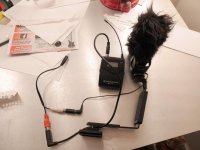
This won't work for phantom power but is the lightest solution I've found to split the tracks on my GH3. It honestly works very well and I used it for a big project and the client was very pleased. When compared to the pre-amps of my Tascam or Mix Pre however, the quality of the sound is easily distinguishable...
 
Does that indi protools box have attenuation? or is it not needed as the preamps can be manually adjusted via menus?
 
Does that indi protools box have attenuation? or is it not needed as the preamps can be manually adjusted via menus?

The A-Box (Pocket) is little more than a Hosa CYX-405F in in a different form factor, so no attenuation.

AFAIK it was originally designed for the RED(s) then modified for Alexa, Ikonoscope, & a couple versions for the Blackmagic(s).

The one with cabling for the GH cameras was designed for Blackmagic's Pocket.
 
Very interesting info. Curious though, since we have more control over audio on the GH4. Is a Line2Mic attenuator cable still necessary for H4N to camera setups?
 
since we have more control over audio on the GH4. Is a Line2Mic attenuator cable still necessary for H4N to camera setups?

It is for the GH3, so it might be the same case with the GH4 when taking a LINE level audio feed. The GH3 works best with a -20 dB audio signal so you need a 20 dB pad when using LINE level audio.
 
TheDingo,

Any suggestions for testing on-board mics like Rode's VideoMic Pro, or Shure's LensHopper? Mostly for dual sound, but occasionally run 'n gun documentary when the SoundPerson's not nearby.

Thanks,
Bern
 
TheDingo,

Any suggestions for testing on-board mics like Rode's VideoMic Pro, or Shure's LensHopper? Mostly for dual sound, but occasionally run 'n gun documentary when the SoundPerson's not nearby.

Thanks,
Bern

Hey Bern

What do you mean by 'dual sound'

ALSO

What exactly are you trying to test about the mics?
 
You don't need one now (for the GH2 at least). The 3.5 mm out of the H4n goes straight into the camera fine. (Well, when adding the 3.5 to 2.5 step down anyway.)
I wish I had known before I bought the Tascam, I had to get a cable with a -35db pad, although I did get a headphone jack split off the cable, then I needed a amp to boost the headphone volume. sigh**
 
Hey Bern

What do you mean by 'dual sound'

I should have written "Dual System Sound", where the camera's audio is only a guide track used to sync up in post to a better recording, in my case one captured by a dedicated SoundPerson.

What exactly are you trying to test about the mics?

The best baseline settings for capturing people speaking voice using an on-board mic such as the Rode VideoMic Pro. For those not familiar with these they have setting for -10, 0, & +20 dB.

Since these won't accept a test-tone directly I'm wondering what would be best practices for establishing the various camera & mic settings.
 
Back
Top