Audio meters register input, but no audio recorded...?

Muskoka

Member
I recently shot a quick interview using two DSLRs, one with a Sennheiser MKE400 directly into Camera B, and an Audio Technica 1820 wireless receiver plugged directly into Camera A. This was a run-n-gun, and I had forgotten my cans so just went off the camera's audio meters for levels. Everything was fine until I dropped the files into my NLE; the audio from Camera B was fine and that little shotgun saved my ass; Camera A had nothing from the lav.

I set up Camera A again exactly as I had during the interview and the result was the same; level meters showed input but there was no audio recorded. I then inserted a Tascam DR60D in between and ran the output from the Audio Technica through it, then back from the Tascam's camera out into the same camera via a 3.5mm. Audio recorded in-camera just fine.

My question; how is it possible that I was getting great audio signal according to the meters when the output from the AT was going directly into the camera but no audio was recorded?
 
On my Nikons (can't speak for Canon DSLRs), if there's a source plugged into the mic jack, that's the feed it records; there is no specific setting for external mic - and without making any changes to the camera side setup at all, I recorded lav audio into the same jack when I used the Tascam.
 
LAV mics need 5 volt "plug-in" power to function, so any device you connect them to has to be able to deliver this 5 volts for the LAV mic to work. With some devices all you have to do is turn on "plug-in" power from the device's menu to get the LAV to function.
 
LAV mics need 5 volt "plug-in" power to function, so any device you connect them to has to be able to deliver this 5 volts for the LAV mic to work. With some devices all you have to do is turn on "plug-in" power from the device's menu to get the LAV to function.

He said it was a wireless mic.

My guess is he had the wireless set to mic-out level, and the camera to line-in level.

That, however, does not explain why he was getting proper levels on the in camera meter, I would expect them to so next to nothing if the above was the case. But who knows how DSLR's are set up for audio in.
 
A wild guess but I would suspect plug compatibility. With out knowing more it's really just a guess but your wireless out may not have been comparable with the camera. For instance if it was a mono plug (TS) then the Ring position in the camera would be shorted to ground. Or if it's a balanced out from the receiver and you are using a passthrough adapter and recording mono then the "L" and "R" signals are going to cancel out. In both cases you might see levels depending on where the meter is looking at the signal.

In both cases going through a recorded might have "fixed" the incompatibility.

But to give anything but wild guesses people would need a lot more specific details about the equipment and the signal chain.
 
Well, I don't know what to tell you. I put the rig together tonight to see if I could provide more information, and...it works again. I ran half a dozen short clips, disconnecting and reconnecting various parts as I went, and it just worked every time.

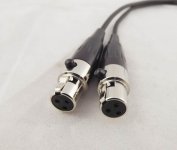
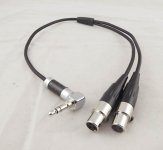
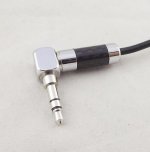
The best I'm able to provide as far as the connectors is concerned is to show you these;

s-l1600-2.jpgs-l1600-3.jpgs-l1600.jpg

Two mini XLRF out of the Audio Technica receiver to a single 3.5mm into the camera. As far as whether they're balanced, unbalanced, off-balance (maybe that's me)...I have no idea. The only thing I know for certain is the 3.5mm into the camera provides a stereo signal.

While I'm happy it's working as it had before, I'd still love to know how I was getting meter levels but not recording any audio. Maybe it was a ghost in the machine for about 8 hours the other day.
 
If the outputs are balanced and the inputs are unbalanced, phase issues is common cause of low/no audio. i.e., pins/terminals 2 and 3 are 180 degrees out of phase.
 
My question; how is it possible that I was getting great audio signal according to the meters when the output from the AT was going directly into the camera but no audio was recorded?

You're really the only person who can answer that -- you're the only one who knows what you did and how you set it up.

But... it really doesn't matter. The fact is, it *did* happen. And you didn't catch it and correct it because you weren't monitoring on headphones. Doesn't matter why you weren't. I'm just sayin' that the entire point of monitoring the return signal from the recorder (be that a camera or a separate audio recorder), is so you hear exactly what was recorded. Which in this case would have been nothing -- which would have alerted you in real time that something in your setup was wrong.

Learn from it an move on. We've all done this at one time or another. I've even done this when I was monitoring with headphones (forgot to turn on my MixPre-D, so the camera reverted to internal mics) because having to be a one man band caused me to go attention blind to the audio because I was too involved with running the camera. Twenty-five or so short interviews and one of them had iffy sound. Trust me when I say that I was not a happy camper when I got to editing. But I don't (at least, haven't) make that mistake any more.
 
Well, if it worked before, and is working now, it was most likely operator error. In other words, you had something set wrong on that shoot.
 
At the end of the day, while I'm sure I set up the rig last night the same way I had it on the day of the shoot in question and when I put it together again once I discovered the issue, the fact remains there was clearly some unknown issue that I'll likely never know. Operator error? Attention blind? Quite likely. I'm just glad I had that little Sennheiser on my B Cam for a reference track like I always do as it was plenty good enough to save my bacon.

Thanks for everyone's input...no pun intended.
 
Well I have a question... Unless you are using a stereo pair of microphones you are NOT getting stereo out of the receiver. This whole setup is a bit confusing since it's a two channel reciever but you appear to be feeding a single mono mic into a single transmitter. So maybe the receiver is set to output dual mono? If not you should only be getting a signal on one of the mini plug contacts.

In that case My new best guess is that that is the case and either your camera or editing software is just setting the pan to center so you get sound out of both speakers. In that case it would be looking for the tip to be hot. Since (assuming no dual mono mode) only one of the reciver channels would have a signal my guess is that you swapped the plugs and had the signal going to the ring when you had problems.

Simple test record a bit swap the two mini XLR's at the reciever and record a bit more. If you get a level one way and not the other that is your answer.
 
I think Scott may have it there.

Looking at your photo of the cable, it does not seem to be coded. I would figure out which XLR pin 2 is connected to the tip on the TRS and mark it with a piece of tape or something so you know which is which in the future. That is assuming pin 2 is hot on your radio mic (most, but not all, are).
 
Unless you are using old gear I think the pin 2 VS pin 3 hot is finally not much of an issue. As I understand it pin 2 was west coast film and video and pin 3 was east coast music production/ theatre. We almost never saw pin 3 hot on the west coast, but every once in awhile... I have pin switch adapters in my adapter bag just incase. But I haven't seen any pin 3 hot gear that isn't from before the 80's. Don't know if it's really "solved" or I have just been lucky.
 
The last time I encountered an polarity issue was on a client's Tascam (DA-30 as I recall) DAT machine in the early 1990s which was pin-3 hot, as I recall it was at least notated prominently on the rear panel. The pin 2/3 dilemma was a 'popular topic at an AES show I attended in the mid-1980s.. in fact as a joke they had a spin-able wheel to choose the polarity of the day.
 
Perhaps.......hmm

If you put the card back in the camera and play it from there to headphones, is it there?

I had a situation in which I had a switch in the wrong position on the camera. The positive side of the audio was going to one track, the negative to the other track. When I brought the sound into post, the two cancelled out. I deleted one and got enough sound to make the clips usable.

Hope this helps.

Regards,

Ty Ford
 
Back
Top