C100: Atomos NINJA V Audio Delay Setting C100MKII

ghostwind

Member
Quick question. There's a setting (see screenshot attached) on my NINJA V which allows adjusting for any audio delay that the camera may have over HDMI to the NINJA. I'm using the C100MKII, and was wondering from people here if they know what the delay is for this camera. I know from reading, that some DSLR cameras, like Sonys or Panasonics may have 2-3 frames of delay, but not sure of the C100MKII. I of course tried it, and I can't objectively tell of any delay. So I had my Audio Delay setting at 0 on the NINJA. But then I though to go all the way to 5 and even 10 to see what the result would be, and the result is the same - no delay.

So out of curiosity, I have 2 questions:

1. C100MKII owners that use the NINJA V, any delay you notice?

2. If no delay, like I'm subjectively seeing, then wouldn't setting it to 5 or 10 frames make it actually have the audio be 5 or 10 frames *before* the video?

Curious about this. I tested with the onboard mic as well as a Sennheiser 416 XLR mic I'm planning to use. Again, comparing audio from internal cards to external NINJA files, I don't notice delay, no matter the setting.
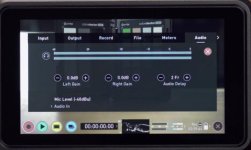
 

Attachments

  • 2007472458_ScreenShot2020-09-15at7_38_26PM.png.1e6926bb820b84da2d43cf619ebfeb0f.jpg
    2007472458_ScreenShot2020-09-15at7_38_26PM.png.1e6926bb820b84da2d43cf619ebfeb0f.jpg
    17.9 KB · Views: 0
It's been a while so IDR exactly, but make sure you're delaying your frames for the HDMI feed and not the Ninja's mic input (which seems like you're not using).

I used this feature before [with HDMI] and there was definitely a delay difference.
 
My memory is the delay is only required when you need to match/sync (audio input directly to the Ninja via the audio connection) to the HDMI video stream recorded from the camera. If using the audio in the HDMI, it is already in sync and requires no adjustment. Open to correction if I am not remembering this correctly.

B
 
I used the audio delay with a Sony a6300 and an external microphone going into the camera. I was filming sports and noticed the sounds from sticks/bats hitting the ball delayed so I used that feature to bring it back 2-3 frames.

When you critically listen to the sounds in post after a ball hits a bat, it's about 2-3 frames after visually seeing it which looks and sounds right when watching it in real time, but it was off 5-6 and looked/sounded bad so I corrected it with that feature above.
 
Thanks for the replies. Yes, the setting is for HDMI. I just don't see a delay, which maybe the C100 doesn't have over HDMI. So that's good, but my second question was if I do dial in a delay - exaggerated like 10frames, shouldn't I see a difference? Shouldn't the sound now be before the image (since my C100 we're assuming has 0 delay)? I see no difference, no matter what setting I use..

Maybe this is more of an issue with DLSRs, not cinema cameras. Still, strange it would have zero effect one way or another.
 
Maybe I'm not remembering my setup correctly and I was recording into the Ninja V - but yes, you should definitely hear/see a delay when it works properly.
 
Hmm. I don't, so that's why I was asking. And it's clear that the audio track lines up properly in Premiere with the video track. So perhaps if a camera has 0 delay, such as the C100MK2 I guess, then the setting is meaningless, because it cannot make the sound go before the video.
 
Look at the audio waveforms and check...did you try that?

When I compared mine, I clearly saw the spikes/peaks/louder noises on the audio track of the original audio 5-6 frames after the delayed/corrected audio.

This feature affects only your ProRes files that are being created through HDMI; not your camera's internal audio.
 
Last edited:
This feature only works if you are putting audio directly into the Atomos to sync with the video feed coming in via HDMI. It does not work on audio embedded in the HDMI stream acquired at/by the camera. sorry, but words alone make this difficult to explain.
 
This feature only works if you are putting audio directly into the Atomos to sync with the video feed coming in via HDMI. It does not work on audio embedded in the HDMI stream acquired at/by the camera. sorry, but words alone make this difficult to explain.

I wish I can remember if I had a microphone plugged into the Atomos.

Check this out starting at 9:35 if you'd like:

https://www.youtube.com/watch?v=kduSZbNKNSs&t
 
Thanks NorBro, what Gerald says is interesting about the HDMI embedded audio from the camera. Using only Panasonic for the last 5 or so years, I have never had to set a frame delay on the HDMI audio, but about 3-5 frame delay when using the Atomos as the audio input. I must say that the newer versions of the Atom OS may have added new features (I have an original Ninja Blade, Shogun, original Ninja (UHD) and two Ninja Infernos) and will have to go in to see if the frame delay adjustment works on the HDMI stream as Gerald indicates. Will report back later in the weekend. My recollection is that it does not - only when combining Atomos acquired audio synced to the incoming HDMI stream. The complexity on this stuff just keeps getting deeper and deeper.... LOL Good stuff - appreciate the reference!!

B
 
I was indicating it too but I know people will listen to a YouTube personality more, so I looked for one and referenced him, lol.

It definitely works. For me it was either with a microphone into the camera or the Atomos.

And I only used it with Sony cameras (seems he did too) so I do not have experience with any others.
 
Yes you can set a delay, but I just could not resist so I set up a Lumix GH5s linked to a Ninja Inferno and varied the delay from 1 to 35 (yep 35) frames and can tell no difference. So while you can set a delay, it does not appear to affect the HDMI embedded audio - at least in the test I just did. The plot thickens.
 
BTW, I know when you use the audio inputs on the Atomos, you need to set a delay and it can vary by individual camera, even of the exact same make and model (only one frame variation between similar models, but still).
 
Look at the audio waveforms and check...did you try that?

When I compared mine, I clearly saw the spikes/peaks/louder noises on the audio track of the original audio 5-6 frames after the delayed/corrected audio.

This feature affects only your ProRes files that are being created through HDMI; not your camera's internal audio.

Yes, that's what I did. I compared the MOV files from the camera vs the ProRes files from the Ninja. All lined up just fine.
 
Yes you can set a delay, but I just could not resist so I set up a Lumix GH5s linked to a Ninja Inferno and varied the delay from 1 to 35 (yep 35) frames and can tell no difference. So while you can set a delay, it does not appear to affect the HDMI embedded audio - at least in the test I just did. The plot thickens.

So after reading all the messages here, it seems that the setting can affect audio to the Ninja as well as what Gerald and NorBro say (audio over HDMI), but it won't have any effect if the camera over HDMI has 0 delay to begin with. Which is the case with my C100MK2 and the GH5 is seems. So if the camera has 0 delay over HDMI, and you set 1-35, it won't push the audio before the video.
 
One thing I did just notice while comparing for this test, is that the ProRes files form the Ninja are a few frames (14 in my case) shorter than the MOV files from the camera. Not sure why, not an issue, but strange thing. The MOV files are 14 frames longer overall, but both the MOV and ProRes files have audio and video that sync perfectly. Not sure why Ninja files are shorter.
 
Back
Top