Apple dumps Intel and shows Final Cut Pro on new Mac with Apple CPU !

According to Nikkei, the next-generation of Apple silicon — tentatively dubbed “M2” — has entered the production cycle ... the expectation is that the M2 chip (or “M1X,” however it is branded) will add more CPU and GPU performance, more Thunderbolt lanes, and allow for at least two external displays .... Last year, Bloomberg said Apple was developing a successor to the M1 featuring 20 CPU cores destined for its high-end laptops. ARM Mac desktops like the Mac Pro or iMac Pro could feature 32-core chip designs...

https://9to5mac.com/2021/04/27/next...-included-in-macbooks-in-second-half-of-year/

NVIDIA is partnering with MediaTek for a new reference line of laptops.
This is the first big project for NVIDIA after its acquisition of ARM Limited last year.
These laptops are to be designed for Chromium, Linux, and NVIDIA SDKs.

https://www.androidcentral.com/nvid...-series-chromium-powered-laptops-rtx-graphics
An already-beleaguered Intel is now facing more fire, thanks to Nvidia announcing last Monday that it will start making CPUs for facilities like data centers and supercomputers.

Named Grace (after computer science pioneer Grace Hopper), Nvidia’s CPU hopes to make a splash in the high-performance computing space. Nvidia says Grace is set to launch in 2023, but Los Alamos National Laboratory in the US and the Swiss National Computing Centre have already announced plans for Grace-based supercomputers.

https://spectrum.ieee.org/tech-talk...-supercomputing-cpu-puts-intel-under-pressure

Arm unveiled the performance numbers for its Arm Neoverse V1 and N2 server chip platforms, with processing boosts ranging from 40% to 50% over the previous generation.

https://venturebeat.com/2021/04/27/...hips-generate-at-least-40-better-performance/
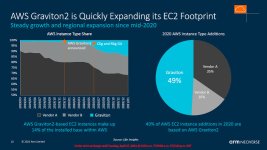
 
The ARM chip type is taking off in the data center, at least if you rent from Amazon Web Services (AWS). This slide says that half of all servers added in 2020 use Amazon's own ARM processor (which they call Graviton). Someone said that the servers are 30% cheaper while 30% faster. So tech companies can cut their costs in half.

graviton.jpgs
 
More powerful MacBook Pro's and Mac Mini's by the summer hopefully. Possibly 20-core and 40-core Mac Pro's, with 64-core and 128-core GPU's eventually next year:

https://www.bloomberg.com/news/arti...ook-pro-macbook-air-revamps-with-faster-chips

Whats interesting is the move from 4 efficiency cores on the M1 to 2 efficiency cores on the new chip. Many of us assumed it would still be 4. Will this have an impact on lighter tasks or is the thought that there are more high performance cores so it doesn't really need as many? Did apple realize we didn't really make use of 4 efficiency cores and going forward will only have 2? Is this the downside to the lower end M1 where users tend to do a lot of lighter tasks so it sacrifices performance cores but adds more efficiency cores to compensate?

Jumping from 4 to 8 performance cores was expected and insane considering how fast the M1 already is as a CPU. My M1 MBA really does not suffer from a lack of CPU power. The fan based systems are even better.

Where the M1 can use a boost is the GPU. Not that the M1 GPU is horrible. Its at least as good as the 560 GPU which was the top MBP GPU until 2018 and Apple added the build to order Vega20 option. Many users still did not pay for that upgrade so the M1 GPU is in fact as fast or faster than almost every MBP GPU minus the 5xxx series in the most recent Intel models.

For the pro apps the M1 is also as good as my Vega56 eGPU due to the loss of bandwidth of TB3 and how the pro apps are optimized for lesser hardware. Resolve and game engines are a different story. I really look forward to seeing where the GPU goes next. The 5600M has a Metal score roughly 2x higher than the M1 currently. If apple doubles the GPU at best it will match the expensive GPU upgrade on the 16" Intel MBP. Will that be enough for users or will they expect more? It would likely be part of the base model this time and not an insanely expensive upgrade build to order option. So price wise it should be compared to the 5300 and it would be a pretty decent speed boost. I could see higher end 5600M users however not very impressed to have a MBP with basically the same performance. I'm Hoping Apple can do more than 2x GPU performance. If this rumor is true the 16 core should be roughly equal to the 5600m and the 32 core option roughly twice that which is impressive. How much that 32 core will add to the cost will need to be seen. That could potentially be close to the 5700XT in a laptop.
 
More powerful MacBook Pro's and Mac Mini's by the summer hopefully. Possibly 20-core and 40-core Mac Pro's, with 64-core and 128-core GPU's eventually next year:

https://www.bloomberg.com/news/arti...ook-pro-macbook-air-revamps-with-faster-chips

I think it will be cool. The new chips are known to support the more advanced Neural Engine. It will also be possible to add more Thunderbolt ports to computers.

The new generation chips will equip the Mac Pro with 64 or 128 gigabytes of RAM. Computers will come with AMD graphics cards. The new devices will receive more compact dimensions. Thanks to new processors from Apple, the amount of RAM in the MacBook Pro will be limited to 64, not 16 gigabytes.
 
I was thinking of picking up the 13in MB Pro M1, but I don't think it will be enough real estate for editing. Any guesses on the price point/release dates on the 14/16 inch models?
 
I was thinking of picking up the 13in MB Pro M1, but I don't think it will be enough real estate for editing. Any guesses on the price point/release dates on the 14/16 inch models?

Seems like apple is maintaining the same price point as previous generations, no? Just with more horsepower. Dunno about release. Guessing late this year or early next
 
The most used computer in my life has been a 13" MacBook Air and for editing a 15" MBP.

I bought a M1 MBP and I must say it was actually more difficult to get used to editing on it than I thought it would be (but I'm good now after a few weeks).

The screen size is the clear observation/consideration, but what actually threw me off the most is the less amount of surface area for your hands and wrists to operate the keyboard (even compared to the 13" MBA).

___

I would guess the 14" and 16" will start around $1500.
 
I was thinking of picking up the 13in MB Pro M1, but I don't think it will be enough real estate for editing. Any guesses on the price point/release dates on the 14/16 inch models?

I actually don't find a huge difference between a 15" and 13" laptop. Resolution wise the 15" was a 1440 wide display vs the 13" which is 1280. Thats the 1x resolution of course but essentially that's what the screen real estate is like.

There isn't a huge difference between the two resolutions. Apple also has the ability to use scaled resolutions. The 15" can go up to 1920 wide and the 13" up to 1680 wide. Thats a lot more real estate to fit an NLE UI. The reason it doesn't go higher is Apple prefer to target an optimal resolution for vision and comfort. Most PC laptops just give you a 1920 or 3840 wide display on 15" without factoring in just how tiny that is to use. By targeting 1440 on the 15" Apple provided the optimal 2x pixel density for the optimal DPI for a more comfortable experience. PC laptops with a HD or UHD display use an inferior scaling method to have a more comfortable workspace. Apple renders the screen on the GPU at 2x resolution and then maps that to what pixels the display has. So when you set the M1 MBA to 1680 wide its actually being handled on the GPU like a 3360 wide display that is then mapped to the 2560 retina pixels it has. Its kind of like having a 1.5x Retina display which is still much better than a 1x display. The pixels are so small its also really hard to tell its not a 1:1 display. At home I use a 27" UHD monitor that I often scale up to 2560 which is the same as the 5k Apple iMac display. Its really hard to tell it isn't a 1:1 5k. Anyway my point is Apple has kind of perfected the optimal screen density and scaling. In fact its so good that by default Apple sets their Macs to use the one notch scaled up resolution as the normal setting. The 13" shows its default as 1440. They didn't bump up the resolution of the 13". They just realized it looks so good to just set it as the default. When you drop down to 1280 scaled mode thats the actual 1:1 2x resolution.

No matter what laptop is used the editing experience is somewhat restricted due to screen space. When you factor in many of us edit at least on a 24" - 27" and in many cases two monitors its hard to shrink down to a single 13", 15" or 17" laptop. I used to use a 17" MBP and while it did have more space and was easier to use at the DPI at that resolution it was still a compromise compared to working on a desktop. Thats why I prefer to have a desktop and a affordable and compact MBA. The M1 is more than capable of handling the kind of editing tasks I would do on the road.

I honestly prefer the 13" M1 MBA because I wanted a smaller screen that was easier to carry around, use on a flight and ran forever on battery. It may lack in a bit of screen space but I just plug in my iPad and use Sidecar to add a second portable display. A 12.9" iPad Pro is almost a perfect addition to the 13" M1 Macs to have a dual screen setup on the road. There are other portable monitors only solutions out there but if one already has an iPad sitting around use it as a second display. Actually works really good with
FCPX. I do use FCPX which helps a bit since its UI is streamlined for smaller displays. When I use Resolve with Braw I will say the 13" does start to feel super tight. Especially in Fusion. When I bump it up to 1680 wide however it gets much better.
 
^Thanks, I was thinking mostly of the UI (Premiere Pro) on a 13in vs the 14 or 16in. If the 16" M1 (or x or whatever) comes in around $2100-$2200 I'll probably go for that...
 
^Thanks, I was thinking mostly of the UI (Premiere Pro) on a 13in vs the 14 or 16in. If the 16" M1 (or x or whatever) comes in around $2100-$2200 I'll probably go for that...

There isn't going to be much physical difference between 13" and 14". Just like there wasn't much difference between the 15" and 16". 1440 UI space vs 1536 UI space. Thats less than 100 pixels of extra UI space. Its more but not physically enough to make a massive difference. I don't think the newer 16" models will change much from that. Apple doesn't like to deviate from a certain DPI. In the case of the 16" its the same DPI as the 15". It just adds more pixels along the edges into of a bezel. There isn't much bezel left so the new 16" will likely still be around the same resolution. Not that having more is goign to be a massive boost to be honest. You can scale the current 16" to 2048 wide which means the GPU is essentially rendering the UI at 4096 wide. Thats as good if not better than any other laptop out there. No other laptop I know of supports DCI 2k and 4k resolution even if that is at 1.5x retina.

Having used a 17", 15" and now a 13" Mac I honestly don't see a massive UI space difference between the 3 models. With scaling the 15" easily had more detail than my non retina 17" ever did. The 13" gets pretty darn close.

The 14" is likely going to be the same concept as the 16". Less bezel to add maybe another 70 - 80 pixels or so. A little boost but still the same more or less UI space.

As far as Premeire UI I'm not entirely sure. It has been a long time since I used Premiere. But the same rule kind of applies. If the UI struggles at one resolution adding another 80 pixels likely isn't going to suddenly change that. Basically if Premeire sucks on a 13" I will bet my life it will still suck on a 14". The 16" will have more UI space but in order to really have a tangible impact on the UI you really need to use it scaled to 2048 which is very tiny details. I used a 15" at 1920 for years and eventually stopped. I have since learned how to better swap applications quickly and keep my laptops at their default size now most of the time.

You can also get a 13" MBA and a 12.9" iPad Pro with a XDR display for less than the new or current 16" MBP. Thats a dual monitor setup thats 100% battery powered and very compact to travel with. plus you now have a tablet to use production apps that are more touch screen friendly like a slate.
 
^Thanks, I was thinking mostly of the UI (Premiere Pro) on a 13in vs the 14 or 16in. If the 16" M1 (or x or whatever) comes in around $2100-$2200 I'll probably go for that...


I will add one reason to maybe wait would be to see if the 16" gets a XDR display. I almost bought a 12.9" iPad Pro to hopefully use with Sidecar as a HDR grading monitor but I have yet to see a review where anybody actually tests it for that purpose. A better solution for many would be for the 16" and the larger iMac to have XDR. I feel Apple will likely go this direction eventually.
 
I never even noticed how Macs handle screen resolution till I connected an ATEM device and actually read what the note on the screen said. Ive never once looked at an Apple screen and thought it lacking in any way. However they do it, it works.
 
A market update - to the best of my abilities.

It looks like Microsoft is not going to do a Windows-for-ARM OS, instead turning to a compiler, wherever needed. There might be some performance issues.

Qualcomm and Samsung seem to want to go after the ARM market but at the lower end. Correspondingly, they'll split their models between the Chrome and Windows.

Chromebooks are blazing hot for the school market. HP overtook Apple as a #1 computer manufacturer in the US due to its success with Chromebooks. The price/performance ratio seems to be more than sufficient.

Intel has gone the "ARM route" by redesigning their mobile chips on the fast one/slow one principle. Their new CPU (Tiger lake, right?) seems to be good enough and it has pretty much every app in the universe from Windows. Once again, the performance is good enough for most users.

AMD is betting on its GPU's, with the CPU's already good enough.

NVIDIA still dominates in the GPU market with the 81% share and is on Jim Kramer's "buy" list. BTW, Jim Kramer has a long buy list.

Apple is doing really well with M1 and is outperforming a comparable Windows laptops on performance, albeit lacking in some features. And a ton of apps.
 
Back
Top