Aotearoa - super short for Your Big Break entry on GH1

Nitsuj

Well-known member
Hey there people. Well I decided to go ahead and do an entry for the Your Big Break contest in New Zealand. I wasn't sure how I was going to pull my idea off in Tennessee but I am satisfied with the results. From concept to completion it took me 2 1/2 weeks at a cost of $33. It is a teaser based off of my 2 page script on my entry link.

Hope you like.

http://www.your-big-break.com/entry/11762

There is a direct link to the full HD version there.

It was shot on my GH1, a still photography tripod, and a PL filer with ND filter with STOCK lens. 1080p, Smooth Film Mode
Contrast -2
Sharpness -1
Saturation -1
Noise Reduction -2

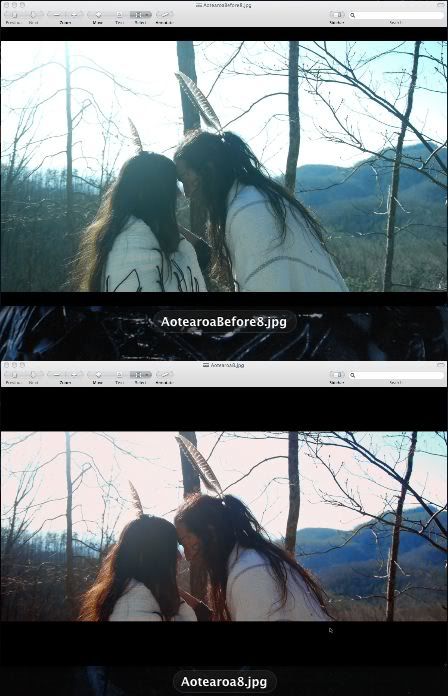
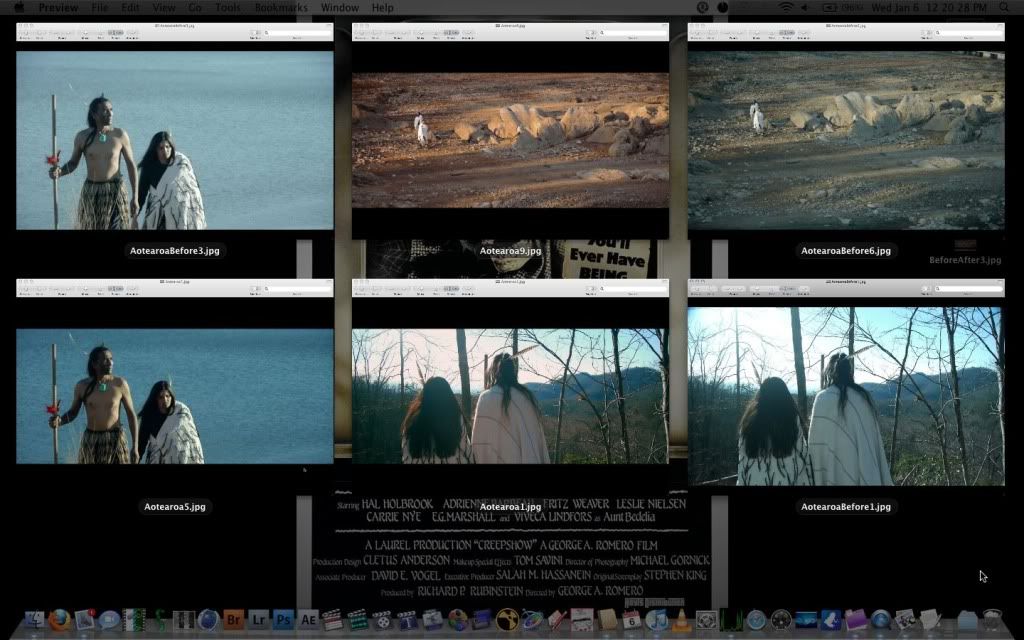
Now that produces a washed out image which I have been hearing it helps hold up to grading better in post. I gotta say that I was surprised how well it was holding up. I pushed this pretty far in some shots and maybe even a little too far. But I wanted it to not look like it was 20 degrees and more like an almost real early spring. I am not too sure if those Smooth Film settings are the best as of yet and this is only my second shot at using Apple Color but seems to look good to me. I have been teaching myself to read scopes and after using Color and doing my grading on full manual I won't ever look back to a quick plugin solution.
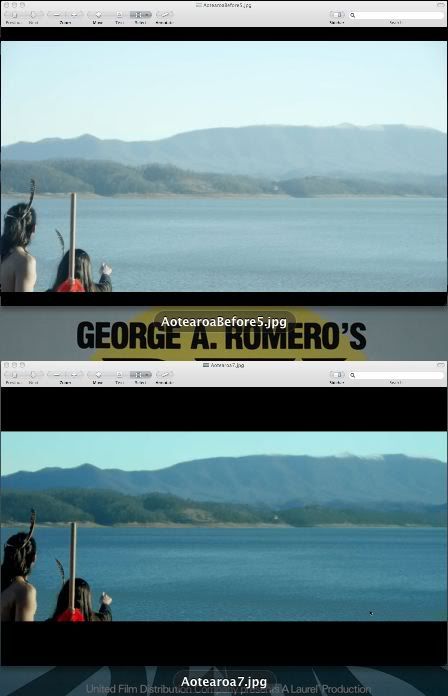
BeforeAfter1.jpg


BeforeAfter2.jpg
 
Those settings definitely do produce a washed out image in camera, and I've been using basically those same settings. Like you, I'm starting to wonder if "smooth" really is the best setting for this camera, as it is pretty low contrast to begin with - however, it does handle the grading quite well so I'm just not sure. I think it may capture more detail this way and then its up to us to pull out what we want in post, but out of the camera it's pretty washed out.

Your post-color + crop images look fantastic.
 
Yeah your color correction is great. What's best, it doesn't look like it was shot on the "GH1", you know what I mean? Great work, thank you for sharing.
 
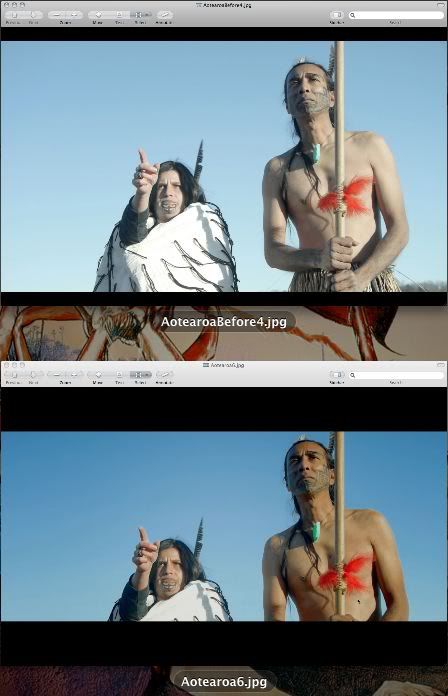
Thanks for your comments. Yeah the ability to pull up what I want in post was my appeal with these settings. I wanted to layer the backgrounds to give a depth to it. Before looks really flat and after has a depth just by color alone. I have been learning about adding depth to images lately and applied it here. I can see where too much saturation with the GH1 could cause problems. Right now these settings work but I will have to try some others out and see how that goes.

The ability to single out colors in Apple Color is great. I made his pendant jump out along with layering the background by doing keys in Color and adjusting settings to specific parts of the image. It's night and day compared to the single plugin/presettings way that seems to be the norm anymore.
 
It looks excellent. The subject matter is great. Good luck with the short. Go out and prove once again that if you really know what you are doing the GH 1 can look great at 1080p. Even around a lot of trees, grass and leaves and with the stock lens!
 
Last edited:
Looks great. This is a great thread you've started. I really like the benefit of seeing Before and After images. Initially, I'd say your "before" picture looks more overexposed than necessary. However, my recent experience with the GH1 (and the success of your After photo) shows that having the image look that "hot" out of the camera yields great results when you bring down the image in post. Nice work.
 
It looks excellent. The subject matter is great. Good luck with the short. Go out and prove once again that if you really know what you are doing the GH 1 can look great at 1080p. Even around a lot of trees, grass and leaves and with the stock lens!

Hey thanks for the comment. Yeah I have been preaching 1080p on the GH1 since I got it. Nothing wrong with it as long as you know your limitations. The more you use the GH1 the more you become familiar with what it can and can't do. Right now I use 1080p about 99% of the time and just experiment and plan shots.
 
Looks great. This is a great thread you've started. I really like the benefit of seeing Before and After images. Initially, I'd say your "before" picture looks more overexposed than necessary. However, my recent experience with the GH1 (and the success of your After photo) shows that having the image look that "hot" out of the camera yields great results when you bring down the image in post. Nice work.

Yeah it can be a little tricky getting a proper exposure with so much sky behind them and only able to use the histogram on the GH1. I had to find a good balance between the highlights and the shadows in his face. I wanted to make sure you could see his whole face. A little sacrifice in the highlights but I knew I would be able to adjust for it in post. Thanks for the comments!

Here are a couple more.

BeforeAfter3.jpg


Now the below shot was tricky. It was a very limiting location and the sun was practically right in frame. I also positioned the camera where you can't see the houses in the shots. One is hidden by a tree and the other by her head. Not a whole lot I could have done about the sky with the gear and time I had but I think it turned out okay. I used the large white van right behind me as a bounce to throw up light on them so you could still see them. So I had to expose for that.
BeforeAfter4.jpg


BeforeAfter5.jpg
 
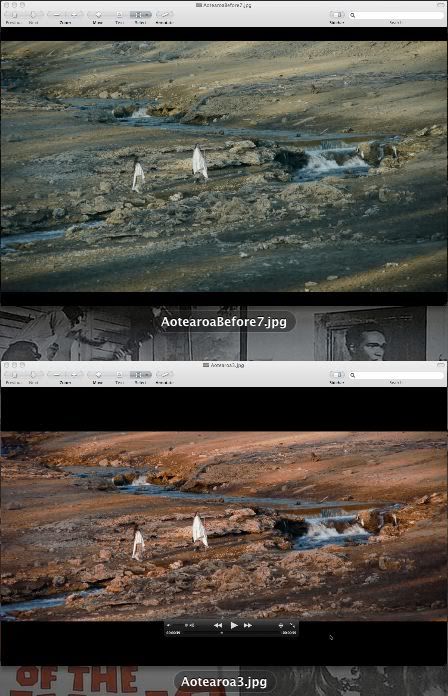
Are you planning on doing a little tutorial with these before and after shots. I'm trying to learn color correction myself (lucky to put a few books on hold at the local library!!!). I'm especially curious how you corrected the dull dirt/rock landscape into that rich, warm red-earth color.
 
Are you planning on doing a little tutorial with these before and after shots. I'm trying to learn color correction myself (lucky to put a few books on hold at the local library!!!). I'm especially curious how you corrected the dull dirt/rock landscape into that rich, warm red-earth color.

I haven't thought of doing something like that yet. I am in the process of learning myself though I know I will always be learning the art of film since it is so new in the scope of things. That shot was a little tricky and I used 7 out of 8 tabs in the secondaries just to get it right. Basically every shade was keyed and altered to match the overall look and feel. I really wanted to bring out the reds because growing up in TN you see a lot of red clay. I added a touch of pink to give that almost dusty, Arizona, feel. Not sure if that came off that way but I was thinking of it when I put it on the rock highlights haha. Maybe I will throw one together some day. I have an old color correction book that teaches you how to read scopes. So a book on that subject is highly recommended.
 
I definitely got that dusty, red clay earth feel. That's exactly how I would describe what the shot looks like to me. Especially that warm, red-clay, it really comes from the earth.

I've only recently begun to hear about Apple Color. Is there a PC equivalent to what this program can do?
 
Hmmm I don't know really. I do believe the Avid has color correction tools comparable other than that I am not sure. I bet there are tons of people here in the forums that know and you could head over to creativecow.net for a possible answer.
 
I have Color but have never really used it. You're making me seriously consider doing the final grade for my GH1 short using it. It looks like it's worth the learning curve.
The stuff you've done using secondary color correction looks great. I have a question, though: does it look good on moving video vs. a still? I ask because my experience with secondary color correction is that you can sometimes see artifacting when you use keys to correct selective colors. Any problems with that? If not, I'm sold on Apple Color.

Your widescreen compositions are nice. How are you accounting for it when you shoot with the GH1? Are you using one of the grid lines on the LCD to show you where you will be cropping in post? Or are you just "winging it"?
 
I have Color but have never really used it. You're making me seriously consider doing the final grade for my GH1 short using it. It looks like it's worth the learning curve.
The stuff you've done using secondary color correction looks great. I have a question, though: does it look good on moving video vs. a still? I ask because my experience with secondary color correction is that you can sometimes see artifacting when you use keys to correct selective colors. Any problems with that? If not, I'm sold on Apple Color.

Your widescreen compositions are nice. How are you accounting for it when you shoot with the GH1? Are you using one of the grid lines on the LCD to show you where you will be cropping in post? Or are you just "winging it"?

The first question about moving video vs still... I did a location scout and found that spot with the rocks. I then did a color correction test on that. I did a basic correction and found as I rendered all the detail in the rocks were causing some jitter in the colors. The reason was because the shade of colors were shifting as I did the pan. So I found that you have to do keys for a broad range of colors so when you pan it covers the spectrum. I know it sounds crazy but the more you play with it the more you understand. What I discovered is you need to key a certain color then add a good amount of blur to that layer to compensate the motion. Damn it sounds crazy so I guess I need to show it on a video some day.

I tell you what... the best tutorials I know on the web are from one person alone.
http://www.youtube.com/user/AppleShakeGuru

Watch his stuff and learn a lot. He rocks. He might have something in there that explains what I mean. If not just let me know and I will come up with a video to show it.

By the way I was out celebrating and my typing may not be great in this post so ignore that. I will re-read this tomorrow and adjust accordingly. ;)
 
Last edited:
Your widescreen compositions are nice. How are you accounting for it when you shoot with the GH1? Are you using one of the grid lines on the LCD to show you where you will be cropping in post? Or are you just "winging it"?

I am using the grid lines in the GH1 for it. It's there to remind me for moments like this when I jumped out of the car quickly into 20 degree weather to get a shot with lightly clothed actors. You can forget in moments like that.
 
Very nice, Nitsuj! That warm color grading, wow ... Makes me want to see the full film.

best regards, Gunther
 
Back
Top