Anyone switching from FCP

Here's the bottom line. Those of us that have been using FCP to make our living, do so primarily because it's what most people are using. The same can be said for Avid users. That's why we have put up with Apple's slack when it comes to updating. Sony Vegas or Premiere may be the cat's pajamas, but as of now, I won't bother to learn either because they are basically irrelevant to my business.

So with this in mind, the answer to the question is, I will be switching to whatever everyone else does. This includes the possibility of learning iMovie Pro (ugh..). I'm pretty sure I will be learning and incorporating Avid, regardless. It is still a PRO app and holds water in the biz. But as far as Premiere or whatever else, time and money will tell....
 
In a nutshell, unless you're editing AVCHD or do a lot AE, I'd go with Avid. Without giving it a second thought.

I love the no-nonsense layout of the Avid platform.... Learning Avid got me away from "drag & drop" editing and I learned how to use the keyboard shortcuts.

Yeah, Avid is very keyboard centric. You can certainly use a keyboard with Premiere, but in MC, if you want to get work done efficiently, learning the keyboard is the way to go. Dragging, dropping, clicking... all doable, but it'll slow you down. Keyboards fit with my style of editing. Avid's SmartTool, which people who prefer using a mouse probably love, is pretty cool, and beats what I've seen from Premiere.

I love media management in Media Composer. It simply blows away everything else. PhraseFind makes finding stuff incredibly easy too. AMA allows you to bring in all kinds of media types without any transcoding (except AVCHD). Easy mixing and matching of various formats too.

And depending on what you're cutting, ScriptSync is one of the most incredible tools. Period. Nothing else like it. (It's patented and has another 7 years of protection.)

As I mentioned up top, if you use other Adobe programs, then Premiere has a tighter integration. But if you work (or hope to work) in the industry... well Avid definitely has a tighter integration there. When FCP first came out a lot of people said it was the death of Avid, not because FCP was cheaper and would gain a large following, but because the industry would move over to it. That didn't happen. Sure, there are places that do a lot of editing on FCP, but by and large the industry is dominated by Avid.

Anyway, like others have said, download a 30 day demo on Avid's site to see if you like it. There is a learning curve of course, but try not to let that turn you off. Because once you get into the program, I mean really delve down into it - there's nothing that really compares.

Well, that's my experience at least. I've been editing on Avid since 1995 and after stints using FCP and Premiere, I always end up back with Avid.
 
im on a macpro. those cards arent compatible with my mac right? GeForce GTX 285 which is not available anymore, Quadro FX 4800 & Quadro 4000 are the ones that i see as an option. if others can work on my macpro id like to know. im on a macpro 8 core 2.93ghz Nehalem.

thanks
david

you can get a gtx285 that has been flashed for mac. it's what a lot of us are using for our davinci resolve gpu's and they are rock solid. you only get something like a 5% performance increase with a fx4000 card. the gtx285 is only $250 so it's kind of a no brainer...
 
I decided today that I am giving up on Final Cut X. I am looking to get Media Composer 5.5 and Resolve. If anyone has any suggestions or advice, please let me know.

Substitute Episode for Squeeze and you have where I am heading.

Resolve just arrived today and I just upgraded to Media Composer 5.5
 
So, is PP not able to use the GPU on ATI cards?

Last time I used Avid MC, it required a USB dongle to be attached to the computer. I'm guessing that has changed?

No dongle. Its software activation only for all new licenses of media composer.

We're switching to Premiere. I'd prefer Avid but the other editors will transition faster/easier to Premiere and we already own it. Plus we're on shared storage so Avid will be much much more expensive to move to.
 
A bit off topic, but is Media Composer compatible with OSX 1.6.7 (latest update?)

http://www.avid.com/US/products/Media-Composer/system-requirements

Mac

Computer: Avid-qualified Mac-based computer or laptop2 (see details)
OS: Mac OS X 10.6.5/10.6.6 (Snow Leopard)
Processor: Intel Dual or Intel Dual Core 2.66 GHz Xeon processor or faster, or Intel Core 2 Duo 2.33 GHz processor or faster (laptops)
Memory: 4 GB of RAM
Graphics Card: NVIDIA GeForce family3 or ATI Radeon family (as supported by Apple)
Internal Hard Drive: Minimum 80 GB 7200 rpm hard disk
 
For those of you considering the Adobe crossgrade offer, here are Videoguys System Recommendations for Adobe CS5.5 Production Premium

The new CS5.5 version of Adobe Premeire Pro requires a 64-bit operating system, a multi-core processor, plenty of RAM and a fast GPU. We realize that you may need to upgrade your machine. Here is the base system specs that Videoguys recommend that will give you excellent performance and optimized Mercury playback.

Mac Snow Leopard 10.6.3
Intel based Quad Core Processor or faster
At least 6 GB RAM but 12 GB is even better!
GTX285; Quadro4000
Windows 7 64-bit
Intel Quad-Core Processor or faster
At least 6 GB RAM but 12 GB is even better!
GTX 470/570/580; Quadro2000/4000 or faster *

* Although Adobe CS5 officially only supports a handful of GPU for the mercury playback engine, we have provided links on our blog to articles that show you how to enable MANY other nVidia cards for Mercury.

How to Unlock Adobe Premiere CS5 to use almost any NVIDIA graphics card with CUDA acceleration
How To Enable the Cuda / Mercury Engine on Premiere CS5 / Snow Leopard
 
Adobe can handle shared storage. Weren't they doing this before anyone else?

Edius runs under bootcamp. I us it the most out of the three I have (AVID and PPro being the other two). I still like AVID's CC tools best though. Edius is superfast RT editing.
 
Last edited:
So, is PP not able to use the GPU on ATI cards?

Last time I used Avid MC, it required a USB dongle to be attached to the computer. I'm guessing that has changed?

when i installed MC a last night i "unchecked" the pace button (or whatever it was called) because i thought it might interfere with my trial. the install went in perfectly with the 30 trial now counting down. maybe if i decided to purchase i have a feeling ill have to deal with that part that i bypassed upon this initial install.

and PP with not get anywhere near the performance from an ATI card that it will with an nVidia card with CUDA. the only way i can really give PP a serious go (which i already have with CS5 suite) is to fork over the big cash for either a used GTX 285, Quadra 4800 or Quadra 4000. the quadra's are expensive which if i know i would be happy with PP i just go ahead and buy it but i have reservations still about PP.

david
 
you can get a gtx285 that has been flashed for mac. it's what a lot of us are using for our davinci resolve gpu's and they are rock solid. you only get something like a 5% performance increase with a fx4000 card. the gtx285 is only $250 so it's kind of a no brainer...

how do you get it flashed? can i buy it that way or is it an update of sorts that i will have to do myself? thanks for this suggestion and also to ATL Media Group for also suggesting the similar card.
 
Funny thing is I upgraded to the quadro4000 expecting improvement with FCPX. I wasnt thinking about switching but since Resolve and PP love this card, I think I made a good investment indeed...
 
how do you get it flashed? can i buy it that way or is it an update of sorts that i will have to do myself? thanks for this suggestion and also to ATL Media Group for also suggesting the similar card.
you buy it that way. there is an ebay seller called "macvideocards". he is located in hollywood. he has a great reputation with these things and is great about offering support (although it was a no brainer process). i picked the card up from him at his place and have never had a minute's trouble.

this is more than a firmware thing. the card has to have a different chipset soldered to the board from what i understand. the result is the exact same card that was originally sold for the mac, now discontinued.

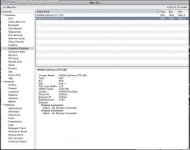
here's a grab of my system profile. the mac doesn't see any difference between the flashed card and the one built for mac.


lwy1oq
 

Attachments

  • Screen shot 2011-06-23 at 12.14.53 AM.jpg
    Screen shot 2011-06-23 at 12.14.53 AM.jpg
    14.2 KB · Views: 0
I started with Premiere back in the days. It totally sucked big but affordable. Went to Media 100, was not intuitive, expensive. Avid was never in the picture. Went to FCP, now on FCP 7 and will stick with it for now. Playing around with FCP X, will NOT use it on any project until it is more stable. When Premiere 5 came along, I got it but have not used it much, maybe will upgrade it later. tested a trial version of Avid. Nah, why bother.

So I got my options. Prudence dictates a wait and see if I will fully convert to FCP X. Probably will once the first update releases. For now though I'm not getting all emotional about the career threatening inadequacies of FCP X and how Apple has slapped me in the face. It is version 1.0.
 
Back
Top