
Navigation
Install the app
How to install the app on iOS
Follow along with the video below to see how to install our site as a web app on your home screen.
Note: This feature may not be available in some browsers.
More options
You are using an out of date browser. It may not display this or other websites correctly.
You should upgrade or use an alternative browser.
You should upgrade or use an alternative browser.
Anyone switching from FCP
- Thread starter qwerty123
- Start date

Scott F
Pug Life
For those of you considering the Adobe crossgrade offer, here are Videoguys System Recommendations for Adobe CS5.5 Production Premium
The new CS5.5 version of Adobe Premeire Pro requires a 64-bit operating system, a multi-core processor, plenty of RAM and a fast GPU. We realize that you may need to upgrade your machine. Here is the base system specs that Videoguys recommend that will give you excellent performance and optimized Mercury playback.
Mac Snow Leopard 10.6.3
Intel based Quad Core Processor or faster
At least 6 GB RAM but 12 GB is even better!
GTX285; Quadro4000
Windows 7 64-bit
Intel Quad-Core Processor or faster
At least 6 GB RAM but 12 GB is even better!
GTX 470/570/580; Quadro2000/4000 or faster *
* Although Adobe CS5 officially only supports a handful of GPU for the mercury playback engine, we have provided links on our blog to articles that show you how to enable MANY other nVidia cards for Mercury.
How to Unlock Adobe Premiere CS5 to use almost any NVIDIA graphics card with CUDA acceleration
How To Enable the Cuda / Mercury Engine on Premiere CS5 / Snow Leopard
Just ordered! Stoked to upgrade all my other Adobe products and learn Premiere. Excellent customer service on the phone.

Frank Perrotto
Active member
My two cents - I work as an editor in network television. I've worked on game shows, reality shows, and now mostly work in animation and on sizzle reels. I really think Final Cut will be on its way out in most professional environments after this release. I can already tell that if it doesn't do the job efficiently with the favored editors, they're going to recommend switching to Premiere, which on the animated shows I work in is already there, sitting unused as part of the CS. There are certain jobs for which Final Cut was just better suited to the job than Avid (I believe storyboard animatics is one of them), and sometimes it was just a financial consideration. Most smaller production houses used Final Cut because it would be easier to find cheaper editors or they'd just hire Avid people who'd probably pick it up pretty fast since they're similar enough. I've worked on a show or two where that was the case. It's really more important for the assistants to know the technical ins-and-outs than the editors.
I think Barry is right in that Avid and Adobe HAVE to be sharpening their pricing knives right now ready to go in for the kill. I have Premiere on my mac but never used it. I used the old versions, before I got into editing for television and HAD to know Avid and Final Cut. But since then (3+ years ago?), I haven't touched it. Might be time to get reacquainted just in case. I'll say that I've NEVER, NOT ONCE, encountered Premiere working in television. Photoshop and AE, yes, every single day, but not Premiere. Might be it's time to shine, now!
What's funny to me about all the articles telling professional editors to stop saying the sky is falling and to just man up and learn to deal with the change is that those people must have no clue what it's like to work in a broadcast environment. I don't mean local commercials or documentaries or industrials, I'm talking about working on a reality show where, for instance, everything has to be delivered on tape and there are certain expectations about work-flow and what can be accomplished. We KNOW we're going to be dealing with companies thinking it's fine to upgrade only to find out somewhere down the line that, "Oh yeah, it doesn't do multi-cam... yet." Too bad we need multi-cam right now! I've worked on multi-cam shows in Avid and Final Cut and Avid was MUCH better at it, though.
In the New York Times article that just went up, the author says, "No output to tape? Get over it, tape is on its way out." COULD HAVE FOOLED ME! Everything I've ever worked on, save some of the extra material for the web (and they want those on DVD a lot of the time) has been delivered on tape. I've never set foot in an editing suite without at least 2 tape decks. I'd say on the shooting side, I've seen a lot more switching to tapeless, but on the finishing side, tape is still king. These companies like having those big tape libraries sitting there, ready to grab something at any time, rather than hard drives that could magically stop working at any moment so they must be backed up 2-3 times, minimum.
The other side of the coin is that, like I said, in some places they don't care what NLE it is, they just want the skills of that particular editor. So if you have an editor that you love working with and he or she says that they'd prefer it if we start using Premiere instead, not to mention being tied into AE and PS, then why wouldn't they do that? Many shows treat their team as technical advisors as well and so they DO get to weigh in on those kinds of purchasing decisions. There seems to be a lack of understanding that the 'it's what you do with the tool' argument works both ways - some people are skilled enough that they can use their preferred tool and not have to bother learning all 3 (4 for now, since FCP 7 will be around for at least another year in some places and Premiere will start to have broadcast market penetration). But still, lack of multicam and output to tape is really a killer for a long time to come as far as I can tell.
Having said all this, I will get FCX and learn it and if I like using it, I'll still use it for home projects. I don't use Avid at home cause I still think it's clunky and not intuitive with certain things, but I'm fine working on it when I'm getting paid. But I'd be really surprised if, from what I've seen, FCX is used anywhere I work.
I think Barry is right in that Avid and Adobe HAVE to be sharpening their pricing knives right now ready to go in for the kill. I have Premiere on my mac but never used it. I used the old versions, before I got into editing for television and HAD to know Avid and Final Cut. But since then (3+ years ago?), I haven't touched it. Might be time to get reacquainted just in case. I'll say that I've NEVER, NOT ONCE, encountered Premiere working in television. Photoshop and AE, yes, every single day, but not Premiere. Might be it's time to shine, now!
What's funny to me about all the articles telling professional editors to stop saying the sky is falling and to just man up and learn to deal with the change is that those people must have no clue what it's like to work in a broadcast environment. I don't mean local commercials or documentaries or industrials, I'm talking about working on a reality show where, for instance, everything has to be delivered on tape and there are certain expectations about work-flow and what can be accomplished. We KNOW we're going to be dealing with companies thinking it's fine to upgrade only to find out somewhere down the line that, "Oh yeah, it doesn't do multi-cam... yet." Too bad we need multi-cam right now! I've worked on multi-cam shows in Avid and Final Cut and Avid was MUCH better at it, though.
In the New York Times article that just went up, the author says, "No output to tape? Get over it, tape is on its way out." COULD HAVE FOOLED ME! Everything I've ever worked on, save some of the extra material for the web (and they want those on DVD a lot of the time) has been delivered on tape. I've never set foot in an editing suite without at least 2 tape decks. I'd say on the shooting side, I've seen a lot more switching to tapeless, but on the finishing side, tape is still king. These companies like having those big tape libraries sitting there, ready to grab something at any time, rather than hard drives that could magically stop working at any moment so they must be backed up 2-3 times, minimum.
The other side of the coin is that, like I said, in some places they don't care what NLE it is, they just want the skills of that particular editor. So if you have an editor that you love working with and he or she says that they'd prefer it if we start using Premiere instead, not to mention being tied into AE and PS, then why wouldn't they do that? Many shows treat their team as technical advisors as well and so they DO get to weigh in on those kinds of purchasing decisions. There seems to be a lack of understanding that the 'it's what you do with the tool' argument works both ways - some people are skilled enough that they can use their preferred tool and not have to bother learning all 3 (4 for now, since FCP 7 will be around for at least another year in some places and Premiere will start to have broadcast market penetration). But still, lack of multicam and output to tape is really a killer for a long time to come as far as I can tell.
Having said all this, I will get FCX and learn it and if I like using it, I'll still use it for home projects. I don't use Avid at home cause I still think it's clunky and not intuitive with certain things, but I'm fine working on it when I'm getting paid. But I'd be really surprised if, from what I've seen, FCX is used anywhere I work.
David Pogue just weighed in on FCPX, I think it's a fair take. Have a look.
http://pogue.blogs.nytimes.com/2011...?ref=personaltechemail&nl=technology&emc=cta1
http://pogue.blogs.nytimes.com/2011...?ref=personaltechemail&nl=technology&emc=cta1
From the article:
"I wrote my review from the perspective of an advanced amateur; I’m not a professional editor. I made four movies with Final Cut Pro X, including helping my son with a 20-minute final eighth-grade project. I found FCP X infinitely more powerful than iMovie, yet infinitely less intimidating than the old Final Cut."
He doesn't understand the world I work in. His opinion doesn't carry weight.
"I wrote my review from the perspective of an advanced amateur; I’m not a professional editor. I made four movies with Final Cut Pro X, including helping my son with a 20-minute final eighth-grade project. I found FCP X infinitely more powerful than iMovie, yet infinitely less intimidating than the old Final Cut."
He doesn't understand the world I work in. His opinion doesn't carry weight.

keylight
Veteran
At the heart of it, it's because Avid converts everything into its own omfi or mxf format upon import
Not true, or at best a bit misleading. You can use media in their native formats without any transcoding or MXF encapsulation using AMA. http://www.avid.com/US/products/Avid-Media-Access/features (see formats below). For other file types, MXF is acts as a wrapper around the media enabling all kinds of metadata to be stored. The files that can be imported using AMA already have methods of storing meta data, so there is no need to wrap them in MXF.
Highlights
- Get native, direct access to file-based video without moving, importing, or transcoding media
- Instantly view, edit, and play back clips, with access to all clip metadata
- Cut multiple media formats together in the timeline without converting clips
- Supports more popular tapeless formats than ever, including:
- RED (.R3D)
- QuickTime (including ProRes and Canon 5D/7D movies)
- HDCAM SR Lite
- XDCAM, XDCAM HD, and XDCAM EX
- P2, DVC PRO HD, and AVC-Intra
- GFCAM
- Canon XF
- Redesigned plug-in architecture in Media Composer 5, Symphony 5, and NewsCutter 9 allows for even greater future format support
And for those who are interested in what MXF does:
Material Exchange Format (MXF) is a wrapper or container format which encapsulates media and rich production metadata into a single file, which is useful for media storage and exchange. It is an open technology that can is implemented by different manufacturers.
MXF is designed to be flexible enough for use in all stages of content creation, from acquisition, to authoring, to distribution. The primary benefit of MXF is that it provides greater workflow efficiency by preserving useful metadata as media files make their way through the content creation process. The MXF format is independent of the type of content that it contains, so an MXF file can contain video and/or audio at any resolution or compression. In many instances MXF files encapsulate media which is already formatted to one of the existing industry standards.
MXF allows for easy exchange of material between file servers, tape streamers and digital archives. MXF is an ideal interchange format to enable workflow efficiencies in news broadcasting, post production, asset management, and archiving applications.
You can select the MXF format when you capture, link, create titles, or render effects.
Last edited:

Batutta
Major Contributor
Not true. http://www.avid.com/US/products/Avid-Media-Access/features (although AVCHD still needs transcoding)
Fair enough. I'm currently using Avid in an offline capacity where all the digitizing has been done for me (in a low rez OMF format). My previous experience was with a tape deck back in the stone age (the 90's). AMA is a recent development.
David Pogue just weighed in on FCPX, I think it's a fair take. Have a look.
http://pogue.blogs.nytimes.com/2011...?ref=personaltechemail&nl=technology&emc=cta1
There are a lot of "Apple's going to fix it, don't worry" in that article that may or may not necessarily be true. Where is he getting this information? Is Apple telling him directly? Why isn't anyone else flat out saying this then?
keylight
Veteran
Where is [Pogue] getting this information? Is Apple telling him directly? Why isn't anyone else flat out saying this then?
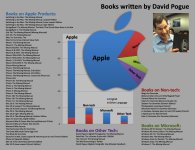
Coming soon from David Pogue: "Final Cut Professional X - the Missing Manual"
Keep this chart in mind whenever you read anything Pogue writes.
Keep this chart in mind whenever you read anything Pogue writes.
Last edited:

Avid's educational licensing is cheaper than FCPX. It's $295 a seat. Students can buy it for $295 and get 4 years of free upgrades. Call Avid and talk to them, then call Adobe and talk to them. You owe it to your students. When I taught we started in FCP, advanced editing was Avid, compositing etc...was Adobe. They need to learn them all.
So, is PP not able to use the GPU on ATI cards?
Last time I used Avid MC, it required a USB dongle to be attached to the computer. I'm guessing that has changed?
No, but it requires online authentication/serial number, similar to Adobe products.
My advice to anyone listening would be -- give it a week. See if Apple says anything about future directions (not that I expect them to; their response to the proven iPhone 4 antenna issues was defiant and combative) but hey, give them a chance to craft a response.
In the meantime, if I was the marketing director at Adobe or Avid, I can guarantee you I'd be devising some sort of irresistible crossgrade promotion, to take advantage of the immediate knee-jerk reaction. So for those considering switching, give those companies a chance to see if they come up with some irresistible offers.
Furthermore, Apple has a history of giving people what they say they don't want, only to have people change their minds and embrace it. Remember the reactions to the announcement of the iPad? NOBODY wanted an iPad, they mocked and ridiculed it and asked "who is this for, really?" fast forward to when it'd been out six months, and it's the by-far most-successful Mac product ever. Or when they took away the floppy drive -- people screamed. And the ExpressCard slot -- that caused furor. But people seem to adapt.
So I know it looks like a disaster right now, but -- nobody's holding a gun to your head to make a purchase decision right at this moment, right? So give it a little time and see what shakes out.
Wait and see seems to be the prudent thing to do. Jumping ship this early is not a good business decision. FCP 7 works fine for me while I play with FCPX, which has some really cool features I'm liking a lot. Im thinking once FCPX matures, I will migrate fully, and by then I will be proficient with its UI. I am actually excited about how Apple will integrate FCPX with its roadmap and key technologies such as Thunderbolt, touchscreen, etc. Apple tends to out innovate others so I'm cautiously optimistic.

Nicholas Natteau
Veteran
if I could ask Steve Jobs just one question...
if I could ask Steve Jobs just one question...
If i could ask Steve Jobs just one question it would be:
Whatever happened to the Apple philosophy "it works like it's supposed to"
Like thousands of others, what I find incomprehensible about the logic behind Final Cut PRO X is how professionally crippled it is.
I mean why get rid of crucial professional tools like "EDL, OMF, complex audio editing, etc" How would leaving that in there have scared novices away from using the program? Those things are options, you're not obliged to use them if you don't want to. Audio editing? If you don't want to do it, just don't double click the audio track.
And speaking of simple, if Apple's aim behind FCP X was really to simplify the program so that anyone could feel comfortable using it, what could be simpler to understand than a timeline? Than "in" and "out"
Sorry, I just can't understand the logic of gutting the most popular professional NLE in history.
But on a more positive note, having used Motion 5 for several days now, I'm delighted to see that it hasn't lost anything Motion 4 had, and indeed performs noticeably faster, gave it 5 stars.
Here's to hoping that the "PRO" gets put back into Final Cut. Doing it doesn't have to make the program more complicated. What was that complicated about FCP to begin with?
if I could ask Steve Jobs just one question...
If i could ask Steve Jobs just one question it would be:
Whatever happened to the Apple philosophy "it works like it's supposed to"
Like thousands of others, what I find incomprehensible about the logic behind Final Cut PRO X is how professionally crippled it is.
I mean why get rid of crucial professional tools like "EDL, OMF, complex audio editing, etc" How would leaving that in there have scared novices away from using the program? Those things are options, you're not obliged to use them if you don't want to. Audio editing? If you don't want to do it, just don't double click the audio track.
And speaking of simple, if Apple's aim behind FCP X was really to simplify the program so that anyone could feel comfortable using it, what could be simpler to understand than a timeline? Than "in" and "out"
Sorry, I just can't understand the logic of gutting the most popular professional NLE in history.
But on a more positive note, having used Motion 5 for several days now, I'm delighted to see that it hasn't lost anything Motion 4 had, and indeed performs noticeably faster, gave it 5 stars.
Here's to hoping that the "PRO" gets put back into Final Cut. Doing it doesn't have to make the program more complicated. What was that complicated about FCP to begin with?
Last edited:
CS5.5 + AVCHD = fail on older Mac
CS5.5 + AVCHD = fail on older Mac
Remember if you've not got a CUDA card and want to use AVCHD without transcoding your are SOL with PP5.5/5 unless you buy something like Noescene. Even editing with ProRes422 on my MBP (2009) with 8 gigs of ram and a Nvidia 9600M GT uses a huge amount of CPU cycles and has made me switch back to FCP6.
CS5.5 + AVCHD = fail on older Mac
Remember if you've not got a CUDA card and want to use AVCHD without transcoding your are SOL with PP5.5/5 unless you buy something like Noescene. Even editing with ProRes422 on my MBP (2009) with 8 gigs of ram and a Nvidia 9600M GT uses a huge amount of CPU cycles and has made me switch back to FCP6.

Remember if you've not got a CUDA card and want to use AVCHD without transcoding your are SOL with PP5.5/5 unless you buy something like Noescene.
Why is that? Must be a Mac thing. PPro 5 does AVCHD just fine on a PC.

chromeboy007
Well-known member
In the meantime, if I was the marketing director at Adobe or Avid, I can guarantee you I'd be devising some sort of irresistible crossgrade promotion, to take advantage of the immediate knee-jerk reaction. So for those considering switching, give those companies a chance to see if they come up with some irresistible offers.
CS6 in and of itself would be an irresistible offer. Hope they push up their release date as a result.
Frank Perrotto
Active member
I like Premiere so far, but I think there's a lot of screen real estate that's taken up by the borders of all the windows. Final Cut allowed you to see a lot of tracks, even on my 21.5" imac and even with waveforms showing at smaller track sizes. Premiere only allows you to downsize to a certain point with wave forms showing. I also like how man tabs you can fit into Final Cut's browser... I option open a lot of bins at the same time and it's easier to switch back and forth with them. Maybe it's just time for a second monitor on the home system.
That said, I tried editing some Red R3D files I found online and it worked fine at lower playback resolutions. I was honestly amazed I could do anything with them after hearing so much about how difficult Red is in post. I'm on an imac with an ATI Radeon 4670, so I've only got the Mercury software engine, but it still seems ok. Just ordered more RAM though. Also tried native editing of files from my T2i and those are ok at 1/4 resolution during playback.
That said, I tried editing some Red R3D files I found online and it worked fine at lower playback resolutions. I was honestly amazed I could do anything with them after hearing so much about how difficult Red is in post. I'm on an imac with an ATI Radeon 4670, so I've only got the Mercury software engine, but it still seems ok. Just ordered more RAM though. Also tried native editing of files from my T2i and those are ok at 1/4 resolution during playback.