Anyone having card speed issues, please try again without native 24p

Just to add: my Transcend 6 16GB card would crap out with the "B" 32Mbit settings when I film my daffodil of death test with Native 24/25p ON; however, the same tests appear to work perfectly fine when I turn 24/25p OFF. (note: I am only performing stability testing at this time).

what bitrates are you hitting with your deadly daffodils? static shots or moving? you should really try the star chart test, it really pushes the camera that thing.

All my tests shows that motion with high details hit lower bitrates than static high detailed shots.

I am using a Panasonic 16gig class 6 by the way.
 
With "B" 32Mbit settings w/ Native 24/25p OFF, Windows tells me it is 29.7mbps. With "B" 32Mbit settings w/Native 24/25p ON, the camera locks up and I have to perform a battery pull; when I check the file, it is corrupted so I have no info.

My testing parameters are simple: focal range at 20mm, point at the flowers (I just check and it's not daffodils), OIS ON, auto-focus on, static shots, panning shots, then test the entire focal range. Perform the same test with 720p.

Lastly, my Transcend 6 16GB fails with "C" settings w/ Native 24/25p OFF.
 
Very interesting thread.

First off, Svart, I'd like to thank you for bringing this up to our attention and furthermore not relenting in your pursuit of vindication. The way certain people (one in particular) were missing or avoiding your point and details, I was seriously concidering the possibility they were trolling you ;)

I will in fact be shooting something on a tripod, in 24p native in a week or so and althogh it's unlikely there will be enough stillness to trigger this effect, I feel it's important that I'm aware of it.

So I decided to pit my GH1 up against Pappas' chart. I very much expected it to crap out right away, but in fact no matter what I initially did I could not get the effect to trigger. Faster shutter.. noise reduction down.. refocusing.. etc. etc. THEN however, I decided to turn my ISO down to 100 (from 800 I think) and -boom- I got the error and my GH1 froze up. It's definately a issue sparked from extremely low changes in consecutive video frames.. fine enough a difference that simply raising the ISO to add noise can (at times) be enough to counteract it.

To sum up the situation.. I would not disagree with Svart that this could be concidered a flaw in the 24p patch... although perhaps a safer from being flamed word would be "drawback". It's certainly not an intended biproduct of the 24p patch. Just because some people can bypass a problem, doesn't mean it's right to treat the problem as though it doesn't exist. It's kind of like someone with a driveway telling someone without one they can't complain about there other neighbor's 5 cars taking up all the parking on the block because they shouldn't bought a house with a driveway...or some analogy like that.

Anyhow.. as for my SD card.. I have a 16GB PNY Optima - Class 4. I'm pretty suprised at it's performanced being a class 4 I picked up at Staples. I was going to shell out more to order a Class 6 or 10 online.. but I needed something fast so I picked up the PNY (best brand/price combo I found at the store).

According to my speed test program my card gets 19.7MB/s read and 11.5MB/s write.. at least with my current card reader. It seems to be holding up to those results while recording as well. The program I'm using is designed to judge speed capabilities for video on a hard drive... so I trust it's reasonably reporting results for what my card can do consistently.

Here's a question... I'm not sure what was involved in the fix.. but has anyone tried the earlier version of the 24p patch? The one that didn't play back natively?
 
To sum up the situation.. I would not disagree with Svart that this could be concidered a flaw in the 24p patch... although perhaps a safer from being flamed word would be "drawback". It's certainly not an intended biproduct of the 24p patch. Just because some people can bypass a problem, doesn't mean it's right to treat the problem as though it doesn't exist.
Well the biggest problem is the fact that when using native 24p/25p the GH1 freezes. When pushing the limits of ones card by applying the three AVCHD bitrate patches the worst case scenario is you get the "card speed error", but at least you retain what you've shot up to that point. With native patch the camera freezes and and your shoot is gone. This makes the native patch a much more experimental feature in my mind. With fast card and certain types of scenes there seems to be a certain level of stability.

I think that lpowell is onto something with his analysis of the rogue P frames. Somehow, these are only seen when applying the native patch. With 60i wrapper I have yet to see a rogue P frame in all of the test shots I did.

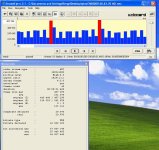
Speaking of the 60i wrapper footage. I did a bunch of star chart tripod tests with 60,62,70 settings. Looking at resultant files at low level (see attachment) I can see that recording always terminates at the end of P-frame sequence, before the next I frame. Since in 60i mode, the I/P size allocation looks normal for static footage (larger I frame, smaller P frames), it seems that some kind of buffer limit is reached.

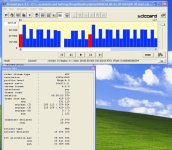
Too see if enlarging the GOP sequence could possibly allow the buffer not to be filled with large I frames so quickly, I upped the GOP to 30, but still got the "Card Speed" warning, followed by "Error Writing to Card" message. The files were not written to the card. By picking a more modest 20 setting, I was able to record I few more seconds (than with stock GOP 15) and didn't get "Error Writing to Card" message, so could analyze the files (see 2nd attachment). Interestingly, I/P frame size allocation changed quite dramatically, with more than half the P frames larger than I frame and appearance of some dwarf P frames.
 

Attachments

  • 00008 60,62,70 60i star chart streameye.JPG
    00008 60,62,70 60i star chart streameye.JPG
    93.6 KB · Views: 0
  • 00018 60,62,70 GOP20 star chart streameye.JPG
    00018 60,62,70 GOP20 star chart streameye.JPG
    88.8 KB · Views: 0
Very interesting thread.

First off, Svart, I'd like to thank you for bringing this up to our attention and furthermore not relenting in your pursuit of vindication. The way certain people (one in particular) were missing or avoiding your point and details, I was seriously concidering the possibility they were trolling you ;)

I will in fact be shooting something on a tripod, in 24p native in a week or so and althogh it's unlikely there will be enough stillness to trigger this effect, I feel it's important that I'm aware of it.

So I decided to pit my GH1 up against Pappas' chart. I very much expected it to crap out right away, but in fact no matter what I initially did I could not get the effect to trigger. Faster shutter.. noise reduction down.. refocusing.. etc. etc. THEN however, I decided to turn my ISO down to 100 (from 800 I think) and -boom- I got the error and my GH1 froze up. It's definately a issue sparked from extremely low changes in consecutive video frames.. fine enough a difference that simply raising the ISO to add noise can (at times) be enough to counteract it.

To sum up the situation.. I would not disagree with Svart that this could be concidered a flaw in the 24p patch... although perhaps a safer from being flamed word would be "drawback". It's certainly not an intended biproduct of the 24p patch. Just because some people can bypass a problem, doesn't mean it's right to treat the problem as though it doesn't exist. It's kind of like someone with a driveway telling someone without one they can't complain about there other neighbor's 5 cars taking up all the parking on the block because they shouldn't bought a house with a driveway...or some analogy like that.

Anyhow.. as for my SD card.. I have a 16GB PNY Optima - Class 4. I'm pretty suprised at it's performanced being a class 4 I picked up at Staples. I was going to shell out more to order a Class 6 or 10 online.. but I needed something fast so I picked up the PNY (best brand/price combo I found at the store).

According to my speed test program my card gets 19.7MB/s read and 11.5MB/s write.. at least with my current card reader. It seems to be holding up to those results while recording as well. The program I'm using is designed to judge speed capabilities for video on a hard drive... so I trust it's reasonably reporting results for what my card can do consistently.

Here's a question... I'm not sure what was involved in the fix.. but has anyone tried the earlier version of the 24p patch? The one that didn't play back natively?

i tried pointing out several times, though i like how you just called me a troll, had the original 24p patch and never experienced a problem. however that patch showed the clips playing back at 47 instead of 29.971. and i still can't create the same problem others are encountering.

and i wonder if it's possible that tester13 change the patch back to where you couldn't view files in camera and if it'll work better for some.
 
Last edited:
I have noticed the batteries drain quicker since the hack. I imagine the camera is working harder at these higher bitrates and thus uses more power.
 
I've run Native 24p tests with PTool C settings on GOP lengths from 8 to 30, and none of them cured the occasional huge P-frame bug. On both Class 6 Transend 16GB and Class 10 Sandisk 16GB cards I only got write speed errors on about 10% of the videos. However, just as 3Tigers reported, I got numerous write speed errors when I tried the C settings with Native 24p off. In my case, it seems more reliable with Native 24p on...
 
i tried pointing out several times, though i like how you just called me a troll, had the original 24p patch and never experienced a problem. however that patch showed the clips playing back at 47 instead of 29.971. and i still can't create the same problem others are encountering.

and i wonder if it's possible that tester13 change the patch back to where you couldn't view files in camera and if it'll work better for some.

Heh, I said "was concidering the possibility" not that said person "was" ;)

Quite frankly I'm sure the issue exists on all GH1s running the native 24p patch with the vast majority of SDHC cards out there... it's just a matter of matching the scenario. As I mentioned, it was simply a matter of lower ISO with me. Now I'm actually curious how easy (or not) it is to trip at ISO 100. My card's a pretty fast Class 4, but it doesn't have the "extreme" burst speeds to give the proper overhead to bypass the problem.

As for utilizing an older 24native patch... I think I'll test that out now.
 
i will recreate every scenario possible to see if i can trip my card up. i sat it on a tripod, recorded a white wall. sat it on a tripod and recorded high detail. never a hiccup. both were for 30second. the newest ptool, settings were.

SandDisk Ultra II
24p
VA 40
OB 46
LB 50

these are the settings i use, as i don't see it necessary to get any higher.

and during which, i accidentally left a 1gb SandDisk card i use to load the ptool and it recorded on that as well. No problems. I had iso 100 and shutter speeds in the 100's. Manual lens.
 
I noticed the same thing today.

I have also noticed that the battery drains much faster. By the way, I am using the 38/40/42 settings for AVCHD and the native 24p patch, and I also noticed in some high detailed static scenes occasional freezing. But most (static) scenes work (very detailed, in the woods). Hence for me, the risk is low (buffalo class 6 card), and I stay with 24pN for now.
 
As for utilizing an older 24native patch... I think I'll test that out now.

So, I'll admit.. this time around it was harder to trip the error. I don't know wht the variable was, but at the same settings.. at ISO 100.. it took a few attempts to get the error to drop. It seems it's not really happening right away, however within the course of a minute or so the error will go off on Pappas chart. I would also note.. my monitor is only 1280x1084.. so lack of chart detail may be a factor amongsts other things.

It took a bit more work.. but I then tried it with an old Native 24p patch (pre-in-camera patch) and I was indeed able to get it to trip. I'm thinking my setup and card are just at the borderline of this problem.. so it required some extra time before the error pop comes along.

I would have to say that most users probably don't have to worry about this... however it's important to keep in mind when doing tripod shots outdoors. If it's just some recreational shooting or nature stuff, if this trips super rarely, it's fine. However if you ever film outdoor weddings with the GH13 as your tripod cam, one error out of every 1,000 shoots is still too many, so you may want to either leave it at non-native or just kick it into 720p for those specific shots... as a precaution. Or I suppose you can shell out the extra money for a SanDisk extreme.

---- afterthought----

Though then again.. a wedding should have plenty enough motion to stop this from triggering I might think... but still... any event videography knows you need to shoot for 100% peace of mind.
 
Last edited:
SO is there "reliable" settings yet that one can use? The last few posts is indicating that the 24pN patch is "acting up" on some. I also notice the Battery drain as well. Will someone experiment with the "third party " batteries ticked. This might do something..you never know.
 
SO is there "reliable" settings yet that one can use? The last few posts is indicating that the 24pN patch is "acting up" on some. I also notice the Battery drain as well. Will someone experiment with the "third party " batteries ticked. This might do something..you never know.

Well, acting up perhaps makes it sound too unstable. It's in very specific situations that it does this. If you shooting handheld, should mount, monopod, etc... anything but unmanned tripod... it should be fine. But if your leaving a tripod alone to point at a high detail scene... with low ISO set in particularly... you do run the risk of the error triggering.

Nothing as of yet seems to entirely stop this from happening except to avoid these situations. If your shooting tripod and are concerned, keep it non 24pN or just switch to 720 for that shot. If you absolutely need to shoot at these settings with a tripod.. and you just happen to be shooting a mountain of grass... put the ISO up a little and noise reduction down... sharpness down too. Even a manned tripod shouldn't be in too much danger of this, because just touching the tripod is likely giving it enough subtle motion to stop the error in most cases.
 
I've run Native 24p tests with PTool C settings on GOP lengths from 8 to 30, and none of them cured the occasional huge P-frame bug. On both Class 6 Transend 16GB and Class 10 Sandisk 16GB cards I only got write speed errors on about 10% of the videos. However, just as 3Tigers reported, I got numerous write speed errors when I tried the C settings with Native 24p off. In my case, it seems more reliable with Native 24p on...

I've been able to duplicate the 24P crashes here, but it has taken quite some effort. I had to use the back of a dollar bill my sharpest lens (50mm f/2 ZD macro) ISO 200 (not enough light for ISO 100) and noise reduction to it highest setting to finally tease out the failure. But even then, it was not consistent.

I'm using the "c" Bitrate settings and have the GOP set to 12 for 1080p24. Overall, I find this to be a really nice setting. I get very little in the way of "pulsing" and the gradient banding is very minimal. Overall, this is quite good and stable with the exception of this high detail static scene issue. Interestingly, I don't get the extra large "spiked" frame if I record witht the lens cap on. I'm not sure what that does to the "dumping unused bytes" theory.

BTW, I was able to create a stream where the extra large frames were about 2.5MB in size. Also, I've seen streams where the extra large frame is an I frame. So far it is also marked as a "key" in those situations.

I shot off and on all day today at ISO 100 and never ran into the problem into the freezing problem a real world situation. However, I did have a stream with that had very large 2.3Mb final "P" frames.

And on a final note, I noticed that when I had the failures, the extra large frames were extra keyframe "I" frames and were not "P" frames. So I had back-to-back "I" frames.


The cards I use have write speeds of 10.5MBs and 12.8MBs. The 10.5MBs card is a Class 10 Adata. The 12.8MBs card is a Class 6 Patriot. Interesting how the Class 6 card is actually a faster card. We really should start a sticky thread with tests results for various cards. The Class designation seems useful only in guaranteeing a minimum performance level.
 
Last edited:
The Class designation seems useful only in guaranteeing a minimum performance level.

That is exactly what the "class X" designation means. Some cards can do much more, but any that have "class X" written on them mean that they will meet that minimum data rate. They don't have to significantly go over that number. Some like the Sandisk line typically do while cheaper cards typically don't.

I'm sure Vitaliy will figure it out when/if he gets to it. Now that we are able to reproduce it at will we have a better chance of getting it fixed.

I'm not sure what the 24p hack actually *is*, but it's probably a jump over a sub routine that interlaces the data stream. Who knows what else that sub routine actually does and why these frames are so much bigger than they should be.

I'm wondering if the interlacing does some kind of truncating of large bit streams and that is why we still see slight mud and somewhat lower resolution when we run without the Native 24p even though we still have large bitrate settings..
 
we still see slight mud and somewhat lower resolution when we run without the Native 24p even though we still have large bitrate settings..

Svart,

So you feel that 60i wrapper has more mud and less resolution than the 24PN? Did you test for that?

Pappas
 
I didn't do any scientific testing. I just have a gut feeling that it does when looking at so many files from all of the testing I've done.

I think the 24p patch was a little bit sharper. Also I notice that there are still spots in my video where you have areas of low detail, mainly in the shadows. I don't see it as much with the Native 24p material. It could be a happy side effect of the larger I frames.

If we were to find a way to get the best of both worlds, that would be awesome.

I've been in the audio field long enough to experience the birth of digital recording and remember with non-fondness the rise of in-the-box track summing. What happens is when you do math on a bunch of numbers, the resulting number gets huge. Eventually when you have a word length that is going to be more than your processor can handle (16 bit, 32 bit, etc) the programs would just truncate that number and you would lose all that extra precision. Do that enough and your output bitstream would be very compromised compared to all of the input streams.

I say this because what if those huge I frames really are legit data and the 60i wrapper can't handle something that large? what do you do with the extra? Is this why I see more detail in the Native 24p than the 60i?

Who knows.
 
I can echo what others are saying here. 1080 24p native patch, no motion, shooting a detailed scene (brush covered mountain side) will cause the "write speed error" almost instantly. I've also had it happen when panning very slow over the same detailed scene. Fast motion and/or 720 60p mode seem to be unaffected.
 
what can i shoot indoors that's "high detail". i don't have a printer and i want to test what people have crashed on. i just shot a dollar bill with a 28, 50 and 85 and nothing. recorded for 30 seconds. i'm going to try a painting of a forest, see if that does anything.
 
Back
Top