
Navigation
Install the app
How to install the app on iOS
Follow along with the video below to see how to install our site as a web app on your home screen.
Note: This feature may not be available in some browsers.
More options
You are using an out of date browser. It may not display this or other websites correctly.
You should upgrade or use an alternative browser.
You should upgrade or use an alternative browser.
C100: Anybody used the Canon C100 for greenscreen ?
- Thread starter Robert70
- Start date


Matt Gottshalk
Resident Preditor
Here's a comparison I did between keying the af-100 and a Red:
The C100's codec is better codec than the af100 so you should be good to go.
The C100's codec is better codec than the af100 so you should be good to go.
Last edited:

MattDavis
Well-known member
Yes, I'm using it for greenscreen - it's as good, if not slightly better, than my EX1 cameras. I've shot chromakey with my PIX220, and I have to say... Actually... for simple work, I'm kinda fine with the AVCHD. (shrug)
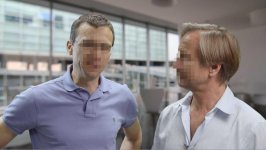
That's AVCHD in FCPX. Wide Dynamic Ragne. And it was shot here:
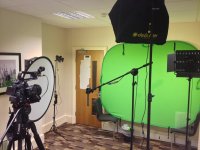
The Dedo spot at the rear has a Dichroic daylight filter in it - that's my 'hot tip o' the day'.
I had to pump out 10 x 3 minute PTC on a 'same day' basis. The trick is to get good separation from the green, to match the lighting to your background (each vid had a different background), and understand ambient fill.
If I were doing a movie, if I were doing match moves and so on, I'd probably choose a different camera or a different workflow, but a great many of us are using Chromakey to just make a 'better background' for our interviews. I did so much of this with the EX1, so glad to be back doing this on the C100 after some 'issues' (!!!) with the FS100 - even with the Pix.
That's AVCHD in FCPX. Wide Dynamic Ragne. And it was shot here:
The Dedo spot at the rear has a Dichroic daylight filter in it - that's my 'hot tip o' the day'.
I had to pump out 10 x 3 minute PTC on a 'same day' basis. The trick is to get good separation from the green, to match the lighting to your background (each vid had a different background), and understand ambient fill.
If I were doing a movie, if I were doing match moves and so on, I'd probably choose a different camera or a different workflow, but a great many of us are using Chromakey to just make a 'better background' for our interviews. I did so much of this with the EX1, so glad to be back doing this on the C100 after some 'issues' (!!!) with the FS100 - even with the Pix.
Last edited:
Hey Fellas, many thanks for the info all good and helpful advice, I'm shooting a childrens pilot with puppets in a studio and we have to emulate a bright sunny day! Apparently children love the bold primary colours, so the set up should be interesting -
I was thinking If I used the C-Log [850] the colours would be less saturated but as long as the green is nice and flat keying shouldn't be a problem and they would have latitude in post for the subject grades?
I was thinking If I used the C-Log [850] the colours would be less saturated but as long as the green is nice and flat keying shouldn't be a problem and they would have latitude in post for the subject grades?
Matt Gottshalk
Resident Preditor
I wouldn't use clog for greenscreen.
My .02
My .02
MattDavis
Well-known member
+1 on both Mhood & mcgeedigital - WDR is your friend.
If you're not editing the material, I'd still recommend shooting to an external recorder - not because you'll gain much more quality, but because you've done 'due diligence'. I know some editors will go the extra mile on ProRes/DNxHD footage which they'd not be prepared to do on AVCHD. Also, Canon's AVCHD needs an extra 'secret sauce' step to cure its Malign PSF that some editors will not know about, and who will be eager to blame the cameraman, format and camera rather than cure it with a click of a mouse. I wish it wasn't so, but that's the way it rolls.
Light the chromakey backdrop well (even, not too over-exposed) and Keylight/Premiere and Built-in/FCPX keyers will do a good job, even with 4:2:0 talking head material. As soon as we add fur, motion match and transparency, we do up the ante quite a bit.
If you're not editing the material, I'd still recommend shooting to an external recorder - not because you'll gain much more quality, but because you've done 'due diligence'. I know some editors will go the extra mile on ProRes/DNxHD footage which they'd not be prepared to do on AVCHD. Also, Canon's AVCHD needs an extra 'secret sauce' step to cure its Malign PSF that some editors will not know about, and who will be eager to blame the cameraman, format and camera rather than cure it with a click of a mouse. I wish it wasn't so, but that's the way it rolls.
Light the chromakey backdrop well (even, not too over-exposed) and Keylight/Premiere and Built-in/FCPX keyers will do a good job, even with 4:2:0 talking head material. As soon as we add fur, motion match and transparency, we do up the ante quite a bit.

Spartacus
Veteran
Could you elaborate on this? Still reading myself into C100 post workflows... Thanks!Also, Canon's AVCHD needs an extra 'secret sauce' step to cure its Malign PSF that some editors will not know about, and who will be eager to blame the cameraman, format and camera rather than cure it with a click of a mouse.

Darren Levine
Veteran
Only now starting to do some green screen with c100.
seamless paper
lighting was smooth but lacking some intensity near the bottom of the screen
keying with ultra key, only 1 effect. didn't nitpick a whole lot, especially when it came to the bird.
seamless paper
lighting was smooth but lacking some intensity near the bottom of the screen
keying with ultra key, only 1 effect. didn't nitpick a whole lot, especially when it came to the bird.
jm.gardiner
Well-known member
It's good to back light with -Green (Magenta) to eliminate green spill on your subject.
I've used 1/2 Magenta with pretty good success.
I've used 1/2 Magenta with pretty good success.
The camera keys very well. A ninja and decent technique helps. I had good luck with Canon Log but I was shooting for footage being composited into Arri Log C, which is even much flatter. Choose your picture look based on the rest of your workflow, not whether or not you're keying. Wide DR is noisier but it's easier to composite other re709 elements into.
MattDavis
Well-known member
Could you elaborate on this? Still reading myself into C100 post workflows... Thanks!
In both Premiere and FCPX, you need to ensure that the Malignant PSF is read as Progressive, otherwise you get nasty edges.
Thinking of which, need to point out (somewhat stressingly) that the built-in 'ordinary' default Wide Dynamic Range has some sharpening in it. Not a lot (minus three, IIRC), but you really really need to dial that out to -10 for chromakey. Any sharpening/detail enhancement will add a thin black line around your edge. I dialled it out a long time ago and promptly forgot I did that. I used the default WDR on a recent shoot and 'came a-cropper' with the sharpening line, needing to do a marginal 'erode' to get rid of it. Sigh.