GH5 Any way to to control ISO by rear dial?

valdi99

Active member
Anybody knows how to configure GH5 to control ISO by rear dial?

Not by the Control Wheel (that works with iso by default), but by rear dial on top plate. There is Fn button to switch both dials on top plate, front/rear - F1 (can also be assigned to something else) but pressing F1 switches dials only temporarily. I am much more used to change iso by rear dial, after having GH4 for quite a long time.
 
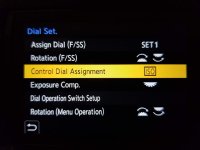
By default, pressing the ISO Button on top of the GH5 allows control by the rear wheel. Is this not the case with yours?
 
Anybody knows how to configure GH5 to control ISO by rear dial?

Not by the Control Wheel (that works with iso by default), but by rear dial on top plate. There is Fn button to switch both dials on top plate, front/rear - F1 (can also be assigned to something else) but pressing F1 switches dials only temporarily. I am much more used to change iso by rear dial, after having GH4 for quite a long time.

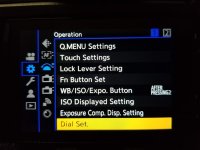
Yeah, mine is setup to do this. I don't have the camera in front of me right now, but I believe you go into the menu for dial control, and the setting is in there. It seems that this would have been put where all of the other function button customizations are, but this is not the case.
 
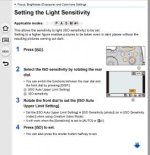
This image is from the GH5 manual. ISO is normally controlled by the rear wheel, which is what I think you are wanting, yes?

Screen Shot 2020-01-31 at 3.56.52 PM.jpg
 
I can control the ISO without pressing the ISO button with my current configuration.

Really? Without pressing a Fn button first? I thought only aperture or shutter could be controlled by the front and rear wheels (again not the Control Dial on the back).
 
valdi99,

I think I know what your issue may be. The "ISO" and the "ISO Limit" functions can get inadvertently switched, causing confusion. This happened to me once. If you hit the top ISO button, then hit the Display button, it toggles ISO control from front dial to rear dial. I think this may be what happened on your GH5. Try this and see if it solves your problem.
 
20200202_213143.jpg20200202_213157.jpg

This is how to control ISO without going into menus with the control dial. This is a photo from my S1H, but it's very similar on my GH5S.
 
valdi99, If you hit the top ISO button, then hit the Display button, it toggles ISO control from front dial to rear dial. I think this may be what happened on your GH5. Try this and see if it solves your problem.

Thank you. You are right! But pressing DISP button every time makes it even harder. On my GH5 by default, rear dial changes ISO LIMIT, while front-dial ISO itself. So to control ISO by rear dial I need either:
- press ISO button first, then toggle dials function by pressing DISP button, and then turn rear dial to control ISO;
- or press ISO button first, then control ISO by front-dial, what I don't like.

Both options are not convenient to me, as I need or to lift and move the index finger to front dial after pressing ISO button
OR press DISP with my thumb, then move my thumb back to rear dial (while in both cases my thumb was already on rear dial, ready to change ISO).
 
Last edited:
All right, problem solved. But it was not so intuitive, as I had to set in menu what estarkey7 have pictured, then press ISO buton, then DISP button (toggling ISO to rear dial) and then press MENU/SET. Turned camera off, then on again and now it works like a charm.

Thank you guys for your help very much indeed!
 
Last edited:
Back
Top