GH4 Any way to get HDR video from gh4?

Well, I need it for creative purposes. Our skies here are gray and dull. With the dynamic range the HDR method provides Im sure I could give more life for the nature scenes.
 
can you cut in a better looking sky? "Movie Magic!" Don't be stuck with what you got, make it better. It is YOUR Sandbox :)

Inspired by this thread, I just tried to HACK some HDR footage together in Sony Vegas.... I took a track with lots of darks and bights, made two tracks where I brightened the darks a lot in one, and brought down the highs in the other and setup up a good look on each, then tried to ChromaKey merge them. It wasn't pretty, and too embarassing to post here. hahahahaha! but COULD almost work in certain situations.


You can shoot some interesting HD movies in STILL MODE. but looking at these, I'd prefer to shoot 4k and create effects like this in post:

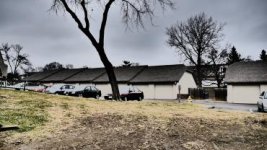
"IMPRESSIVE ART" filter: (kinda does HDR, but blows out highs at the same time)
vlcsnap-2014-12-14-13h08m08s177.jpg

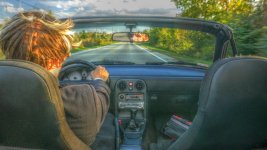
"HDR" filter -- look at the tree change from dark to light
vlcsnap-2014-12-14-13h08m39s22.jpg

very dull grey day today
 
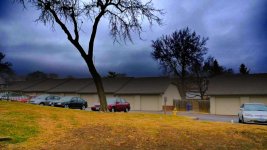
ooh this was fun!
Here's the above pic, split, contrasted, faded in, and color pushed (not my best work! but fun to do)

Image1.jpg
 
Well, I need it for creative purposes. Our skies here are gray and dull. With the dynamic range the HDR method provides Im sure I could give more life for the nature scenes.

Judicious application of Graduated ND(s), & Attenuator, filters is the traditional method of controlling bright sections of a frame.

Haven't had too much use for Hard Edge Graduated ND(s) but Soft Edge Graduated ND(s) are often indespisanble & I'm a particular fan of Attenuator(s) as their is no edge, rather their density gently increases (blends) across the entire filter, a feature that can be helpful when panning.

http://www.bhphotovideo.com/c/searc...E_2|0&N=4256189536&srtclk=sort&Ntt=attenuator
 
Haven't had too much use for Hard Edge Graduated ND(s) but Soft Edge Graduated ND(s) are often indespisanble & I'm a particular fan of Attenuator(s) as their is no edge, rather their density gently increases (blends) across the entire filter, a feature that can be helpful when panning.

Have you used these alongside variable NDs, or is the combination too much?
 
That's not an example of HDR, instead it's a result of heavy grading, similar to cranking up the Clarity in Photoshop/Lightroom.
 
mkay, this looks promising. I'll come back with VIDEO after processing. (this is a first alpha test. MUCH tweaking needed!)

CineD flattish....
hdr.jpg

HDR
untitled_pregamma_1_mantiuk06_contrast_mapping_0.3_saturation_factor_1.75_detail_factor_10.3.jpg
 
Welp, I consider the system an HDR video a success, but my graphics tweaking skills a failure. Would take some skills, time, talent to dial it in well. I think NEAT VIDEO would help.
This does NOT rely on getting bracketed hi/lo ISOs like most HDR requires. Instead, the software processes the images into pseudo-looking HDR from single frames.
I believe shooting somewhat FLAT like CINE-D helps the effect.

1. install free LUMINANCE HDR http://qtpfsgui.sourceforge.net/
2. Export your video to a directory of single images - depends on your editing software
3. In LUMINANCE HDR, open NEW HDR IMAGE, and pull in a single frame to process. You will need to move EV slider a little to hit next
4. tweak image until it looks like a cool HDR - I used MONTIUK06, .3, 1.75, 10.2

* Step 4 is where the creative tweaking happens. There are ton of possibilites and ways to adjust your "HDR Look" in step 4. Take some time and try them all.

5. change RESULT SIZE: in my case, to full UDH 3840x2160
6. Click TONEMAP to create your HDR Image, and see if it looks like you want. Repeat step 4 until you have it looking like you want.

7. under TONE MAP SETTINGS, "Save" your parameters (for use in the batch conversion)
8. goto TOOLS > BATCH TONE MAP and select your INPUT FOLDER with your images
9. click + in the next box to add your TONE MAP SETTINGS you saved in step 7
10. pick output type and folder, hit start and WAIT A LONG WHILE!!!

11. Import back in to your NLE from single images, and color to taste.

I flattened my test with LEVELS 16-235, did WHITE BALANCE, added some contrast back in, lots of color saturation, and a slight vignette.

I am not saying it is good, I'm saying it is a START

 
Not really. I do use nd grads a lot though, to give my skies a bit of drama that they might otherwise not have.
 
I wonder if Panasonice would offer HDR mode in 1080 60 where it alternates ISOs like magic lantern does? would be cool
 
I wonder if Panasonice would offer HDR mode in 1080 60 where it alternates ISOs like magic lantern does? would be cool

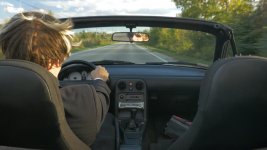
I would seriously doubt that Panasonic would do this. However, a hack may/may not enable this functionality. I would think that the hardware could easily handle the task in 1080 given that it handles internal 4K. It would definitely be interesting. One very practical arena for HDR is for interiors like when doing a real estate walkthrough. I've seen some samples that have worked tremendously well with Canon via ML.
 
it would increase the Dynamic Range as well, technically, I think. Give you more stops up high and down low, am I right?
 
Back
Top